
GPS, Maps, Voice Navigation

50,000,000+
Installs
AppStar Studios
Developer
-
Travel & Local
Category
-
Rated for 3+
Content Rating
-
interactiveappstudios@gmail.com
Developer Email
-
https://appstarstudios.blogspot.com/2017/09/privacy-policy.html
Privacy Policy
Screenshots
editor reviews
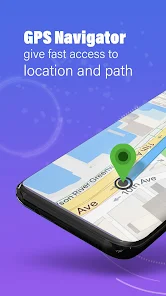
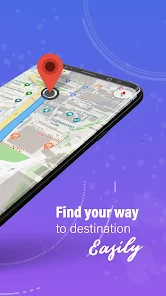
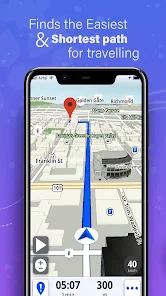
You know that moment when you're driving in an unfamiliar area, your phone's screen is glaring in the sunlight, and you just need a clear, no-fuss voice telling you where to turn? That's the gap GPS, Maps, Voice Navigation from AppStar Studios tries to fill. This isn't trying to be a full-blown tour guide or a traffic-avoiding wizard like Google Maps or Waze. It strips things back to the absolute essentials: showing you a map and telling you where to go. I downloaded it from the Google Play store just to see if it could be a good backup app. Right away though, the first impression was a bit rough. The interface feels dated, like something from five years ago, with clunky buttons and a low-resolution map tile style that's a little jarring after using modern navigation apps.
Actually using it to get from point A to point B was a mixed bag. Once you type in an address—which isn't as smooth as the predictive search in more popular apps—the voice navigation kicks in reliably. The voice itself is robotic and gets a bit tiring on a long drive, but it never missed a turn instruction. The screen shows a simple arrow and the next street name, which is honestly great if you want to keep your eyes on the road. A small practical tip: you can download offline maps, but the process isn't obvious at first glance. During my test, the app kept its cool in weak signal areas, which was a plus, but it also got confused by a recent road closure that Google Maps had already updated. So, the data seems to be older.
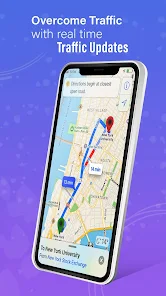
After spending a week with it, I think this app has a very specific audience. Someone who just wants a bare-bones offline navigator for a cheap phone or a secondary device might find it perfectly fine. It's certainly not going to replace Waze for daily commuting or Apple Maps for its clean integration. The lack of real-time traffic updates is a huge drawback for city driving. I can see why someone might keep it installed as a low-storage emergency tool, but I found myself uninstalling it because its clumsy interface and outdated map data made it feel more like a chore than a help. It works, but in 2024, "just works" isn't enough to compete with the polished giants.
features
- 🗺️ Offline maps are the main hook here. While Google Maps requires a bit of a hunt to save an area, this app loads a simple, static map view that works well without a data connection. It's perfect for hiking or driving through remote areas where signal cuts out.
- 🗺️ The voice navigation is direct and clear, but it's the pure simplicity that stands out. In Waze, you're bombarded with ads, social features, and alerts. This app literally just says "turn left in 200 meters" and shuts up until the next turn. There's no noise.
- 🗺️ It has a "Trip History" feature that logs every route you've taken. Unlike Google Maps which buries your timeline in menus, this app shows your past trips in a clean, chronological list with start and end points. For tracking mileage or remembering where you parked a week ago, it's surprisingly useful.
pros
- 👍 Minimal battery drain. Compared to Waze, which is notorious for eating through a phone's battery, this app sips power. It doesn't run constant background processes for traffic updates or social features, so it's a lifesaver for longer road trips without a charger.
- 👍 No account required. You can use Google Maps without signing in, but it nags you. This app lets you download maps and start navigating instantly. There's zero privacy worry about your location history being attached to a profile.
- 👍 Low storage footprint. At roughly 15MB, it takes up a fraction of the space compared to the bloated 200MB+ size of other navigation apps. Great for phones with limited memory.
cons
- 👎 Its map database is noticeably outdated. In a city that built a new bypass six months ago, this app still directed me onto a road that was dead-ended. Apps like Google Maps and Here WeGo update their maps weekly, and this one feels like it's running on yearly updates.
- 👎 The search functionality is clunky. Typing an address is tedious because it doesn't offer predictive suggestions as you type. Parking lots or specific businesses rarely show up, forcing you to manually input coordinates or street names.
- 👎 There's no real-time traffic rerouting. Waze excels at dynamically avoiding traffic jams. This app just blindly follows the planned route regardless of how bad traffic gets ahead, which makes it basically useless for city commutes.
Articles
![]()
Guide
How to Update Google Play Store on Android 2026
![]()
Guide
How to Download Older Versions of Android Apps
![]()
Guide
How to Download Apps Without Google Play Store
![]()
Guide
What Is an APK File for Android?
If you use an Android phone, you may have seen the term APK while searching for apps or games online. Some websites offer an APK download instead of a Google Play install button. Some users also mention APK files when talking about apps that are not available in their region, older app versions, or Android games downloaded outside the Play Store.
![]()
Guide
How to Install Games from Google Play for Beginners
Installing games on an Android phone is usually simple, but for beginners, the process can still feel confusing at first. You may not know where to search, which button to tap, whether the game is safe, or why Google Play sometimes asks for account settings, storage access, or payment information. If you are using an Android phone for the first time, learning how to install games from Google Play is one of the easiest ways to get started.
![]()
Guide
How Useful Gemini Is for Everyday Questions and Quick Tasks
emini feels different from many AI apps because it is not only trying to be a chatbot. After using it for everyday questions, quick writing, image understanding, and planning, I think its biggest strength is convenience.
![]()
Guide
What to Know Before Downloading APKs
For many Android users, downloading an APK is a common way to install apps and games. Sometimes an app is not available in a certain country.
![]()
Guide
ChatGPT Review: Is It Still the Best AI App in 2026?
![]()
Guide
Seedance 2.0 vs Sora: The Future of AI Video Generation
The AI video race has intensified dramatically over the past two years. Platforms like Sora from OpenAI and Luma Dream Machine pushed the boundaries of text-to-video realism. Yet, despite their impressive outputs, most tools still operate as probabilistic generators—you describe a scene, and the model interprets it. Control remains limited. With the February 2026 release of Seedance 2.0, developed by ByteDance, the paradigm shifted. Internally known as Jimeng 2.0, Seedance does not position itself as just another video model. It positions itself as an AI Director. Rather than guessing what you want, Seedance 2.0 allows you to direct what happens. This distinction defines everything that follows.









Recommended Apps
![]()
Home Design 3D
Anuman4.2
![]()
Truth or Dare Game - Party App
Chouic4.8
![]()
Photo Collage Maker
Scoompa4.7![]()
Learn to Draw Flower
Creative APPS4.2![]()
FIFA World Cup 2026™
FIFA2.8![]()
Mirror Plus: Mirror with Light
Digitalchemy, LLC4.4![]()
Meitu- Photo Editor & AI Art
Meitu (China) Limited4.5![]()
Perplexity - Ask Anything
PerplexityAI4.7![]()
GhostTube SLS Camera Alternate
GhostTube4![]()
Boom Chip Blast: 2-Player
Black Pyramid 3D Games Studio0![]()
Healthy Benefits+
Solutran, Inc.4.5![]()
Deepcheck AI Search Assistant
rohe.ai4![]()
Idol Prank Video Call & Chat
LightCode Solutions4![]()
Face Shape - Pretty Scale
GlintTec Apps3.9![]()
Plant App - Plant Identifier
ScaleUp4.6












































