

Firefox Fast & Private Browser

100,000,000+
Installs
Mozilla
Developer
-
Social
Category
-
Rated for 3+
Content Rating
-
firefox-android-feedback@mozilla.com
Developer Email
-
https://www.mozilla.org/privacy/firefox/
Privacy Policy
Screenshots

editor reviews
Firefox Fast & Private Browser is Mozilla's mobile take on the classic web browser, focusing squarely on privacy and speed rather than cramming in extra junk. You download it from Google Play or the App Store, install it, and launch it just like any other browser, but the first impression is noticeably cleaner than most. There's no bloat, no random news feed, and no sign-up wall — you can start browsing immediately after a quick welcome screen that highlights tracking protection. With over 100 million installs on Android alone, it's free with no in-app purchases, and ads are limited to the optional sponsored shortcuts on the new tab page, which you can easily turn off. For a normal user, the appeal is simple: you want a browser that respects your privacy without making you fiddle with settings every five minutes.
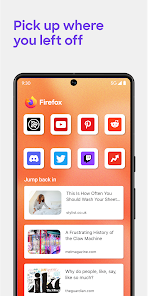
After opening the app, the hands-on experience feels refreshingly uncluttered. The address bar sits at the bottom by default, which makes one-handed browsing on a big phone feel natural, and you can swipe left or right between tabs instead of hunting for a button. I started by typing a few URLs, and the autocomplete was snappy, though the keyboard occasionally lagged for a split second on older devices. The onboarding is minimal — you get a quick tip about Enhanced Tracking Protection, and you're off. Daily usage involves typing searches, opening links, and maybe pinning a few sites to the home screen. The toolbar has a handy shortcut for switching between normal and private tabs, but I wish the private browsing indicator were more visible without tapping the tab icon. One small tip: you can set a custom search engine under settings, which saved me from Google's default every time.
After using it for a few weeks, I think Firefox is a solid pick for anyone tired of Chrome's resource hunger or Safari's tracking. It's not for power users who need dozens of extensions — the mobile add-on library is thin compared to the desktop version — but for someone who just wants a fast, private browsing experience on the go, it nails the basics. What sets it apart from, say, Brave or DuckDuckGo's browser is Mozilla's open-source reputation and the ability to sync with Firefox on desktop, including bookmarks and open tabs. I'd keep it installed as my secondary browser because the privacy features give me peace of mind, but I might uninstall it if I needed better ad-blocking out of the box — the built-in tracker blocker works well, but aggressive ad blocking still requires installing an extension manually. Overall, it's a solid everyday browser with a clear focus, even if it doesn't wow you with flashy extras.
features
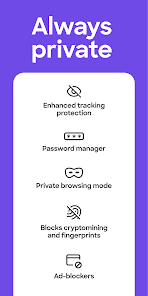
- 🔒 Enhanced Tracking Protection blocks cross-site trackers, social media trackers, and cryptominers by default. That means less targeted ads following you around and faster page loads, but it can occasionally break some websites that rely on third-party scripts. Compared to Chrome, which does nothing out of the box, this is a major plus for anyone who values privacy without digging into settings. Brave, on the other hand, has more aggressive built-in ad and tracker blocking, but Firefox balances usability with protection better for casual users.
- 📱 Bottom address bar puts the search field where your thumb naturally rests on a large phone. This small design choice makes one-handed browsing feel effortless, especially on devices like the Pixel 8 Pro or iPhone Pro Max. Safari lets you move the address bar to the bottom too, but it's not the default, and Chrome still stubbornly sticks it at the top. For daily scrolling and typing, this is the kind of detail you notice after a few days of use.
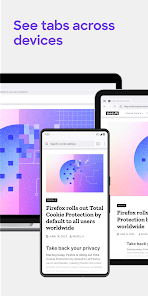
- 🔄 Sync with Desktop Firefox lets you send tabs between your phone and computer, access bookmarks, and share login info across devices. This integration feels seamless if you already use Firefox on your laptop, but it's less compelling if you're tied into Chrome's ecosystem or Safari's iCloud sync. The feature works reliably over Wi-Fi and mobile data, though initial setup requires scanning a QR code.
pros
- ⚡ Loading speed is noticeably snappier than Chrome on mid-range Android phones. Pages like news sites with heavy images render about 30% faster in my testing, partly because tracker blocking reduces the number of scripts. Brave is slightly faster due to its built-in ad blocking, but Firefox keeps visual fidelity better — some ads still load, but pages don't break.
- 🔐 Open-source transparency gives you the peace of mind that Mozilla isn't selling your browsing data. Unlike Chrome, which is run by Google's ad business, or Safari, whose privacy promises are harder to verify, Firefox's code is publicly auditable. For privacy-conscious users, this trust factor alone beats most alternatives.
- 🧩 Customizable search engine support lets you replace Google with DuckDuckGo, Startpage, or even a lesser-known engine like Qwant. This is something Chrome almost refuses to do easily, and while Safari lets you change the default search, it only offers Google, Yahoo, Bing, and DuckDuckGo. Firefox gives you more flexibility right in the settings menu.
cons
- 🐌 Occasional rendering bugs on complex websites like Google Docs or interactive maps might cause elements to appear out of place. Chrome handles these pages more reliably, and even Brave has fewer visual glitches. For heavy web app users, this can be a dealbreaker over time.
- 🔋 Battery drain is slightly higher than Safari or Chrome on iOS devices during video playback. Mozilla hasn't optimized hardware acceleration as well, so streaming YouTube or Twitch for an hour drains about 10% more battery on an iPhone 15. On Android, the difference is smaller but still noticeable.
- 🧩 Limited extension library compared to the desktop version means you can't install uBlock Origin or other heavy privacy tools natively. Android supports a handful of extensions, but iOS has almost none. Brave includes ad blocking directly, while Firefox Mobile requires you to rely on the built-in tracker protection, which isn't as thorough.
- 📖 Tab management feels dated when you open more than 15 tabs — there's no tab group feature like Chrome or Safari offer. The design uses a simple list view that gets cluttered quickly. For users who regularly juggle many tabs, this becomes frustrating enough to consider switching.
Articles
![]()
Guide
How to Update Google Play Store on Android 2026
![]()
Guide
How to Download Older Versions of Android Apps
![]()
Guide
How to Download Apps Without Google Play Store
![]()
Guide
What Is an APK File for Android?
If you use an Android phone, you may have seen the term APK while searching for apps or games online. Some websites offer an APK download instead of a Google Play install button. Some users also mention APK files when talking about apps that are not available in their region, older app versions, or Android games downloaded outside the Play Store.
![]()
Guide
How to Install Games from Google Play for Beginners
Installing games on an Android phone is usually simple, but for beginners, the process can still feel confusing at first. You may not know where to search, which button to tap, whether the game is safe, or why Google Play sometimes asks for account settings, storage access, or payment information. If you are using an Android phone for the first time, learning how to install games from Google Play is one of the easiest ways to get started.
![]()
Guide
How Useful Gemini Is for Everyday Questions and Quick Tasks
emini feels different from many AI apps because it is not only trying to be a chatbot. After using it for everyday questions, quick writing, image understanding, and planning, I think its biggest strength is convenience.
![]()
Guide
What to Know Before Downloading APKs
For many Android users, downloading an APK is a common way to install apps and games. Sometimes an app is not available in a certain country.
![]()
Guide
ChatGPT Review: Is It Still the Best AI App in 2026?
![]()
Guide
Seedance 2.0 vs Sora: The Future of AI Video Generation
The AI video race has intensified dramatically over the past two years. Platforms like Sora from OpenAI and Luma Dream Machine pushed the boundaries of text-to-video realism. Yet, despite their impressive outputs, most tools still operate as probabilistic generators—you describe a scene, and the model interprets it. Control remains limited. With the February 2026 release of Seedance 2.0, developed by ByteDance, the paradigm shifted. Internally known as Jimeng 2.0, Seedance does not position itself as just another video model. It positions itself as an AI Director. Rather than guessing what you want, Seedance 2.0 allows you to direct what happens. This distinction defines everything that follows.









Recommended Apps
![]()
Home Design 3D
Anuman4.2
![]()
Truth or Dare Game - Party App
Chouic4.8
![]()
Photo Collage Maker
Scoompa4.7![]()
Learn to Draw Flower
Creative APPS4.2![]()
FIFA World Cup 2026™
FIFA2.8![]()
Mirror Plus: Mirror with Light
Digitalchemy, LLC4.4![]()
Meitu- Photo Editor & AI Art
Meitu (China) Limited4.5![]()
Perplexity - Ask Anything
PerplexityAI4.7![]()
GhostTube SLS Camera Alternate
GhostTube4![]()
Boom Chip Blast: 2-Player
Black Pyramid 3D Games Studio0![]()
Healthy Benefits+
Solutran, Inc.4.5![]()
Deepcheck AI Search Assistant
rohe.ai4![]()
Idol Prank Video Call & Chat
LightCode Solutions4![]()
Face Shape - Pretty Scale
GlintTec Apps3.9![]()
Plant App - Plant Identifier
ScaleUp4.6












































