

Truecaller: Caller ID & Block

1,000,000,000+
Installs
Truecaller
Developer
-
Social
Category
-
Rated for 3+
Content Rating
-
support@truecaller.com
Developer Email
-
https://www.truecaller.com/privacy-policy
Privacy Policy
Screenshots
editor reviews
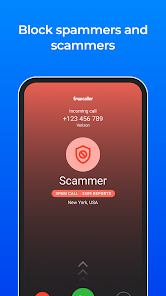
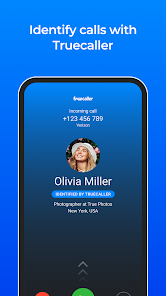
You know that moment when your phone buzzes with a call from an unknown number and you try to decide if it's a spammer or something important? That's exactly why I downloaded Truecaller from Google Play. It's basically a caller ID and spam blocking app that has been around forever and has over a billion downloads, which is crazy to think about. When you first launch it, you grant permissions to access your contacts and calls, and it starts working almost immediately. The setup process asks if you want to sync your contacts and enable spam detection, and it feels pretty straightforward. The first time a call came in and I saw “Potential Spam” flash on the screen along with the caller's real name from the community database, I honestly felt a bit relieved. It's free to download, though there are in-app purchases for premium features, and you do see ads unless you pay.
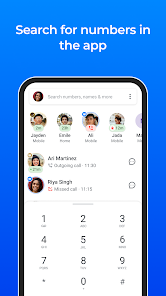
After using it for a few weeks, the hands-on experience is decent but not flawless. The interface is clean with tabs for calls, messages, and a dialer. When a call comes in, the app shows a pop-up with the caller's name and whether others have reported it as spam. You can block numbers right from that screen or report them yourself. The app also lets you search for any number in its database, which can be useful for checking who just called you. I did notice that sometimes it takes a second or two for the identification to show up, which can be annoying. A small practical tip: if you receive a lot of spam calls, enabling the automatic block feature in settings saves you a lot of tapping. There's also a community spam list that updates based on reports from other users, so it tends to get better over time.
Overall, Truecaller is incredibly useful if you're drowning in spam calls or telemarketers. It's also handy for business owners who need to screen unknown callers. But if you rarely get spam or don't mind answering unknown numbers, the app might feel intrusive since it requests access to your contacts and call logs, which raises privacy concerns for some people. Compared to alternatives like Hiya or CallApp, Truecaller has a much larger user base, so its spam database is more reliable. However, the free version can be ad-heavy and the premium subscription feels a bit pricey for what it offers. I keep it installed because the spam blocking alone is worth it, but I can see why some users uninstall it after a while if their spam situation improves or if they feel uncomfortable with the data access.
features
- 📞 Real-time Caller ID: Truecaller automatically shows the name of the caller even if they are not in your contacts, based on its massive community-driven database. In comparison, Hiya also offers caller ID but relies more on business listings and carrier data, which can be less accurate for personal numbers.
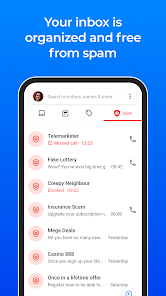
- 🛡️ Advanced Spam Blocking: The app uses machine learning and user reports to filter out spam calls and SMS. You can block entire categories like telemarketers or scams. Google's native Phone app does block spam, but Truecaller's database is more granular and updated faster by millions of users.
- 📱 Smart Messaging Features: Truecaller includes a messaging tab that organizes texts and can automatically block spam messages. It also offers a flash messaging feature for quick notes. Neither Hiya nor Google Phone provide a built-in messaging interface like this, making Truecaller a more all-in-one communication tool.
- 👥 Community-Based Reporting: Every time a user reports a number as spam, it gets added to the global list. This creates a self-improving system that learns quickly. Apps like Whoscall also have community features, but Truecaller's scale gives it a clear edge in accuracy and coverage worldwide.
pros
- 🌐 Massive User Database: Truecaller's billion-plus installs means its spam detection is often more accurate than Hiya or Whoscall. When a number gets flagged, it's likely already in the database, so new spam numbers get caught fast.
- 🔒 Cross-Platform Availability: Unlike Google Phone which is limited to Android, Truecaller works on both iOS and Android. This is a big plus if you switch phones or want a consistent experience across devices.
- ⚡ Quick Setup and Integration: The app integrates smoothly with your phone's native dialer and SMS app. No need to change your default apps if you don't want to, unlike CallApp which sometimes messes with the default dialer settings.
cons
- 🛡️ Privacy Concerns: Truecaller requires access to your contacts and call logs, which feels invasive compared to Google Phone that only uses local data. Some users worry about their contact list being uploaded to the cloud, which is a fair concern.
- 💰 Ad-Heavy Free Version: The free version shows ads after calls and in the app itself. Hiya offers a cleaner free experience with fewer interruptions, making Truecaller feel a bit cluttered at times.
- ⚠️ Occasional False Positives: Legitimate numbers sometimes get flagged as spam, especially from small businesses or new numbers. Google Phone rarely misidentifies contacts, while Truecaller can be overzealous in its spam tagging.
- 🔋 Battery Drain: The app runs in the background constantly to scan incoming calls and messages, which can drain your battery faster than similar apps like Whoscall that use less aggressive background processes.
Articles
![]()
Guide
How to Update Google Play Store on Android 2026
![]()
Guide
How to Download Older Versions of Android Apps
![]()
Guide
How to Download Apps Without Google Play Store
![]()
Guide
What Is an APK File for Android?
If you use an Android phone, you may have seen the term APK while searching for apps or games online. Some websites offer an APK download instead of a Google Play install button. Some users also mention APK files when talking about apps that are not available in their region, older app versions, or Android games downloaded outside the Play Store.
![]()
Guide
How to Install Games from Google Play for Beginners
Installing games on an Android phone is usually simple, but for beginners, the process can still feel confusing at first. You may not know where to search, which button to tap, whether the game is safe, or why Google Play sometimes asks for account settings, storage access, or payment information. If you are using an Android phone for the first time, learning how to install games from Google Play is one of the easiest ways to get started.
![]()
Guide
How Useful Gemini Is for Everyday Questions and Quick Tasks
emini feels different from many AI apps because it is not only trying to be a chatbot. After using it for everyday questions, quick writing, image understanding, and planning, I think its biggest strength is convenience.
![]()
Guide
What to Know Before Downloading APKs
For many Android users, downloading an APK is a common way to install apps and games. Sometimes an app is not available in a certain country.
![]()
Guide
ChatGPT Review: Is It Still the Best AI App in 2026?
![]()
Guide
Seedance 2.0 vs Sora: The Future of AI Video Generation
The AI video race has intensified dramatically over the past two years. Platforms like Sora from OpenAI and Luma Dream Machine pushed the boundaries of text-to-video realism. Yet, despite their impressive outputs, most tools still operate as probabilistic generators—you describe a scene, and the model interprets it. Control remains limited. With the February 2026 release of Seedance 2.0, developed by ByteDance, the paradigm shifted. Internally known as Jimeng 2.0, Seedance does not position itself as just another video model. It positions itself as an AI Director. Rather than guessing what you want, Seedance 2.0 allows you to direct what happens. This distinction defines everything that follows.









Recommended Apps
![]()
Home Design 3D
Anuman4.2
![]()
Truth or Dare Game - Party App
Chouic4.8
![]()
Photo Collage Maker
Scoompa4.7![]()
Learn to Draw Flower
Creative APPS4.2![]()
FIFA World Cup 2026™
FIFA2.8![]()
Mirror Plus: Mirror with Light
Digitalchemy, LLC4.4![]()
Meitu- Photo Editor & AI Art
Meitu (China) Limited4.5![]()
Perplexity - Ask Anything
PerplexityAI4.7![]()
GhostTube SLS Camera Alternate
GhostTube4![]()
Boom Chip Blast: 2-Player
Black Pyramid 3D Games Studio0![]()
Healthy Benefits+
Solutran, Inc.4.5![]()
Deepcheck AI Search Assistant
rohe.ai4![]()
Idol Prank Video Call & Chat
LightCode Solutions4![]()
Face Shape - Pretty Scale
GlintTec Apps3.9![]()
Plant App - Plant Identifier
ScaleUp4.6












































