
Opera Mini: Fast Web Browser

500,000,000+
Installs
Opera
Developer
-
Social
Category
-
Rated for 3+
Content Rating
-
support-mini-android@opera.com
Developer Email
-
http://www.opera.com/privacy
Privacy Policy
Screenshots
editor reviews
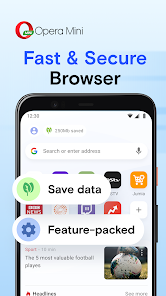
Opera Mini is a lightweight web browser designed primarily for speed and data efficiency, making it a go-to choice for users on slower connections or those with limited data plans. After downloading it from the Google Play Store or App Store, the first thing I noticed was how quick the install was — the app is only around 10 MB. Launching it greeted me with a clean, dark-themed homepage that immediately felt less cluttered than Chrome or Safari. There's no mandatory sign-up, though you can create a free Opera account to sync bookmarks across devices. The initial impression is solid: it loads rapidly, shows a news feed if you want, and offers a built-in ad blocker right out of the gate. For anyone tired of feature-bloated browsers, it feels like a breath of fresh air.
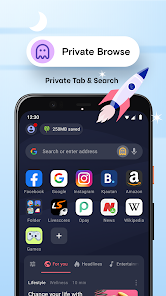
Once you start using it, the experience is straightforward. The address bar sits at the top, and below it, you get quick-access tiles for your most visited sites. Swiping left or right navigates between tabs, which is smooth on both Android and iOS. A standout moment during use was the data compression mode — it shrinks pages noticeably, and on 3G, that makes a real difference. The built-in ad blocker works quietly in the background, cutting out most pop-ups without needing extra extensions. I found the night mode particularly useful for late-night reading, though the font options feel a bit limited. The only slightly confusing part was finding the download manager at first; it's tucked away in the menu, but once I knew where it was, it became handy for grabbing files without slowing other tabs.
After weeks of daily use, I'd say Opera Mini is perfect for users who prioritize speed over flashy features. If you often deal with weak Wi-Fi or expensive mobile data, this browser will feel like a lifesaver because it loads pages up to 60% faster than some rivals like Firefox Focus or Samsung Internet. I kept it installed alongside Chrome because it fills a specific niche: when I need a quick, low-data search, Opera Mini wins. However, if you're a heavy user of extensions or prefer full desktop-level browsing on mobile, you might find the lack of add-on support a downside. It's not trying to be a jack-of-all-trades — it does one thing well, and that's enough for many.
features
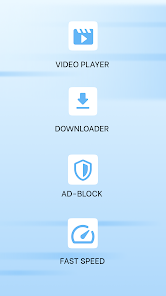
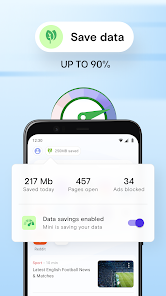
- 📦 Data Saver Mode — Opera Mini's standout feature is its server-side compression, which cuts data usage by up to 70%. Chrome's Lite mode works differently, compressing on your device, but Opera's method feels more aggressive and effective on slow networks.
- 🚀 Built-in Ad Blocker — Unlike many browsers that require installing extensions, Opera Mini blocks ads natively. Chrome needs third-party tools like AdGuard, which adds complexity, while Opera keeps it simple from the start.
- 🎨 Night Mode with Contrast Options — The dark mode here isn't just a flat background shift; it adjusts contrast to reduce eye strain, beating Firefox's simple dark theme hands down. You can fine-tune it for reading in dim light without glare.
- 🔗 Offline File Sharing — Opera Mini includes a file-sharing tool over local networks, a feature missing in Edge or Safari. It's useful for quickly moving photos between devices without cloud uploads.
pros
- ⚡ Speed on Low-End Devices — Opera Mini loads pages faster than Chrome on older Android phones because it strips heavy elements at the server level. My old Galaxy S8 feels almost snappy again.
- 🛡️ Privacy Without Extras — The built-in tracker blocker works automatically, whereas Safari requires manual permission toggles. Opera Mini guards your browsing with minimal user effort.
- 🌐 Multi-Platform Sync — Unlike Firefox Focus, which limits sync to basic bookmarks, Opera Mini syncs tabs and history across devices through a free Opera account. That makes switching between phone and tablet seamless.
cons
- 📺 No Extension Support — Compared to Chrome or Firefox, Opera Mini lacks any extension library. If you rely on VPN blockers or custom script tools, you're out of luck here.
- 📝 Limited Font Customization — Samsung Internet lets you tweak font style and size extensively, but Opera Mini only offers a few preset sizes. Reading long articles feels less personalized.
- 🔒 No Password Manager Built-In — While Chrome integrates Google Password Manager, Opera Mini relies on third-party apps like LastPass. It's a missing convenience for frequent credential users.
- 📉 Occasional Layout Issues — Some sites render oddly due to server-side compression, forcing you to disable data saving mode temporarily. Neither Firefox nor Edge have this problem as often.
Articles
![]()
Guide
How to Update Google Play Store on Android 2026
![]()
Guide
How to Download Older Versions of Android Apps
![]()
Guide
How to Download Apps Without Google Play Store
![]()
Guide
What Is an APK File for Android?
If you use an Android phone, you may have seen the term APK while searching for apps or games online. Some websites offer an APK download instead of a Google Play install button. Some users also mention APK files when talking about apps that are not available in their region, older app versions, or Android games downloaded outside the Play Store.
![]()
Guide
How to Install Games from Google Play for Beginners
Installing games on an Android phone is usually simple, but for beginners, the process can still feel confusing at first. You may not know where to search, which button to tap, whether the game is safe, or why Google Play sometimes asks for account settings, storage access, or payment information. If you are using an Android phone for the first time, learning how to install games from Google Play is one of the easiest ways to get started.
![]()
Guide
How Useful Gemini Is for Everyday Questions and Quick Tasks
emini feels different from many AI apps because it is not only trying to be a chatbot. After using it for everyday questions, quick writing, image understanding, and planning, I think its biggest strength is convenience.
![]()
Guide
What to Know Before Downloading APKs
For many Android users, downloading an APK is a common way to install apps and games. Sometimes an app is not available in a certain country.
![]()
Guide
ChatGPT Review: Is It Still the Best AI App in 2026?
![]()
Guide
Seedance 2.0 vs Sora: The Future of AI Video Generation
The AI video race has intensified dramatically over the past two years. Platforms like Sora from OpenAI and Luma Dream Machine pushed the boundaries of text-to-video realism. Yet, despite their impressive outputs, most tools still operate as probabilistic generators—you describe a scene, and the model interprets it. Control remains limited. With the February 2026 release of Seedance 2.0, developed by ByteDance, the paradigm shifted. Internally known as Jimeng 2.0, Seedance does not position itself as just another video model. It positions itself as an AI Director. Rather than guessing what you want, Seedance 2.0 allows you to direct what happens. This distinction defines everything that follows.









Recommended Apps
![]()
Home Design 3D
Anuman4.2
![]()
Truth or Dare Game - Party App
Chouic4.8
![]()
Photo Collage Maker
Scoompa4.7![]()
Learn to Draw Flower
Creative APPS4.2![]()
FIFA World Cup 2026™
FIFA2.8![]()
Mirror Plus: Mirror with Light
Digitalchemy, LLC4.4![]()
Meitu- Photo Editor & AI Art
Meitu (China) Limited4.5![]()
Perplexity - Ask Anything
PerplexityAI4.7![]()
GhostTube SLS Camera Alternate
GhostTube4![]()
Boom Chip Blast: 2-Player
Black Pyramid 3D Games Studio0![]()
Healthy Benefits+
Solutran, Inc.4.5![]()
Deepcheck AI Search Assistant
rohe.ai4![]()
Idol Prank Video Call & Chat
LightCode Solutions4![]()
Face Shape - Pretty Scale
GlintTec Apps3.9![]()
Plant App - Plant Identifier
ScaleUp4.6












































