

JPay

5,000,000+
Installs
Jpay Mobile
Developer
-
Finance
Category
-
Rated for 3+
Content Rating
-
JPayAndroidConsumerFeedback@aventiv.com
Developer Email
-
https://www.aventiv.com/privacy/
Privacy Policy
Screenshots
editor reviews
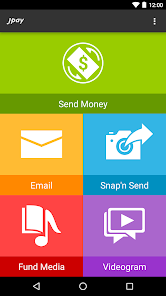
JPay is basically a specialized app for people who have loved ones incarcerated in the U.S. prison system, and I found it through a family member's recommendation. It's not your typical social media or messaging app—it falls into the niche category of correctional communication tools. You mainly use it to send emails, photos, video messages, and even make phone calls to inmates, and it also handles money transfers for commissary accounts or bail payments. When I first downloaded it from the Google Play store (it's free, by the way, with no subscription needed to start), the initial impression was honestly a bit overwhelming. The interface feels outdated, like something from five years ago, with clunky menus and a lot of text everywhere. I expected something more streamlined given how essential it is for families, but the sheer amount of info on the home screen makes you pause and figure out where to click first. It does require creating an account and linking to a specific inmate's facility, which adds a layer of setup time.
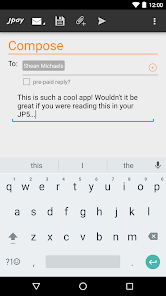
After actually using it for a few weeks, the hands-on experience is a mixed bag. Onboarding walks you through adding an inmate by their facility and ID number, which is straightforward enough, but once you're in, the main actions—sending a message or a gift—are buried under tabs and drop-downs. To send a 5-cent email, you tap "Messages," then "Compose," then select the inmate from a list, and it works, but there's a noticeable delay before the message actually sends. The video calls feature is where things get frustrating: you have to schedule them in advance through the app, and the connection quality really depends on the facility's system. I learned a small trick: you can save money by buying "stamps" in bulk packages rather than per use, which is more cost-effective if you send messages daily. The interface isn't glitchy, but it's not smooth either—the load times when switching between sections like "Photos" and "Trust Fund" can test your patience, especially if you're in a hurry.
After sticking with JPay for a while, I'd say it's a necessary tool if you have a family member inside the system, but it's not something you'd enjoy using for fun. The app does its job—you can reliably send money and messages—but it feels designed more for the prison administration's convenience than the user's. What makes it stand out from alternatives like GTL or Securus is its integrated services: you handle emails, video visits, and payments all in one place, whereas other apps might split these across separate platforms. However, the price adds up quickly—stamps and fees aren't cheap—and the user experience is far from polished. I can see someone keeping it installed if they have regular contact with an inmate, but if the connection is occasional, you might uninstall it to avoid the clutter. Honestly, it's a lifeline for some, but the dated design and slow performance mean it's not winning any awards.
features
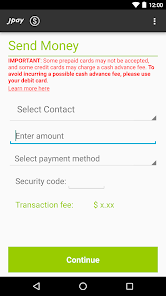
- 💸 JPay's standout feature is the integrated money transfer system for commissary and bail, which handles deposits instantly and notifies you when the funds are available. Unlike GTL's separate "ConnectNetwork" for payments, JPay keeps everything in one app, so you don't juggle multiple accounts.
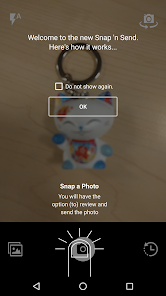
- 📸 The ability to send printed photos directly to an inmate is a nice touch—you upload from your phone, and JPay prints and delivers them for a small fee. Securus doesn't offer this as smoothly, requiring downloads and external printing services.
- 🎥 Scheduling video visits directly through the app is convenient, but it's hit-or-miss—some facilities support it seamlessly, while others rely on older browsers. Compared to GTL's more reliable video platform, JPay's system feels less stable but more centralized.
- ✉️ The "eMessaging" service allows for unlimited text-based communication for a flat fee per month (around $10 in some facilities), which is cheaper than per-message pricing from competitors. However, the character limit per message is tight at 1,000 characters, so longer letters need multiple sends.
pros
- 👨👩👧 JPay is more family-friendly than GTL because it bundles email, photos, and payments into one account, reducing the learning curve for older relatives who aren't tech-savvy.
- ⏳ Message delivery is typically faster than Securus—most emails arrive within minutes instead of hours, which matters when you're waiting for a reply from an inmate on a strict schedule.
- 📱 The app is consistently updated with new facilities joining the network, so coverage is expanding. Unlike some smaller providers that only serve a handful of prisons, JPay covers over 70% of state facilities, making it more likely to work for your situation.
- 💳 You can add funds via credit card or cash at retail locations (like Walmart), which is a nice flexibility compared to GTL's limited payment options that often require bank transfers.
cons
- 🐌 The app's performance is sluggish—menu navigation takes too long to load, and transitions between tabs can freeze for seconds. Both GTL and Securus feel snappier, especially on older phones.
- 💰 Costs add up quickly: each email costs 5 cents, photos cost 50 cents each, and video visits are $10-20 per session. Compared to GTL's flat-rate plans, JPay's per-item pricing feels less transparent and more expensive over time.
- 🔌 Video visit scheduling is clunky—you have to book slots days in advance, and the connection often drops mid-call. Securus offers more flexible scheduling and better call quality, which makes a big difference for long-distance communication.
- ❌ Customer support is notoriously slow; I've waited over a week for a refund on failed transactions. GTL has a live chat feature that resolves issues in hours, while JPay relies on email tickets with generic responses.
Articles
![]()
Guide
How to Update Google Play Store on Android 2026
![]()
Guide
How to Download Older Versions of Android Apps
![]()
Guide
How to Download Apps Without Google Play Store
![]()
Guide
What Is an APK File for Android?
If you use an Android phone, you may have seen the term APK while searching for apps or games online. Some websites offer an APK download instead of a Google Play install button. Some users also mention APK files when talking about apps that are not available in their region, older app versions, or Android games downloaded outside the Play Store.
![]()
Guide
How to Install Games from Google Play for Beginners
Installing games on an Android phone is usually simple, but for beginners, the process can still feel confusing at first. You may not know where to search, which button to tap, whether the game is safe, or why Google Play sometimes asks for account settings, storage access, or payment information. If you are using an Android phone for the first time, learning how to install games from Google Play is one of the easiest ways to get started.
![]()
Guide
How Useful Gemini Is for Everyday Questions and Quick Tasks
emini feels different from many AI apps because it is not only trying to be a chatbot. After using it for everyday questions, quick writing, image understanding, and planning, I think its biggest strength is convenience.
![]()
Guide
What to Know Before Downloading APKs
For many Android users, downloading an APK is a common way to install apps and games. Sometimes an app is not available in a certain country.
![]()
Guide
ChatGPT Review: Is It Still the Best AI App in 2026?
![]()
Guide
Seedance 2.0 vs Sora: The Future of AI Video Generation
The AI video race has intensified dramatically over the past two years. Platforms like Sora from OpenAI and Luma Dream Machine pushed the boundaries of text-to-video realism. Yet, despite their impressive outputs, most tools still operate as probabilistic generators—you describe a scene, and the model interprets it. Control remains limited. With the February 2026 release of Seedance 2.0, developed by ByteDance, the paradigm shifted. Internally known as Jimeng 2.0, Seedance does not position itself as just another video model. It positions itself as an AI Director. Rather than guessing what you want, Seedance 2.0 allows you to direct what happens. This distinction defines everything that follows.









Recommended Apps
![]()
Home Design 3D
Anuman4.2
![]()
Truth or Dare Game - Party App
Chouic4.8
![]()
Photo Collage Maker
Scoompa4.7![]()
Learn to Draw Flower
Creative APPS4.2![]()
FIFA World Cup 2026™
FIFA2.8![]()
Mirror Plus: Mirror with Light
Digitalchemy, LLC4.4![]()
Meitu- Photo Editor & AI Art
Meitu (China) Limited4.5![]()
Perplexity - Ask Anything
PerplexityAI4.7![]()
GhostTube SLS Camera Alternate
GhostTube4![]()
Boom Chip Blast: 2-Player
Black Pyramid 3D Games Studio0![]()
Healthy Benefits+
Solutran, Inc.4.5![]()
Deepcheck AI Search Assistant
rohe.ai4![]()
Idol Prank Video Call & Chat
LightCode Solutions4![]()
Face Shape - Pretty Scale
GlintTec Apps3.9![]()
Plant App - Plant Identifier
ScaleUp4.6











































