
Bing: Chat with AI & GPT-4

10,000,000+
Installs
Microsoft Corporation
Developer
-
Productivity
Category
-
Rated for 3+
Content Rating
-
sapphirefeedback@microsoft.com
Developer Email
-
https://go.microsoft.com/fwlink/?LinkID=248686
Privacy Policy
Screenshots
editor reviews
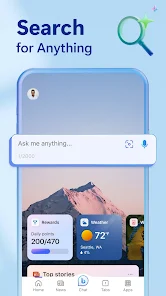
Bing: Chat with AI & GPT-4 is Microsoft's official AI companion app, mixing a search engine and a chatbot into one tool. It's basically your phone's gateway to GPT-4 for free, letting you ask questions, get summaries, and even generate images using DALL-E. You'd download it from the App Store or Google Play if you want a smarter way to browse the web right from your phone. The install count is huge—millions—since it comes bundled with Microsoft's ecosystem, and it's free with no upfront cost, though you might bump into optional in-app purchases for extra features like more conversation boosts. First impression after launching? A clean, almost too minimal screen with a search bar and suggested prompts, but the vibe changes fast once you start typing. It feels reliable but also a bit corporate compared to flashier AI apps, like you're stepping into a business tool rather than a creative playground.
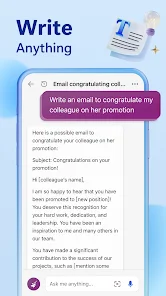
Using Bing day-to-day is pretty straightforward once you get past the initial setup. You log in with your Microsoft account, and then it's all about the chat interface—type something, and it replies with text that can pull from the web in real-time. The onboarding is quick, showing you how to switch between 'More Creative,' 'More Balanced,' and 'More Precise' tones, which is handy for different tasks. A common flow? I'd ask for a dinner recipe, and it'd give me steps, a shopping list, and even an image of the dish, all in one thread. The interface is clean but can feel cramped on a small screen, especially when the GPT-4 responses get long and wordy. A tip I picked up: use the 'Compose' feature to draft emails or social posts—it's faster than typing from scratch. The smooth part is how it handles follow-ups, keeping context across replies, but annoying moments pop up when it hits a limit after 30 chats per session and asks you to reset. It's not perfect, but for quick web queries or brainstorming, it gets the job done without much headache.
After a few weeks of poking around, I've got mixed feelings about this app. It's great if you're already deep in Microsoft's world—like using Outlook or Edge—because the integration is tight, and you can get work done quickly. But if you're all about creative chat or need a pure AI buddy without search ads, you might find it too transactional. What sets Bing apart from something like ChatGPT is the live internet access; it'll check facts and give recent info without a paywall, which is a solid win for free users. I could see someone keeping it installed for real-time research or itinerary planning, but if you just want casual banter or roleplay, the format feels rigid and ad-heavy. I almost uninstalled it because of the chat limits, but the DALL-E image generator kept me around—it's handy for quick visuals. Overall, it's a useful tool but not my go-to for AI fun; that spot still goes to other apps that feel more open-ended.
features
- 💡 Real-time search integration sets Bing apart from AI-only chatbots like ChatGPT. You get GPT-4's reasoning plus live web results, so answers are current and factual. For instance, asking about today's weather or a breaking news event pulls fresh data, not just training cutoffs.
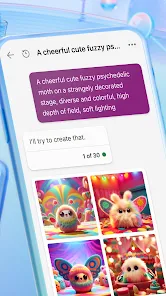
- 💡 DALL-E image generation is built directly into the chat without a separate subscription. Unlike Midjourney, which costs $10/month, Bing lets you create visuals for free just by describing them. It's not as polished, but for quick brainstorming or social media posts, it's a huge win.
- 💡 Multiple conversation tones—'Creative,' 'Balanced,' 'Precise'—give you flexibility across tasks. ChatGPT doesn't offer this directly; you'd have to manually refine prompts. With Bing, switching tones helps for everything from poem writing to technical queries.
pros
- 👍 Free GPT-4 access is a no-brainer compared to ChatGPT Plus at $20/month. You get the same language model power without paying a dime, which is amazing for students or casual users on a budget.
- 👍 Seamless Microsoft ecosystem integration—works with Edge, Outlook, and Windows—makes it a productivity beast. Google Bard feels disconnected in comparison, requiring manual app switching for similar results.
- 👍 Ad-free chatting experience within the AI mode is cleaner than Google's Bard, which sometimes shows sponsored content. No distractions while you're asking complex questions.
cons
- 👎 Strict chat limits after 30 responses per session force frequent resets. ChatGPT doesn't impose this cap, making it feel more fluid for long conversations. It kills the flow when you're deep in a topic.
- 👎 Overly formal tone in default responses compared to Perplexity's playful style. Bing often sounds like it's writing a report, which makes brainstorming feel stiff and less engaging.
- 👎 Heavy reliance on Microsoft account log-in can be annoying. You can't just download and start typing; you need to sign up first. Apps like Claude let you try without accounts, which is smoother for quick tests.
Articles
![]()
Guide
How to Update Google Play Store on Android 2026
![]()
Guide
How to Download Older Versions of Android Apps
![]()
Guide
How to Download Apps Without Google Play Store
![]()
Guide
What Is an APK File for Android?
If you use an Android phone, you may have seen the term APK while searching for apps or games online. Some websites offer an APK download instead of a Google Play install button. Some users also mention APK files when talking about apps that are not available in their region, older app versions, or Android games downloaded outside the Play Store.
![]()
Guide
How to Install Games from Google Play for Beginners
Installing games on an Android phone is usually simple, but for beginners, the process can still feel confusing at first. You may not know where to search, which button to tap, whether the game is safe, or why Google Play sometimes asks for account settings, storage access, or payment information. If you are using an Android phone for the first time, learning how to install games from Google Play is one of the easiest ways to get started.
![]()
Guide
How Useful Gemini Is for Everyday Questions and Quick Tasks
emini feels different from many AI apps because it is not only trying to be a chatbot. After using it for everyday questions, quick writing, image understanding, and planning, I think its biggest strength is convenience.
![]()
Guide
What to Know Before Downloading APKs
For many Android users, downloading an APK is a common way to install apps and games. Sometimes an app is not available in a certain country.
![]()
Guide
ChatGPT Review: Is It Still the Best AI App in 2026?
![]()
Guide
Seedance 2.0 vs Sora: The Future of AI Video Generation
The AI video race has intensified dramatically over the past two years. Platforms like Sora from OpenAI and Luma Dream Machine pushed the boundaries of text-to-video realism. Yet, despite their impressive outputs, most tools still operate as probabilistic generators—you describe a scene, and the model interprets it. Control remains limited. With the February 2026 release of Seedance 2.0, developed by ByteDance, the paradigm shifted. Internally known as Jimeng 2.0, Seedance does not position itself as just another video model. It positions itself as an AI Director. Rather than guessing what you want, Seedance 2.0 allows you to direct what happens. This distinction defines everything that follows.









Recommended Apps
![]()
Home Design 3D
Anuman4.2
![]()
Truth or Dare Game - Party App
Chouic4.8
![]()
Photo Collage Maker
Scoompa4.7![]()
Learn to Draw Flower
Creative APPS4.2![]()
FIFA World Cup 2026™
FIFA2.8![]()
Mirror Plus: Mirror with Light
Digitalchemy, LLC4.4![]()
Meitu- Photo Editor & AI Art
Meitu (China) Limited4.5![]()
Perplexity - Ask Anything
PerplexityAI4.7![]()
GhostTube SLS Camera Alternate
GhostTube4![]()
Boom Chip Blast: 2-Player
Black Pyramid 3D Games Studio0![]()
Healthy Benefits+
Solutran, Inc.4.5![]()
Deepcheck AI Search Assistant
rohe.ai4![]()
Idol Prank Video Call & Chat
LightCode Solutions4![]()
Face Shape - Pretty Scale
GlintTec Apps3.9![]()
Plant App - Plant Identifier
ScaleUp4.6











































