
NCAA March Madness Live

5M+
Installs
NCAA Digital
Developer
-
Sports
Category
-
Everyone
Content Rating
-
mmlivehelp@warnermedia.com
Developer Email
-
http://www.ncaa.com/privacy
Privacy Policy
Screenshots
editor reviews
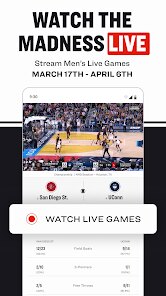
So NCAA March Madness Live is basically the official app you grab if you're even remotely interested in following the college basketball tournament. It's a sports streaming and score tracking app, and the main draw is obviously watching all those tournament games live. I downloaded it from the Play Store because I didn't want to miss any of the first-round chaos. It's a free download, and the first thing you notice after launching it is how clean and focused it feels. There's no clutter about football or baseball – it's purely basketball. The install numbers are in the millions, so it's definitely not some niche thing. You do need to sign in with a TV provider to unlock all the live streams during the big games, but just checking scores and brackets works right away without that.
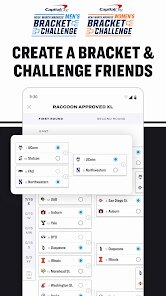
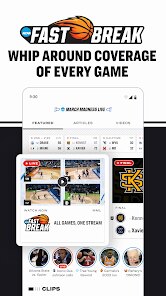
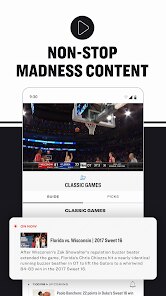
Using this app during the tournament was actually pretty straightforward. The interface puts the current games front and center, so you're not digging through menus to find what's on right now. The main screen has this cool "Studio" tab that felt like a mini TV show, with highlights and analysis already cut up. My usual flow was just opening it, tapping a game from the bracket at the top, and jumping straight into the live action or stats. I did notice that switching between games wasn't as instant as I'd like; sometimes it stalled for a second. The "Bracket" section is handy because you can fill out your own predictions right in the app, and it updates as games finish. One small tip: if you're watching a stream and it buffers, switching from cellular to WiFi fixed it for me more than once.
After using it through the whole tournament, I think this app is perfect for the hardcore college basketball fan or someone doing a bracket pool. The live streams, even with a cable login, worked reliably overall. I wouldn't say it's for someone who just casually checks scores; something like ESPN might be better for general sports news. What sets it apart from something like the regular CBS Sports app is how focused it is – it's literally all about March Madness, with that "Bracket Race" feature that's a lot of fun. I can see keeping it installed for the three weeks of the tournament, but honestly, I'll probably uninstall it after because the rest of the year it's mostly empty. It's a solid, specialized tool.
features
- 🏀 "Bracket Race" is the standout feature here. During a game, you can see the brackets of people you follow and watch their picks succeed or fail in real time. It adds a social, competitive layer that apps like ESPN or CBS Sports don't nail nearly as well. You feel the tournament's drama through your friends' choices.
- 🏀 The "Studio" tab offers highlight packages and really short analyst videos that get stitched together like a live show. For a tournament app, it's a surprisingly polished way to catch up on everything if you missed the actual games. You don't have to hunt through endless menus for a recap.
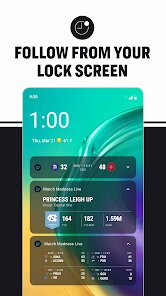
- 🏀 The live stream quality is generally solid once you get in. While other sports apps can crash or delay during peak times, this one felt stable for the most part. It uses your TV provider login, which is standard, but the actual video player remembers where you stopped if you check a score.
pros
- 🏀 No other app puts the bracket this front and center during the tournament. You open it, and the bracket is right there with live scores woven in. ESPN's app hides it in a menu; here, it's the whole reason for existing.
- 🏀 The data is exclusive to the NCAA. Score updates, foul counts, and game clock feel faster than on generic sports tracking apps. If you're watching the tournament closely, you get official stats before aggregation apps like The Score can even refresh.
- 🏀 It's completely ad-free during the actual game streams if you have a TV provider login. Compared to apps like Yahoo Sports that throw random promotions at you while the game is on, this feels clean and focused on the action.
cons
- 🔴 The biggest weakness is the TV provider login wall. Unlike CBS Sports or even YouTube TV, you can't watch many games without signing into a cable subscription. If you're a cord-cutter on Sling or just using an antenna, some streams stay locked.
- 🔴 After the tournament ends, the app becomes basically dead. There's no preseason coverage or summer league content. Compared to the NBA app that runs year-round, this one feels like a temporary tool you uninstall in April.
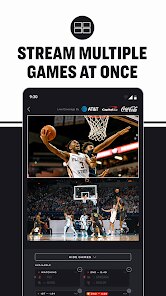
- 🔴 Switching between multiple live games isn't as smooth as it could be. The app sometimes reloads the stream or shows a black screen for a moment. A dedicated app like Multiview on a PC handles multiple games easier.
Articles
![]()
Guide
How to Update Google Play Store on Android 2026
![]()
Guide
How to Download Older Versions of Android Apps
![]()
Guide
How to Download Apps Without Google Play Store
![]()
Guide
What Is an APK File for Android?
If you use an Android phone, you may have seen the term APK while searching for apps or games online. Some websites offer an APK download instead of a Google Play install button. Some users also mention APK files when talking about apps that are not available in their region, older app versions, or Android games downloaded outside the Play Store.
![]()
Guide
How to Install Games from Google Play for Beginners
Installing games on an Android phone is usually simple, but for beginners, the process can still feel confusing at first. You may not know where to search, which button to tap, whether the game is safe, or why Google Play sometimes asks for account settings, storage access, or payment information. If you are using an Android phone for the first time, learning how to install games from Google Play is one of the easiest ways to get started.
![]()
Guide
How Useful Gemini Is for Everyday Questions and Quick Tasks
emini feels different from many AI apps because it is not only trying to be a chatbot. After using it for everyday questions, quick writing, image understanding, and planning, I think its biggest strength is convenience.
![]()
Guide
What to Know Before Downloading APKs
For many Android users, downloading an APK is a common way to install apps and games. Sometimes an app is not available in a certain country.
![]()
Guide
ChatGPT Review: Is It Still the Best AI App in 2026?
![]()
Guide
Seedance 2.0 vs Sora: The Future of AI Video Generation
The AI video race has intensified dramatically over the past two years. Platforms like Sora from OpenAI and Luma Dream Machine pushed the boundaries of text-to-video realism. Yet, despite their impressive outputs, most tools still operate as probabilistic generators—you describe a scene, and the model interprets it. Control remains limited. With the February 2026 release of Seedance 2.0, developed by ByteDance, the paradigm shifted. Internally known as Jimeng 2.0, Seedance does not position itself as just another video model. It positions itself as an AI Director. Rather than guessing what you want, Seedance 2.0 allows you to direct what happens. This distinction defines everything that follows.









Recommended Apps
![]()
Home Design 3D
Anuman4.2
![]()
Truth or Dare Game - Party App
Chouic4.8
![]()
Photo Collage Maker
Scoompa4.7![]()
Learn to Draw Flower
Creative APPS4.2![]()
FIFA World Cup 2026™
FIFA2.8![]()
Mirror Plus: Mirror with Light
Digitalchemy, LLC4.4![]()
Meitu- Photo Editor & AI Art
Meitu (China) Limited4.5![]()
Perplexity - Ask Anything
PerplexityAI4.7![]()
GhostTube SLS Camera Alternate
GhostTube4![]()
Boom Chip Blast: 2-Player
Black Pyramid 3D Games Studio0![]()
Healthy Benefits+
Solutran, Inc.4.5![]()
Deepcheck AI Search Assistant
rohe.ai4![]()
Idol Prank Video Call & Chat
LightCode Solutions4![]()
Face Shape - Pretty Scale
GlintTec Apps3.9![]()
Plant App - Plant Identifier
ScaleUp4.6












































