

FaceArt: Filters for Pictures

50M+
Installs
Lyrebird Studio
Developer
-
Video Players & Editors
Category
-
Rated for 3+
Content Rating
-
lyrebirdstudio@gmail.com
Developer Email
-
https://lyrebirdstudio.net/privacy_policy.htm
Privacy Policy
Screenshots
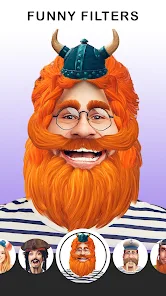
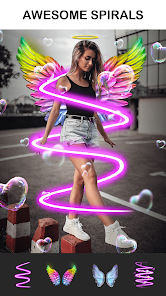
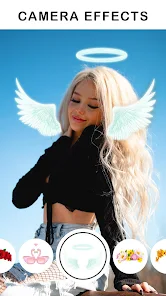
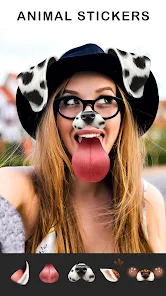
editor reviews
FaceArt is one of those photo filter apps that turns your selfies into digital art, cartoon portraits, or anime-style characters. It sits right in that crowded genre of AI-driven portrait editors, alongside big names like Meitu or FaceApp, but focuses more on stylized looks rather than realistic beauty fixes. You download it from Google Play or the App Store, install it in a few seconds, and it's free to start using, though you'll run into in-app purchases and ads pretty quickly. The first impression after launching is a bit of a mixed bag the interface looks polished but immediately pushes a subscription at you, which can feel pushy for a free app. Still, once you get past that initial hurdle, you can upload a photo and see immediate previews of what you might look like as a watercolor painting or a fantasy character.
Getting hands-on with FaceArt is actually smoother than I expected. The onboarding walks you through the basic filters in a few swipes, and the main screen shows your camera roll with a single tap to select a photo. From there, you pick a style category, like Paintings or Anime, and the app processes the image in about 10 to 15 seconds which feels decent on a mid-range phone. A nice practical tip is to use well-lit, front-facing selfies rather than blurry group shots, because the AI struggles with multiple faces or dim lighting. The interface is mostly intuitive, but I hit a few confusing moments when trying to adjust filter intensity; the slider is hidden under a small button, not immediately obvious. Daily use usually means snapping a photo, applying a filter, and saving or sharing it directly to Instagram or TikTok, which works fine, though the free version litters your export with a watermark unless you pay.
After playing with FaceArt for a couple of weeks, I think it's a fun tool for casual social media users who want quick, flashy edits without learning Photoshop. Someone who loves posting daily story updates or experimenting with different looks will probably enjoy it, especially if they're into anime or cartoon aesthetics. But if you already use a tool like Picsart or Remini for serious photo editing, this app might feel too limiting and gimmicky after the novelty wears off. Compared to FaceApp, which focuses on aging or swapping genders, FaceArt leans harder into artistic filters, which is its main differentiator. That said, the constant nudges to upgrade to the premium version and the occasional crash when processing high-res images made me consider uninstalling it after a month. I ended up keeping it installed because it's genuinely quick for making quirky profile pictures, but I wouldn't pay for the subscription.
features
- 🎨 Stylized Art Genres: FaceArt offers a wide variety of filter categories like watercolor, sketch, anime, and fantasy, giving you more creative options than you'd get in a basic editor like Meitu, which tends to lean into beauty enhancements rather than pure art styles.
- ⚡ Speed Over Precision: The app processes each filter in around 10 seconds, which is noticeably faster than something like FaceApp when applying heavy effects, but you lose some control over fine details like eye shape or background blur.
- 📱 Social Media Integration: It lets you directly share edits to Instagram, TikTok, or Snapchat without saving first, making it handier for quick posting than apps like Picsart that require multiple steps before exporting.
- 🎭 Unique Fantasy Themes: The set of fantasy and mythical creature filters, like vampires or fairies, stands out because few similar apps offer that specific niche, whereas most competitors stick to realistic or cartoon styles only.
pros
- 🎨 Diverse Filter Library: FaceArt provides more artistic variety than FaceApp, which mostly focuses on realistic aging or smile edits, so you get bolder creative results here.
- ⚡ Quick Processing Speed: The filters apply faster than those in Meitu, which can lag on older phones, so you can try multiple looks in a single sitting without frustration.
- 🖼️ Clean Export Options: Unlike some apps that compress images heavily, FaceArt keeps decent resolution in exports, a clear advantage over Picsart's lower-quality free exports.
cons
- 🎨 Aggressive Paid Features: The best filters are locked behind the premium subscription, and ads pop up after every edit, which feels worse than Meitu's ad-light experience.
- ⚡ Inconsistent AI Performance: The AI sometimes distorts facial features on side profiles or glasses, making results look uncanny, a problem less common in FaceApp's polished engine.
- 🖼️ Watermark on Free Exports: Unlike Meitu, which offers watermark-free exports in the free version, FaceArt forces a logo on all saves unless you pay, which is annoying for sharing.
Articles
![]()
Guide
How to Update Google Play Store on Android 2026
![]()
Guide
How to Download Older Versions of Android Apps
![]()
Guide
How to Download Apps Without Google Play Store
![]()
Guide
What Is an APK File for Android?
If you use an Android phone, you may have seen the term APK while searching for apps or games online. Some websites offer an APK download instead of a Google Play install button. Some users also mention APK files when talking about apps that are not available in their region, older app versions, or Android games downloaded outside the Play Store.
![]()
Guide
How to Install Games from Google Play for Beginners
Installing games on an Android phone is usually simple, but for beginners, the process can still feel confusing at first. You may not know where to search, which button to tap, whether the game is safe, or why Google Play sometimes asks for account settings, storage access, or payment information. If you are using an Android phone for the first time, learning how to install games from Google Play is one of the easiest ways to get started.
![]()
Guide
How Useful Gemini Is for Everyday Questions and Quick Tasks
emini feels different from many AI apps because it is not only trying to be a chatbot. After using it for everyday questions, quick writing, image understanding, and planning, I think its biggest strength is convenience.
![]()
Guide
What to Know Before Downloading APKs
For many Android users, downloading an APK is a common way to install apps and games. Sometimes an app is not available in a certain country.
![]()
Guide
ChatGPT Review: Is It Still the Best AI App in 2026?
![]()
Guide
Seedance 2.0 vs Sora: The Future of AI Video Generation
The AI video race has intensified dramatically over the past two years. Platforms like Sora from OpenAI and Luma Dream Machine pushed the boundaries of text-to-video realism. Yet, despite their impressive outputs, most tools still operate as probabilistic generators—you describe a scene, and the model interprets it. Control remains limited. With the February 2026 release of Seedance 2.0, developed by ByteDance, the paradigm shifted. Internally known as Jimeng 2.0, Seedance does not position itself as just another video model. It positions itself as an AI Director. Rather than guessing what you want, Seedance 2.0 allows you to direct what happens. This distinction defines everything that follows.









Recommended Apps
![]()
Home Design 3D
Anuman4.2
![]()
Truth or Dare Game - Party App
Chouic4.8
![]()
Photo Collage Maker
Scoompa4.7![]()
Learn to Draw Flower
Creative APPS4.2![]()
FIFA World Cup 2026™
FIFA2.8![]()
Mirror Plus: Mirror with Light
Digitalchemy, LLC4.4![]()
Meitu- Photo Editor & AI Art
Meitu (China) Limited4.5![]()
Perplexity - Ask Anything
PerplexityAI4.7![]()
GhostTube SLS Camera Alternate
GhostTube4![]()
Boom Chip Blast: 2-Player
Black Pyramid 3D Games Studio0![]()
Healthy Benefits+
Solutran, Inc.4.5![]()
Deepcheck AI Search Assistant
rohe.ai4![]()
Idol Prank Video Call & Chat
LightCode Solutions4![]()
Face Shape - Pretty Scale
GlintTec Apps3.9![]()
Plant App - Plant Identifier
ScaleUp4.6











































