
Square InPic - Photo Editor &

50M+
Installs
Studio 8 Apps
Developer
-
Video Players & Editors
Category
-
Rated for 3+
Content Rating
-
studio8apps@gmail.com
Developer Email
-
http://www.studio8apps.com/privacy-policy/
Privacy Policy
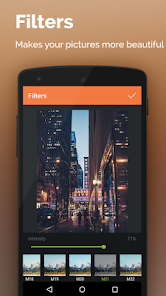
Screenshots
editor reviews
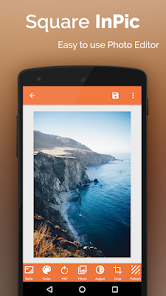
Square InPic is a photo editing app that's been around for a while, focused on one main thing: quickly and easily making your pictures square. It's not a full-blown Photoshop replacement or a platform for heavy social media editing. Instead, it's a straightforward utility tool you might grab from Google Play or the App Store when you just need to crop a landscape or portrait shot into a perfect square for Instagram or a profile picture. After you download and install it, which is free by the way, the first launch is almost disarming in its simplicity. You're greeted by a clean, bare interface with a big plus sign to pick a photo. There are no ads screaming at you from every corner right away, and no tutorial barrage. It just sits there, ready to work, which feels refreshingly direct for a mobile app these days.
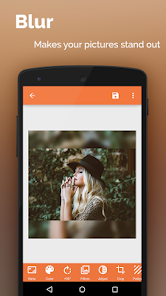
Once you load a picture, the actual hands-on experience kicks in. The main screen shows your photo in a square frame, and you can immediately pinch, zoom, or drag it to get the composition you want. The app then offers a few sliders for a basic color tweak—things like brightness, contrast, and saturation—and that's about it for the serious editing. But the real magic, and the part you'll use the most, is the background fill. Instead of just chopping off the sides, Square InPic lets you blur the leftover space, add a solid color, or use a pattern to fill the non-square area. This is where the app shines for everyday use. A small, practical tip: the blur tool works best on busy backgrounds because it hides the seams between your photo and the filler. Swiping between different fill modes is fluid, but sometimes the blur strength slider feels a bit too sensitive, so you have to nudge it gently. For a normal user doing their daily Instagram story or a quick post, the whole process takes maybe twenty seconds.
After using it for a while, here's my honest take. This app isn't for someone who wants deep layer editing or raw camera controls. It's a one-trick pony, but it does that trick better than most. Compared to apps like Snapseed or VSCO, which also offer cropping tools but bury them inside a dozen menus, Square InPic is frustratingly limited yet wonderfully focused. You will keep it installed if you find yourself constantly needing to make images square without losing the whole picture. But once you figure out that most social media apps now have decent native cropping tools, you might uninstall it. That said, if you value speed over features, and you want to avoid the frustration of manually guessing the right crop size, it's a solid little tool to have in your drawer. I keep it around for the rare times I just need to get a picture posted without any fuss.
features
- 🖼️ The standout feature for me is definitely its smart background filling. Most apps like Snapseed just cut off your image when you crop to a square. InPic, however, intelligently analyzes the edges and fills the leftover space with a blurred version of your picture, a solid color, or a repeating pattern. This lets you keep your entire composition intact, which is a lifesaver for photos with important details near the edges. It's a feature you don't think you need until you actually use it.
- 🖼️ Another strong point is the sheer speed of use. There is just no waiting. You open the app, pick a photo, adjust it, and save it. The processing is instantaneous, even with high-resolution images. This is a huge contrast to more bloated apps like Adobe Lightroom Mobile, which often stutter when applying filters or cropping. For a quick social media post, this speed is more valuable than a hundred fancy filters.
- 🖼️ The interface is worth mentioning because it has no learning curve at all. Square InPic is the antithesis of apps like PicsArt, which can feel like a labyrinth of tools and menus. Here, you see your photo and two or three buttons. You can hand this to anyone you know, and they would figure it out in ten seconds without any instructions. That kind of design is rare and really matters when you're in a hurry.
pros
- 🌟 The main strength is its pure focus. It does one job, and it does it without trying to be anything else. VSCO is a great editor, but its square crop is hidden behind multiple taps. InPic puts it front and center, which makes it much faster for this specific use.
- 🌟 It's completely free to use for the core features. You don't need to subscribe or pay to remove a watermark just to blur a background. Many similar apps, like Crop Fit, lock the best blur effects behind a paywall. InPic keeps the essential tools open to everyone.
- 🌟 The export quality remains high. The app doesn't compress your image to a low resolution just to speed up saving. You get the full quality of the original photo, which is a small but critical point that some lighter apps overlook.
cons
- ⚠️ The biggest weakness is the lack of more advanced editing tools. You are stuck with just brightness, contrast, and saturation sliders. Apps like Snapseed offer selective adjustments, healing tools, and curves. When you want to fix a small blemish or tweak the white balance before cropping, InPic is completely helpless.
- ⚠️ It also doesn't support batch processing. If you have ten photos to square up at once for an album, you have to do them one by one. Tools like Square InstaPic sometimes offer simple batch actions, but InPic lacks this entirely, which feels like a missed opportunity for a utility app.
- ⚠️ The blur effect can sometimes look artificial and harsh. The transition between your photo and the blurred background isn't always smooth, especially with simple, flat-colored images. This makes the result look a bit cheap compared to the more sophisticated algorithms you find in apps like AfterFocus.
Articles
![]()
Guide
How to Update Google Play Store on Android 2026
![]()
Guide
How to Download Older Versions of Android Apps
![]()
Guide
How to Download Apps Without Google Play Store
![]()
Guide
What Is an APK File for Android?
If you use an Android phone, you may have seen the term APK while searching for apps or games online. Some websites offer an APK download instead of a Google Play install button. Some users also mention APK files when talking about apps that are not available in their region, older app versions, or Android games downloaded outside the Play Store.
![]()
Guide
How to Install Games from Google Play for Beginners
Installing games on an Android phone is usually simple, but for beginners, the process can still feel confusing at first. You may not know where to search, which button to tap, whether the game is safe, or why Google Play sometimes asks for account settings, storage access, or payment information. If you are using an Android phone for the first time, learning how to install games from Google Play is one of the easiest ways to get started.
![]()
Guide
How Useful Gemini Is for Everyday Questions and Quick Tasks
emini feels different from many AI apps because it is not only trying to be a chatbot. After using it for everyday questions, quick writing, image understanding, and planning, I think its biggest strength is convenience.
![]()
Guide
What to Know Before Downloading APKs
For many Android users, downloading an APK is a common way to install apps and games. Sometimes an app is not available in a certain country.
![]()
Guide
ChatGPT Review: Is It Still the Best AI App in 2026?
![]()
Guide
Seedance 2.0 vs Sora: The Future of AI Video Generation
The AI video race has intensified dramatically over the past two years. Platforms like Sora from OpenAI and Luma Dream Machine pushed the boundaries of text-to-video realism. Yet, despite their impressive outputs, most tools still operate as probabilistic generators—you describe a scene, and the model interprets it. Control remains limited. With the February 2026 release of Seedance 2.0, developed by ByteDance, the paradigm shifted. Internally known as Jimeng 2.0, Seedance does not position itself as just another video model. It positions itself as an AI Director. Rather than guessing what you want, Seedance 2.0 allows you to direct what happens. This distinction defines everything that follows.









Recommended Apps
![]()
Home Design 3D
Anuman4.2
![]()
Truth or Dare Game - Party App
Chouic4.8
![]()
Photo Collage Maker
Scoompa4.7![]()
Learn to Draw Flower
Creative APPS4.2![]()
FIFA World Cup 2026™
FIFA2.8![]()
Mirror Plus: Mirror with Light
Digitalchemy, LLC4.4![]()
Meitu- Photo Editor & AI Art
Meitu (China) Limited4.5![]()
Perplexity - Ask Anything
PerplexityAI4.7![]()
GhostTube SLS Camera Alternate
GhostTube4![]()
Boom Chip Blast: 2-Player
Black Pyramid 3D Games Studio0![]()
Healthy Benefits+
Solutran, Inc.4.5![]()
Deepcheck AI Search Assistant
rohe.ai4![]()
Idol Prank Video Call & Chat
LightCode Solutions4![]()
Face Shape - Pretty Scale
GlintTec Apps3.9![]()
Plant App - Plant Identifier
ScaleUp4.6












































