
Adobe Photoshop Mix - Cut-out,

10M+
Installs
Adobe
Developer
-
Video Players & Editors
Category
-
Rated for 3+
Content Rating
-
PSMix-Android@adobe.com
Developer Email
-
https://www.adobe.com/privacy/policy.html
Privacy Policy
Screenshots
editor reviews
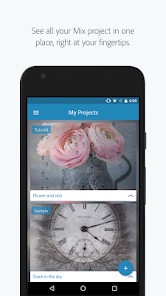
Adobe Photoshop Mix is a mobile photo editing app from Adobe that focuses on cut-out and compositing work. It belongs to the creative tools genre, bridging the gap between simple photo editors and full desktop software. People usually download it from Google Play or the App Store when they need to isolate objects from backgrounds, combine multiple images, or make quick selections on the go. The first impression after launching the app is surprisingly clean — a minimalist interface with a prominent camera roll button and a tutorial prompt. It feels more like a precision tool than a casual filter app, which makes sense given Adobe's reputation. The download is free, though some advanced features and cloud storage integration may require an Adobe Creative Cloud subscription. Registration is optional for basic use, but signing in unlocks syncing with your desktop Photoshop library. There are no intrusive ads, which is a relief for anyone tired of pop-ups in free editing apps.
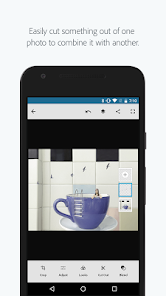
Using Photoshop Mix feels straightforward once you get past the initial learning curve. The onboarding walks you through the selection tools with a sample image, which helps. The main workflow starts with opening a photo from your camera roll or Creative Cloud library. The selection tool is where the app shines — you can roughly paint over the area you want to keep, and the edge detection does a decent job of snapping to boundaries. For tricky edges like hair or fur, the refine edge brush works well but requires patience. After making a selection, you can cut the object, paste it onto another photo, and adjust scale, rotation, and blending. The interface stays uncluttered: tool icons along the bottom, a layers panel on the side, and a preview window. One tip I picked up is to zoom in fully when working on fine details, since the touch controls can be slightly imprecise at normal zoom. Saving and exporting to the camera roll is quick, though the PSD export option only appears if you're signed in. A common frustration is the lack of undo steps beyond the first few actions, so mistakes mean starting over sometimes.
After using this app for a few weeks, I think it's best suited for designers or photo hobbyists who need quick cut-outs but don't want to fire up a laptop. Students working on collages, social media managers creating assets, or anyone who frequently removes backgrounds will find it handy. On the flip side, if you only need casual edits like cropping and filters, this app feels overkill — apps like Snapseed or PicsArt are easier for that. What sets Photoshop Mix apart is how it maintains layer-based editing and sends files directly to desktop Photoshop for further tweaks. Other mobile cut-out tools like Background Eraser or Remove.bg are faster for simple tasks, but they lack the refinement controls and integration that Mix offers. I kept it installed because the selection accuracy beats most free alternatives, but I can see casual users uninstalling it if they rarely need precision cut-out work. It fills a specific niche well, even if it doesn't replace a desktop editor entirely.
features
- ✂️ Selection accuracy is the standout feature here. The combination of a quick selection brush and a refine edge tool lets you capture tricky elements like hair strands or glass reflections. Compared to something like PicsArt's cut-out tool, which often leaves rough edges, Adobe Mix handles soft transitions much more naturally. The real selling point is the ability to save selections as alpha channels and reopen them later in desktop Photoshop — a feature no other mobile app offers at this level.
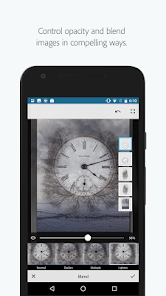
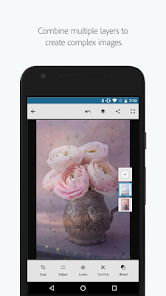
- 🎨 Layer-based compositing works smoothly. You can stack multiple cut-out objects, rearrange their order, and adjust opacity or blending modes. This feels like a mini version of the desktop layers panel. Most competing apps treat each edit as destructive, but Mix keeps the original images intact underneath.
- ☁️ Creative Cloud integration makes the app valuable for anyone in the Adobe ecosystem. Selections, edits, and entire projects sync automatically between your phone and desktop. That means you can start a composite on the bus and finish it on a workstation without losing any work. Other cut-out apps lack this cross-device continuity.
pros
- 👍 Selection precision is unmatched among mobile cut-out apps. While Background Eraser relies on simple tapping to remove colors, Adobe Mix uses edge detection and feathering to create smooth masks. For product photos or portrait cut-outs, the results look professional rather than cheap.
- 👍 Non-destructive editing keeps your originals safe. Every edit sits in a layer stack, so you can hide, delete, or tweak any adjustment without starting over. Free alternatives like Cut Cut or ProKnockout don't offer this level of flexibility.
- 👍 Touch gestures for scaling and rotating are intuitive. Two-finger pinch and drag feels natural, unlike some apps where you have to tap a toolbar button first. The controls are responsive and rarely lag, even on older phones.
cons
- 👎 Limited undo history is frustrating. The app only remembers the last few actions, so if you accidentally apply a change or delete a layer, you might have to redo the entire selection. PicsArt and Snapseed offer more forgiving undo systems.
- 👎 No direct social media export. After finishing an edit, you have to save the image to your camera roll and then upload it manually to Instagram or Facebook. Competing apps like PicsArt include share buttons that skip this step entirely.
- 👎 The free version feels restrictive. Basic cut-out works fine, but features like PSD export, cloud storage, and batch processing require a subscription. Apps like Background Eraser offer similar cut-out quality completely free with fewer limitations.
- 👎 Performance on low-end devices can be slow. The app demands a decent amount of RAM and processor speed. On budget phones, the selection brush lags noticeably, and exporting a layered composite takes a long time compared to lighter alternatives.
Articles
![]()
Guide
How to Update Google Play Store on Android 2026
![]()
Guide
How to Download Older Versions of Android Apps
![]()
Guide
How to Download Apps Without Google Play Store
![]()
Guide
What Is an APK File for Android?
If you use an Android phone, you may have seen the term APK while searching for apps or games online. Some websites offer an APK download instead of a Google Play install button. Some users also mention APK files when talking about apps that are not available in their region, older app versions, or Android games downloaded outside the Play Store.
![]()
Guide
How to Install Games from Google Play for Beginners
Installing games on an Android phone is usually simple, but for beginners, the process can still feel confusing at first. You may not know where to search, which button to tap, whether the game is safe, or why Google Play sometimes asks for account settings, storage access, or payment information. If you are using an Android phone for the first time, learning how to install games from Google Play is one of the easiest ways to get started.
![]()
Guide
How Useful Gemini Is for Everyday Questions and Quick Tasks
emini feels different from many AI apps because it is not only trying to be a chatbot. After using it for everyday questions, quick writing, image understanding, and planning, I think its biggest strength is convenience.
![]()
Guide
What to Know Before Downloading APKs
For many Android users, downloading an APK is a common way to install apps and games. Sometimes an app is not available in a certain country.
![]()
Guide
ChatGPT Review: Is It Still the Best AI App in 2026?
![]()
Guide
Seedance 2.0 vs Sora: The Future of AI Video Generation
The AI video race has intensified dramatically over the past two years. Platforms like Sora from OpenAI and Luma Dream Machine pushed the boundaries of text-to-video realism. Yet, despite their impressive outputs, most tools still operate as probabilistic generators—you describe a scene, and the model interprets it. Control remains limited. With the February 2026 release of Seedance 2.0, developed by ByteDance, the paradigm shifted. Internally known as Jimeng 2.0, Seedance does not position itself as just another video model. It positions itself as an AI Director. Rather than guessing what you want, Seedance 2.0 allows you to direct what happens. This distinction defines everything that follows.









Recommended Apps
![]()
Home Design 3D
Anuman4.2
![]()
Truth or Dare Game - Party App
Chouic4.8
![]()
Photo Collage Maker
Scoompa4.7![]()
Learn to Draw Flower
Creative APPS4.2![]()
FIFA World Cup 2026™
FIFA2.8![]()
Mirror Plus: Mirror with Light
Digitalchemy, LLC4.4![]()
Meitu- Photo Editor & AI Art
Meitu (China) Limited4.5![]()
Perplexity - Ask Anything
PerplexityAI4.7![]()
GhostTube SLS Camera Alternate
GhostTube4![]()
Boom Chip Blast: 2-Player
Black Pyramid 3D Games Studio0![]()
Healthy Benefits+
Solutran, Inc.4.5![]()
Deepcheck AI Search Assistant
rohe.ai4![]()
Idol Prank Video Call & Chat
LightCode Solutions4![]()
Face Shape - Pretty Scale
GlintTec Apps3.9![]()
Plant App - Plant Identifier
ScaleUp4.6











































