

NewProfilePic: Profile Picture

5M+
Installs
Linerock Investments LTD
Developer
-
Video Players & Editors
Category
-
Rated for 3+
Content Rating
-
support@pho.to
Developer Email
-
https://pho.to/privacy
Privacy Policy
Screenshots



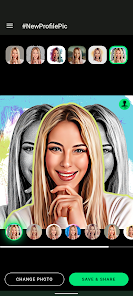
editor reviews
NewProfilePic is a photo editing app built almost entirely around one specific task: generating AI-enhanced profile pictures. You download it from Google Play or the App Store, and it's free to install — though like most apps in this space, there are in-app purchases for extra edits or faster processing. Once you launch it, the first thing you notice is how direct the interface is. There's no sign-up wall or tutorial video; instead, it asks for a photo right away. That click-to-start clarity makes a good first impression, especially if you just want to quickly refresh your avatar without wading through bloated editing suites.
After uploading a photo, you pick a style from a grid — things like “LinkedIn Professional,” “Fantasy Warrior,” or “Vintage Film.” The onboarding is just swiping through a few style previews, and then you hit generate. The app processes your image in about ten to twenty seconds, which feels snappy on newer phones. I took a selfie with decent lighting and tried the “Neon Cyberpunk” look. The result was surprisingly sharp, with my face shape preserved but the background replaced by glowing cityscapes and holographic overlays. The main actions are straightforward: select a style, wait, and save or share. One practical thing I learned: if your haircut covers part of your forehead, the app can sometimes guess that area oddly. Using a full-frontal photo from the shoulders up yields cleaner results. There's also a “Remix” button that lets you tweak the chosen output with different filters, which saves you from running the generator again.
After using NewProfilePic for about a week, I can see it fitting well for people who frequently update their social media avatars — think LinkedIn users, dating app users, or Discord regulars. But if you only need a profile picture once or twice a year, the free version runs out of output credits fast. Compared to something like FaceApp or Remini, NewProfilePic focuses strictly on stylized portraits rather than general photo enhancement. That narrow scope means it nails the profile picture angle but lacks any broader editing tools. The generated images also feel distinct enough that some of my friends asked, “Did you actually go to Tokyo?” because the cyberpunk backgrounds looked that convincing. I ended up keeping it installed for the occasional event or holiday profile refresh, but I could see uninstalling it if the style library stops updating.
features
- 🎨 One-click stylized headshots — Unlike FaceApp which leans toward aging or swapping features, NewProfilePic is built for making any selfie look like a pro headshot in a chosen theme. You pick a look like “Winter Lights” or “Steampunk,” and the app handles hair, skin, and background in one go.
- 🚀 Real-time preview gallery — Before you commit to generating, you can see four style previews on your uploaded photo within seconds. That saves credits and eliminates the wait time of apps like Picsart where you have to render each effect individually.
- 🔄 Remix for fine tuning — After the first result, hitting “Remix” applies a different filter to the same AI generation. This is smarter than just re-running the whole process, especially if you only want a color shift instead of a complete regeneration.
pros
- 🖼️ Style variety feels fresh — Where apps like Remini only enhance existing photos, NewProfilePic adds artistic backgrounds and styling that mimic real photography sets. The “Golden Hour” style genuinely looks like you hired a photographer at sunset.
- ⏱️ Fast output speed — Compared to DreamAvatar or similar tools, NewProfilePic processes in under thirty seconds even on a mid ranged phone. You don't sit staring at a loading spinner for minutes.
- 🚫 No mandatory subscription for basic use — Many competitors lock every output behind a paywall. NewProfilePic gives you a few free credits daily, plus occasional free style drops. That's a big plus if you only need pictures sporadically.
cons
- 🪫 Limited free credits — You get maybe three free outputs a day, and each style attempt consumes one credit. If you want to try five different looks, you'll either wait until tomorrow or buy a pack. FaceApp gives more wiggle room with its free tier.
- 🎯 Awkward with non standard photos — The AI stumbles on side profiles, hats, or glasses. In testing, a photo with aviator sunglasses gave me a half-glowing face. Remini handles edge cases better through manual retouching.
- 📂 No batch export option — You can't generate multiple images in one session and save them all at once. You have to tap save individually for each output. With Picsart you can batch edit.
Articles
![]()
Guide
How to Update Google Play Store on Android 2026
![]()
Guide
How to Download Older Versions of Android Apps
![]()
Guide
How to Download Apps Without Google Play Store
![]()
Guide
What Is an APK File for Android?
If you use an Android phone, you may have seen the term APK while searching for apps or games online. Some websites offer an APK download instead of a Google Play install button. Some users also mention APK files when talking about apps that are not available in their region, older app versions, or Android games downloaded outside the Play Store.
![]()
Guide
How to Install Games from Google Play for Beginners
Installing games on an Android phone is usually simple, but for beginners, the process can still feel confusing at first. You may not know where to search, which button to tap, whether the game is safe, or why Google Play sometimes asks for account settings, storage access, or payment information. If you are using an Android phone for the first time, learning how to install games from Google Play is one of the easiest ways to get started.
![]()
Guide
How Useful Gemini Is for Everyday Questions and Quick Tasks
emini feels different from many AI apps because it is not only trying to be a chatbot. After using it for everyday questions, quick writing, image understanding, and planning, I think its biggest strength is convenience.
![]()
Guide
What to Know Before Downloading APKs
For many Android users, downloading an APK is a common way to install apps and games. Sometimes an app is not available in a certain country.
![]()
Guide
ChatGPT Review: Is It Still the Best AI App in 2026?
![]()
Guide
Seedance 2.0 vs Sora: The Future of AI Video Generation
The AI video race has intensified dramatically over the past two years. Platforms like Sora from OpenAI and Luma Dream Machine pushed the boundaries of text-to-video realism. Yet, despite their impressive outputs, most tools still operate as probabilistic generators—you describe a scene, and the model interprets it. Control remains limited. With the February 2026 release of Seedance 2.0, developed by ByteDance, the paradigm shifted. Internally known as Jimeng 2.0, Seedance does not position itself as just another video model. It positions itself as an AI Director. Rather than guessing what you want, Seedance 2.0 allows you to direct what happens. This distinction defines everything that follows.









Recommended Apps
![]()
Home Design 3D
Anuman4.2
![]()
Truth or Dare Game - Party App
Chouic4.8
![]()
Photo Collage Maker
Scoompa4.7![]()
Learn to Draw Flower
Creative APPS4.2![]()
FIFA World Cup 2026™
FIFA2.8![]()
Mirror Plus: Mirror with Light
Digitalchemy, LLC4.4![]()
Meitu- Photo Editor & AI Art
Meitu (China) Limited4.5![]()
Perplexity - Ask Anything
PerplexityAI4.7![]()
GhostTube SLS Camera Alternate
GhostTube4![]()
Boom Chip Blast: 2-Player
Black Pyramid 3D Games Studio0![]()
Healthy Benefits+
Solutran, Inc.4.5![]()
Deepcheck AI Search Assistant
rohe.ai4![]()
Idol Prank Video Call & Chat
LightCode Solutions4![]()
Face Shape - Pretty Scale
GlintTec Apps3.9![]()
Plant App - Plant Identifier
ScaleUp4.6












































