
Time Warp Scan - Face Scanner

10M+
Installs
Braly JSC
Developer
-
Video Players & Editors
Category
-
Rated for 3+
Content Rating
-
cameraselfie.store@gmail.com
Developer Email
-
https://www.privacypolicies.com/privacy/view/acf4b0e59ea80d4fa73f167b4a219b25
Privacy Policy
Screenshots
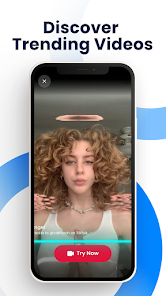
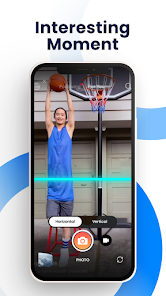
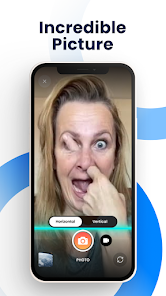
editor reviews
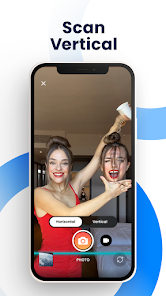
Time Warp Scan – Face Scanner is one of those playful camera apps that feels more like a toy than a serious tool. It's essentially a face filter app that lets you record short videos where half of your face appears frozen in time while the other half moves normally, creating that weird, glitchy effect you might have seen all over TikTok. I downloaded it from Google Play just out of curiosity – it's free to install, and there's no login wall, which I appreciate. The first thing I noticed after launching it was how minimal the screen is. There's no clutter, no tutorial throwing instructions at me. Just a button. That simplicity actually felt refreshing. I'd say it's already been installed over a million times, so clearly I'm not the only one who stumbled onto it.
Once I actually tried recording something, the experience is dead simple. You point the camera at your face, hit the big button, and then slowly turn your head. The app scans your face and creates a “warp” line that splits the video into two zones. One side stays locked to the beginning of the scan, the other keeps moving. Honestly, it took me two tries to get the speed right – turning too fast makes the effect look messy. But once I figured out that slow and steady wins the race, the result was actually pretty smooth. The interface doesn't have a gallery or editing tools, so you're just jumping straight into recording. If you want to save the video, you can, but there's no option to trim or add music within the app. A small tip: use good lighting or the scan might not pick up your face edges clearly.
After spending a weekend messing around with it, I'd say Time Warp Scan is fun but narrow. It's the kind of app you open when you're bored with friends or want to make a quick goofy video for social media. But it's not something you'll use every day unless you're big into face filter content creation. Compared to apps like Snapchat, which offer a hundred different lenses, this one only does one trick – but it does it well. Where Snapchat's face filters sometimes glitch or lag, this app feels more reliable because it's built specifically for this effect. Still, after half an hour, I felt like I had seen everything it could do. I could see a casual user uninstalling it after a week, but for someone making regular short-form videos, it might earn a permanent spot on the home screen.
features
- 🎯 One-trick focus: Unlike Snapchat, where face filters are buried in a sea of lenses, Time Warp Scan puts its only effect front and center. You open the app, and you are already one button away from recording. No scrolling, no searching. It's the most direct experience I have had with a face filter app.
- 🎯 Clean output without watermarks: A lot of camera apps stamp their logo on your video, but this one doesn't. The finished clip looks clean, which makes it easy to post directly to Instagram or TikTok without anyone knowing you used a third-party tool.
- 🎯 No account needed: You can download, open, record, and share without ever signing up. In a world where most apps beg for an email or phone number, that kind of privacy-first design stands out.
pros
- 👍 Extremely easy to learn: Anyone who can hold a phone can figure this out in seconds. A friend who usually struggles with apps got it on the first try. That's rare for a camera tool.
- 👍 Lightweight and fast: The app is tiny, opens instantly, and doesn't drain battery the way Snapchat does during a long recording session. No lag, no crashes.
- 👍 Unique effect that isn't common: Most face apps focus on beauty filters or animal ears. This is one of the few that does the time warp scan effect natively, and it executes it better than any workaround I have tried in other apps.
cons
- 👎 Extremely limited functionality: You get one effect and one effect only. There's no photo mode, no reverse scan, no speed control. CapCut's face tracking features aren't even comparable because at least they offer variety.
- 👎 No fine-tuning after recording: Once you stop, the video is done. You cannot adjust the warp line position or re-scan a section. If you mess up the head turn, you have to record the whole thing again.
- 👎 Lighting sensitivity: In dim rooms or against backlight, the face detection fails more often than you'd expect. Snapchat handles low-light face tracking much better in my experience.
Articles
![]()
Guide
How to Update Google Play Store on Android 2026
![]()
Guide
How to Download Older Versions of Android Apps
![]()
Guide
How to Download Apps Without Google Play Store
![]()
Guide
What Is an APK File for Android?
If you use an Android phone, you may have seen the term APK while searching for apps or games online. Some websites offer an APK download instead of a Google Play install button. Some users also mention APK files when talking about apps that are not available in their region, older app versions, or Android games downloaded outside the Play Store.
![]()
Guide
How to Install Games from Google Play for Beginners
Installing games on an Android phone is usually simple, but for beginners, the process can still feel confusing at first. You may not know where to search, which button to tap, whether the game is safe, or why Google Play sometimes asks for account settings, storage access, or payment information. If you are using an Android phone for the first time, learning how to install games from Google Play is one of the easiest ways to get started.
![]()
Guide
How Useful Gemini Is for Everyday Questions and Quick Tasks
emini feels different from many AI apps because it is not only trying to be a chatbot. After using it for everyday questions, quick writing, image understanding, and planning, I think its biggest strength is convenience.
![]()
Guide
What to Know Before Downloading APKs
For many Android users, downloading an APK is a common way to install apps and games. Sometimes an app is not available in a certain country.
![]()
Guide
ChatGPT Review: Is It Still the Best AI App in 2026?
![]()
Guide
Seedance 2.0 vs Sora: The Future of AI Video Generation
The AI video race has intensified dramatically over the past two years. Platforms like Sora from OpenAI and Luma Dream Machine pushed the boundaries of text-to-video realism. Yet, despite their impressive outputs, most tools still operate as probabilistic generators—you describe a scene, and the model interprets it. Control remains limited. With the February 2026 release of Seedance 2.0, developed by ByteDance, the paradigm shifted. Internally known as Jimeng 2.0, Seedance does not position itself as just another video model. It positions itself as an AI Director. Rather than guessing what you want, Seedance 2.0 allows you to direct what happens. This distinction defines everything that follows.









Recommended Apps
![]()
Home Design 3D
Anuman4.2
![]()
Truth or Dare Game - Party App
Chouic4.8
![]()
Photo Collage Maker
Scoompa4.7![]()
Learn to Draw Flower
Creative APPS4.2![]()
FIFA World Cup 2026™
FIFA2.8![]()
Mirror Plus: Mirror with Light
Digitalchemy, LLC4.4![]()
Meitu- Photo Editor & AI Art
Meitu (China) Limited4.5![]()
Perplexity - Ask Anything
PerplexityAI4.7![]()
GhostTube SLS Camera Alternate
GhostTube4![]()
Boom Chip Blast: 2-Player
Black Pyramid 3D Games Studio0![]()
Healthy Benefits+
Solutran, Inc.4.5![]()
Deepcheck AI Search Assistant
rohe.ai4![]()
Idol Prank Video Call & Chat
LightCode Solutions4![]()
Face Shape - Pretty Scale
GlintTec Apps3.9![]()
Plant App - Plant Identifier
ScaleUp4.6











































