
WOMBO Dream - AI Art Generator

10M+
Installs
Wombo Studios Inc
Developer
-
Generative AI
Category
-
Rated for 3+
Content Rating
-
hello@wombo.ai
Developer Email
-
https://www.w.ai/privacy-policy
Privacy Policy
Screenshots
editor reviews
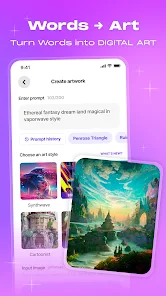
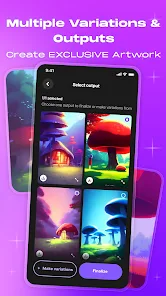
WOMBO Dream is one of those AI art generator apps that's been around for a few years now, made by Wombo Studios Inc. You basically type in a text prompt, pick an art style like fantasy art, anime, or steampunk, and the AI spits out a generated image within seconds. It's available for free on both Google Play and the App Store, with over 10 million downloads, and you can jump right in without needing to create an account right away. The first time you open it, the main screen is pretty straightforward—a text bar at the bottom and a grid of popular creations showing off what the app can do. It feels less overwhelming than some other generative apps I've tried, which is nice when you just want to mess around without reading a tutorial first.
After you start using it, the workflow is surprisingly smooth. You type your prompt, maybe add a few negative keywords if you want to exclude something, and then choose from a bunch of preset styles. The app processes the image in about ten to fifteen seconds, which feels fast enough to keep the creative flow going. I noticed that the free version lets you generate a decent number of images per day without hitting a paywall, and there's a small daily bonus if you watch an optional ad. The layout is simple—your gallery, the prompt bar, and a feed of trending designs from other users. One thing I found helpful is that you can tweak the same prompt with different styles to see how the AI interprets each one, which is basically the main way you explore the app. There's no heavy onboarding, just a quick tip about prompt length, so it feels more like a toy than a complicated tool.
After using it for a couple of weeks, I think WOMBO Dream is best for people who want quick, stylized artwork without any learning curve. Someone who just wants to generate a cool fantasy character portrait or a trippy background for their phone wallpaper will get a lot of mileage out of this app. But if you're after something more photo-realistic or need fine control over composition, you'd probably prefer apps like Midjourney or Leonardo AI, even though they require more time to master. What makes WOMBO Dream stand out is how accessible it feels—you don't need to understand complex prompts or parameters to get something visually interesting. That said, the free tier does limit your daily generations, and the resolution isn't as sharp as some paid alternatives, which might make you uninstall it if you're a serious digital artist. Still, for casual fun and inspiration, it's hard to beat the speed and simplicity.
features
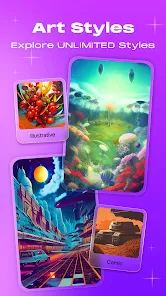
- 🎨 Style variety: WOMBO Dream offers over 50 preset art styles like comic book, oil painting, and neon punk. Compared to Dream by Wombo (the older version), the style selection here feels more polished and consistent. For example, the "Fantasy Art" style gives results that actually look like a digital painting, whereas the older app sometimes mixed styles randomly.
- ⚡ Generation speed: It cranks out an image in roughly 10–15 seconds, which is noticeably faster than apps like StarryAI or Wonder AI, where you might wait 30 seconds to a minute. This speed makes it better for rapid brainstorming or just killing time playing with prompts.
- 🎲 Prompt refinement tools: You can add or subtract keywords and view a history of your prompts with their results. This is a small but handy feature that isn't as straightforward in apps like PixelDream, where you have to manually remember what you typed earlier. The re-roll button also works well without resetting your chosen style.
pros
- ✅ No account needed to start: You can generate images immediately without signing up, which is more convenient than Midjourney where you need a Discord account. This lowers the barrier for newcomers who just want to try AI art.
- ✅ Generous free tier: You get around 10–15 free daily generations without ads forced on you. In comparison, NightCafe limits free users to 5 credits per day, making Dream feel more generous for casual tinkering.
- ✅ Clean interface: The app avoids clutter. Unlike DreamStudio, which throws sliders and CFG scales at you right away, WOMBO Dream keeps everything minimal, so you're never overwhelmed by technical settings.
cons
- ❌ Lower output resolution: The generated images are around 1024x1024 pixels, which falls short compared to Stable Diffusion or Midjourney's native resolution. Enlarging images in WOMBO Dream often leads to blurry results.
- ❌ Limited creative control: There's no option to set a negative prompt properly or adjust guidance scale. Apps like Leonardo AI let you fine-tune this, giving you more say in the final output beyond just choosing a style.
- ❌ Inconsistent style adherence: Some styles, particularly the detailed ones like "Architecture" or "Steampunk," don't always follow the prompt closely. The app sometimes prioritizes stylization over following the text, which can be frustrating if you have a specific vision in mind.
Articles
![]()
Guide
How to Update Google Play Store on Android 2026
![]()
Guide
How to Download Older Versions of Android Apps
![]()
Guide
How to Download Apps Without Google Play Store
![]()
Guide
What Is an APK File for Android?
If you use an Android phone, you may have seen the term APK while searching for apps or games online. Some websites offer an APK download instead of a Google Play install button. Some users also mention APK files when talking about apps that are not available in their region, older app versions, or Android games downloaded outside the Play Store.
![]()
Guide
How to Install Games from Google Play for Beginners
Installing games on an Android phone is usually simple, but for beginners, the process can still feel confusing at first. You may not know where to search, which button to tap, whether the game is safe, or why Google Play sometimes asks for account settings, storage access, or payment information. If you are using an Android phone for the first time, learning how to install games from Google Play is one of the easiest ways to get started.
![]()
Guide
How Useful Gemini Is for Everyday Questions and Quick Tasks
emini feels different from many AI apps because it is not only trying to be a chatbot. After using it for everyday questions, quick writing, image understanding, and planning, I think its biggest strength is convenience.
![]()
Guide
What to Know Before Downloading APKs
For many Android users, downloading an APK is a common way to install apps and games. Sometimes an app is not available in a certain country.
![]()
Guide
ChatGPT Review: Is It Still the Best AI App in 2026?
![]()
Guide
Seedance 2.0 vs Sora: The Future of AI Video Generation
The AI video race has intensified dramatically over the past two years. Platforms like Sora from OpenAI and Luma Dream Machine pushed the boundaries of text-to-video realism. Yet, despite their impressive outputs, most tools still operate as probabilistic generators—you describe a scene, and the model interprets it. Control remains limited. With the February 2026 release of Seedance 2.0, developed by ByteDance, the paradigm shifted. Internally known as Jimeng 2.0, Seedance does not position itself as just another video model. It positions itself as an AI Director. Rather than guessing what you want, Seedance 2.0 allows you to direct what happens. This distinction defines everything that follows.









Recommended Apps
![]()
Home Design 3D
Anuman4.2
![]()
Truth or Dare Game - Party App
Chouic4.8
![]()
Photo Collage Maker
Scoompa4.7![]()
Learn to Draw Flower
Creative APPS4.2![]()
FIFA World Cup 2026™
FIFA2.8![]()
Mirror Plus: Mirror with Light
Digitalchemy, LLC4.4![]()
Meitu- Photo Editor & AI Art
Meitu (China) Limited4.5![]()
Perplexity - Ask Anything
PerplexityAI4.7![]()
GhostTube SLS Camera Alternate
GhostTube4![]()
Boom Chip Blast: 2-Player
Black Pyramid 3D Games Studio0![]()
Healthy Benefits+
Solutran, Inc.4.5![]()
Deepcheck AI Search Assistant
rohe.ai4![]()
Idol Prank Video Call & Chat
LightCode Solutions4![]()
Face Shape - Pretty Scale
GlintTec Apps3.9![]()
Plant App - Plant Identifier
ScaleUp4.6












































