
Photo Effects, Photo Editor

10M+
Installs
Lyrebird Studio
Developer
-
Video Players & Editors
Category
-
Rated for 3+
Content Rating
-
lyrebirdstudio@gmail.com
Developer Email
-
https://lyrebirdstudio.net/privacy_policy.htm
Privacy Policy
Screenshots
editor reviews
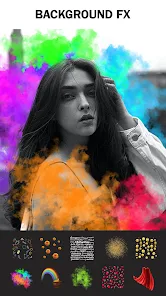
I've been messing around with Photo Effects, a photo editing app from Lyrebird Studio. It's basically one of those all-in-one editors that tries to cover everything from basic tweaks to artistic filters, aiming at casual phone photographers who want quick results. I downloaded it from the Google Play Store, where it sits at over 10 million installs. The app itself is free to download and use, but there are in-app purchases and occasional ads that pop up, which is pretty standard for this type of tool. The first impression after launching it is colorful and a bit crowded, honestly. The layout throws a lot of options at you immediately, which can feel a bit overwhelming if you just wanted to crop a photo quickly.
After using it for a few days, the real experience starts to settle in. The app guides you straight to picking a photo from your gallery, which is straightforward enough. From there, you're faced with a tool bar at the bottom that has tabs for effects, adjustments, and stickers. The main workflow is pretty standard: select an effect, adjust the intensity with a slider, apply, and save. What stood out to me was the sheer variety of filters. They've got everything from retro film looks to glitchy, double-exposure styles. Some of the more complex effects, like the ones that try to simulate double exposure, can be a bit fiddly and require some trial and error to get right. A practical tip I found helpful was to use the undo button often, because it's easy to accidentally apply an effect twice. The interface isn't always the smoothest; sometimes there's a slight lag after applying a heavy filter, but it never crashed on me.
After spending a good amount of time with Photo Effects, I've come to a clear judgment. This is definitely an app for people who enjoy experimenting and don't mind sifting through a lot of options to find a look they like. It's less suited for someone who just needs quick, professional-looking edits without the fuss. Compared to something like Snapseed, which feels more like a precision tool, Photo Effects feels more like a toy box for creative play. I think it stands out from other quirky editors, like PicsArt, by keeping its focus more on photographic effects rather than full-on graphic design. The reason someone might keep it installed is for those occasional moments when you want to give a photo a unique, artistic twist. The reason someone might uninstall it is simply that the interface feels cluttered, and for everyday edits, a simpler app is just faster.
features
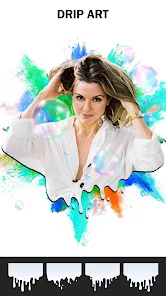
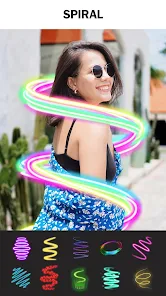
- 💡 The app shines with its massive collection of photo effects. There are dozens of categories, from vintage and film looks to more modern glitch and pop art styles. Each effect often has multiple intensity levels and secondary controls, like adjusting grain or fade, which gives a lot of creative room. In contrast, an app like Lightroom Mobile focuses on precise color grading and is less about pre-built, quirky effect stacks.
- 💡 The double exposure and blending feature is a standout tool. It allows you to overlay two photos and blend them using different modes like Multiply or Screen, then adjust opacity and position. While other apps like PicsArt also do this, Photo Effects offers more preset blend combinations that give a quick, often surprising result, making it easier for a beginner to get a complex look without manual adjustment.
- 💡 The app offers an in-built collage maker that integrates with the effects. You can create a multi-photo grid and then apply a unified effect to the entire collage. This is a time-saver when you want a consistent look for a set of images for social media. Most standalone collage apps don't offer this kind of deep effect integration.
pros
- ✅ The app is completely free to download and use. Unlike many editors that lock basic features behind a paywall, Photo Effects lets you experiment with almost all of its effects at no cost. You'll see ads, but you aren't forced to pay to see what each filter does, which is a huge plus compared to apps like Afterlight.
- ✅ The sheer variety of effects is a strength. If you get bored with one look, there are dozens of others to try. This encourages more creative experimentation than an app like Snapseed, which offers fewer but more powerful editing controls.
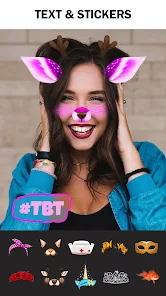
- ✅ There's a built-in photo sticker and text tool. This is useful for adding a personal touch or making memes, which is a feature absent from more serious editors like VSCO. It turns the app into a more versatile tool for social media content.
cons
- ❌ The interface often feels cluttered and slow. Navigating through the many effect categories is not smooth, and the app can lag for a second after applying heavy effects. This is noticeably less polished than the fluid experience in an app like Adobe Lightroom.
- ❌ Many basic adjustment tools are lacking. While the effects are plentiful, the standard editing sliders for exposure, contrast, and white balance feel limited and less precise. For fine-tuning a photo, you're still better off with a dedicated app like Snapseed.
- ❌ The sheer number of low-quality or gimmicky effects is a problem. For every genuinely cool filter, there are several that look tacky or overprocessed. Apps like VSCO are more curated and consistently produce high-quality looks, making it easier to find something that works.
- ❌ The ads can be intrusive and disrupt the editing flow. While the app is free, the frequency and placement of ads are annoying compared to the experience in free versions of apps like Pixlr or Canva, which often handle ads more subtly.
Articles
![]()
Guide
How to Update Google Play Store on Android 2026
![]()
Guide
How to Download Older Versions of Android Apps
![]()
Guide
How to Download Apps Without Google Play Store
![]()
Guide
What Is an APK File for Android?
If you use an Android phone, you may have seen the term APK while searching for apps or games online. Some websites offer an APK download instead of a Google Play install button. Some users also mention APK files when talking about apps that are not available in their region, older app versions, or Android games downloaded outside the Play Store.
![]()
Guide
How to Install Games from Google Play for Beginners
Installing games on an Android phone is usually simple, but for beginners, the process can still feel confusing at first. You may not know where to search, which button to tap, whether the game is safe, or why Google Play sometimes asks for account settings, storage access, or payment information. If you are using an Android phone for the first time, learning how to install games from Google Play is one of the easiest ways to get started.
![]()
Guide
How Useful Gemini Is for Everyday Questions and Quick Tasks
emini feels different from many AI apps because it is not only trying to be a chatbot. After using it for everyday questions, quick writing, image understanding, and planning, I think its biggest strength is convenience.
![]()
Guide
What to Know Before Downloading APKs
For many Android users, downloading an APK is a common way to install apps and games. Sometimes an app is not available in a certain country.
![]()
Guide
ChatGPT Review: Is It Still the Best AI App in 2026?
![]()
Guide
Seedance 2.0 vs Sora: The Future of AI Video Generation
The AI video race has intensified dramatically over the past two years. Platforms like Sora from OpenAI and Luma Dream Machine pushed the boundaries of text-to-video realism. Yet, despite their impressive outputs, most tools still operate as probabilistic generators—you describe a scene, and the model interprets it. Control remains limited. With the February 2026 release of Seedance 2.0, developed by ByteDance, the paradigm shifted. Internally known as Jimeng 2.0, Seedance does not position itself as just another video model. It positions itself as an AI Director. Rather than guessing what you want, Seedance 2.0 allows you to direct what happens. This distinction defines everything that follows.









Recommended Apps
![]()
Home Design 3D
Anuman4.2
![]()
Truth or Dare Game - Party App
Chouic4.8
![]()
Photo Collage Maker
Scoompa4.7![]()
Learn to Draw Flower
Creative APPS4.2![]()
FIFA World Cup 2026™
FIFA2.8![]()
Mirror Plus: Mirror with Light
Digitalchemy, LLC4.4![]()
Meitu- Photo Editor & AI Art
Meitu (China) Limited4.5![]()
Perplexity - Ask Anything
PerplexityAI4.7![]()
GhostTube SLS Camera Alternate
GhostTube4![]()
Boom Chip Blast: 2-Player
Black Pyramid 3D Games Studio0![]()
Healthy Benefits+
Solutran, Inc.4.5![]()
Deepcheck AI Search Assistant
rohe.ai4![]()
Idol Prank Video Call & Chat
LightCode Solutions4![]()
Face Shape - Pretty Scale
GlintTec Apps3.9![]()
Plant App - Plant Identifier
ScaleUp4.6












































