
ToonArt: Cartoon Yourself

10M+
Installs
Lyrebird Studio
Developer
-
Video Players & Editors
Category
-
Rated for 3+
Content Rating
-
lyrebirdstudio@gmail.com
Developer Email
-
https://lyrebirdstudio.net/privacy_policy.htm
Privacy Policy
Screenshots
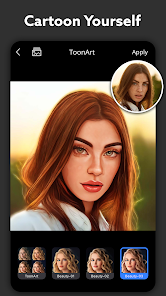
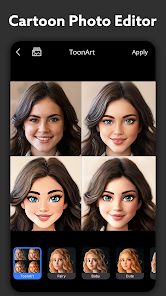
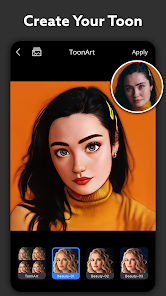
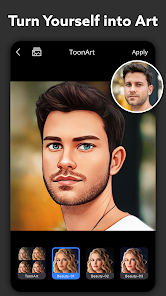
editor reviews
ToonArt is a photo editing app that turns your regular pictures into cartoon-style portraits, stickers, and caricatures. It belongs to the popular AI art generator and photo filter category, so if you've played with apps like FaceApp or Prisma before, the idea is pretty familiar. People usually download this kind of app when they want a quick, fun way to make a profile picture, send a silly version of themselves to friends, or create custom stickers for messaging apps. The first time you open ToonArt, you're greeted with a colorful, busy interface full of template options, trending edits, and a "cartoon yourself" button front and center. It feels like stepping into a candy store for filters — a bit overwhelming at first, but exciting if you just want to see what your face looks like as a Disney character or a comic book hero. The app is free to download from Google Play and the App Store, and has racked up over 50 million installs on Android alone, which shows it's no niche experiment.
Once you actually start using ToonArt, the experience is fairly straightforward. You either take a fresh photo or pick one from your gallery, and then the app automatically detects your face and applies the selected cartoon style. There's a whole library of effects — 3D cartoon, hand-drawn sketch, oil painting, anime, you name it. What I found smooth was the preview system: you can tap different styles without waiting forever for each one to load. But not everything is instant. Some of the more detailed caricature effects take a good 10 to 15 seconds to process, and during that time you're staring at a loading spinner. The editing tools after the filter are basic but useful — you can adjust brightness, contrast, crop, add text, or throw in stickers. A small practical tip: if you want a cleaner result, make sure your original photo has even lighting and your face is centered. The app really struggles with group photos or side profiles, and you'll often end up with a deformed ear or a missing eye.
After spending a few weeks with ToonArt, I think it's best for people who love sharing themed content on social media — TikTok stars, Instagram story addicts, or anyone who gets a kick out of cartoon avatars. But if you're looking for precise, professional-grade portrait editing, this isn't it. The cartoon effects are fun but they're one-trick ponies; you can't fine-tune the AI's output, and the app pushes its premium subscription hard through pop-ups and watermarked exports. Compared to something like Meitu or Remini, ToonArt leans more toward playful, exaggerated art styles rather than realistic enhancement. It's the kind of app you keep installed because once in a while you want to turn a boring selfie into a comic panel — but you'll probably forget about it for weeks between uses.
features
- 🎨 One-tap cartoon conversion — ToonArt's standout feature is how quickly it reads your face and applies a cartoon style. Compared to Cartoonify or MomentCam, ToonArt offers more variety right out of the gate, with over 300 effects spanning anime, 3D, sketch, and caricature. You don't need to manually adjust parameters; the AI handles it all.
- 🎨 Real-time style preview — Unlike some apps that force you to generate and then undo, ToonArt lets you tap through styles and see the result on your actual photo within seconds. This makes browsing feel less like a chore and more like flipping through a lookbook.
- 🎨 Sticker and background maker — Beyond just cartooning faces, ToonArt lets you cut out your cartoon portrait as a sticker or replace the background with patterns. This is something ToonMe doesn't offer natively, so it's a nice bonus for chat app users.
- 🎨 Regular trending templates — The app updates its "trending" section frequently with pop culture-themed filters, like turning yourself into a character from a viral movie or game. This keeps the app feeling fresh even after you've tried everything once.
pros
- ✅ Huge variety of styles — ToonArt gives you more cartoon filter options than most competitors. Where Prisma focuses on artistic oil paintings and FaceApp leans on aging or gender swaps, ToonArt specializes in playful, exaggerated looks that feel like they belong in a comic book or anime.
- ✅ User-friendly onboarding — The app doesn't bombard you with a tutorial. You open it, choose a photo, and you're already editing. This lowers the barrier for casual users who just want a quick result without reading instructions.
- ✅ Active community sharing — ToonArt has an in-app gallery where users share their edits. It's not just a novelty; you can actually get inspired by what others created with the same filters, which keeps you experimenting longer.
cons
- ❌ Heavy watermark on free exports — Every image you save without a subscription gets plastered with a large ToonArt logo. Compare this to Meitu, which offers a smaller, less intrusive mark on free outputs. It makes sharing feel awkward unless you pay up.
- ❌ Slow processing on complex photos — Group shots, side angles, or faces with glasses often result in distorted outputs. The app's AI clearly prefers straight-on, single-face portraits. Apps like Remini handle challenging inputs much more gracefully.
- ❌ Aggressive premium nagging — You'll see upgrade pop-ups after nearly every action, and some of the best filters are locked behind the paywall. It's tolerable but annoying, especially when ToonMe offers a simpler free experience with fewer interruptions.
Articles
![]()
Guide
How to Update Google Play Store on Android 2026
![]()
Guide
How to Download Older Versions of Android Apps
![]()
Guide
How to Download Apps Without Google Play Store
![]()
Guide
What Is an APK File for Android?
If you use an Android phone, you may have seen the term APK while searching for apps or games online. Some websites offer an APK download instead of a Google Play install button. Some users also mention APK files when talking about apps that are not available in their region, older app versions, or Android games downloaded outside the Play Store.
![]()
Guide
How to Install Games from Google Play for Beginners
Installing games on an Android phone is usually simple, but for beginners, the process can still feel confusing at first. You may not know where to search, which button to tap, whether the game is safe, or why Google Play sometimes asks for account settings, storage access, or payment information. If you are using an Android phone for the first time, learning how to install games from Google Play is one of the easiest ways to get started.
![]()
Guide
How Useful Gemini Is for Everyday Questions and Quick Tasks
emini feels different from many AI apps because it is not only trying to be a chatbot. After using it for everyday questions, quick writing, image understanding, and planning, I think its biggest strength is convenience.
![]()
Guide
What to Know Before Downloading APKs
For many Android users, downloading an APK is a common way to install apps and games. Sometimes an app is not available in a certain country.
![]()
Guide
ChatGPT Review: Is It Still the Best AI App in 2026?
![]()
Guide
Seedance 2.0 vs Sora: The Future of AI Video Generation
The AI video race has intensified dramatically over the past two years. Platforms like Sora from OpenAI and Luma Dream Machine pushed the boundaries of text-to-video realism. Yet, despite their impressive outputs, most tools still operate as probabilistic generators—you describe a scene, and the model interprets it. Control remains limited. With the February 2026 release of Seedance 2.0, developed by ByteDance, the paradigm shifted. Internally known as Jimeng 2.0, Seedance does not position itself as just another video model. It positions itself as an AI Director. Rather than guessing what you want, Seedance 2.0 allows you to direct what happens. This distinction defines everything that follows.









Recommended Apps
![]()
Home Design 3D
Anuman4.2
![]()
Truth or Dare Game - Party App
Chouic4.8
![]()
Photo Collage Maker
Scoompa4.7![]()
Learn to Draw Flower
Creative APPS4.2![]()
FIFA World Cup 2026™
FIFA2.8![]()
Mirror Plus: Mirror with Light
Digitalchemy, LLC4.4![]()
Meitu- Photo Editor & AI Art
Meitu (China) Limited4.5![]()
Perplexity - Ask Anything
PerplexityAI4.7![]()
GhostTube SLS Camera Alternate
GhostTube4![]()
Boom Chip Blast: 2-Player
Black Pyramid 3D Games Studio0![]()
Healthy Benefits+
Solutran, Inc.4.5![]()
Deepcheck AI Search Assistant
rohe.ai4![]()
Idol Prank Video Call & Chat
LightCode Solutions4![]()
Face Shape - Pretty Scale
GlintTec Apps3.9![]()
Plant App - Plant Identifier
ScaleUp4.6












































