

Magnifier Plus with Flashlight

10M+
Installs
Digitalchemy, LLC
Developer
-
Video Players & Editors
Category
-
Rated for 3+
Content Rating
-
magnifierplus@digitalchemy.us
Developer Email
-
https://www.digitalchemy.us/magnifier-plus/privacy-policy
Privacy Policy
Screenshots
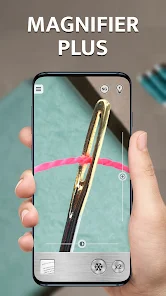
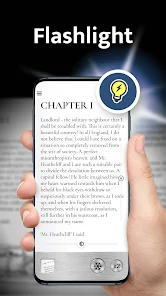
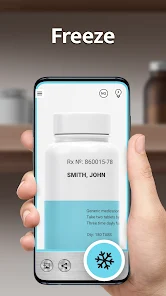
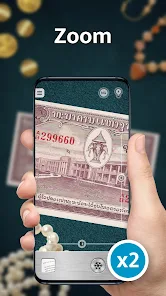
editor reviews
Magnifier Plus with Flashlight is a utility app that essentially turns your phone into a magnifying glass and a flashlight combined. It's the kind of tool you download not because you plan to use it every day, but because when you need it, nothing else really works. I grabbed it from Google Play after struggling to read the tiny expiration date on a jar of sauce. The install count seems healthy, and it's free, which is always a plus for a quick-fix app. My first impression after launching it was honestly surprise—the interface is surprisingly clean and minimal, with a simple slider for zoom and a big button for the flashlight. No clutter, no weird permissions asking for my contacts, just a camera view and a light toggle. It felt very much like a tool, not a full-blown application, which is exactly what I wanted.
Once I actually started using it, the experience was smooth and intuitive. You open the app, and the camera is already running, showing you whatever you're pointing at. The zoom slider is at the bottom, and you just drag it up to about 8x before things get a bit blurry, but for reading small print on medicine bottles or serial numbers on electronics, it's more than enough. The flashlight button sits right next to the zoom, so in low light, I could just tap it on without hunting for a separate setting. A small practical tip I picked up: if you tap the screen to focus and then use the flashlight, the image sharpens noticeably. The only slightly confusing moment was the first time I tried to take a screenshot—there's no built-in snapshot button, which feels like a missed opportunity. But for daily use, like checking a splinter or reading a map legend, it works fast and without fuss.
After using Magnifier Plus with Flashlight for a few weeks, I have a mixed but mostly positive feeling about it. It's perfect for older users, hobbyists like model builders or stamp collectors, or anyone who regularly wrestles with fine print. For a younger, more casual user, it might seem redundant since most phone cameras already have decent zoom. What sets it apart from similar apps, like Magnifier Camera or Simple Magnifier, is the integrated flashlight that's actually well-calibrated—it doesn't wash out the image or create harsh shadows. I can see myself keeping it installed because it takes up almost no space and solves a specific problem instantly. But I can also imagine uninstalling it if a future phone update adds a native magnifier feature. It's not a flashy app, but for a free tool, it's surprisingly reliable and well-designed.
features
- 🔦 The dual-function flashlight and magnifier is the standout feature. While most magnifier apps rely on ambient light, Magnifier Plus with Flashlight integrates a bright LED that doesn't just light up the area—it's placed intelligently so you don't get a glare on what you're trying to read. Compared to an app like Magnifier Camera, which often leaves you fumbling with your phone's native flashlight separately, this one just works in one tap.
- 🔦 The simple, non-intrusive interface is a hidden strength. There's no ads blocking the view, no awkward tutorials, and no permissions beyond the camera. Apps like Magnifying Glass often shove subscription prompts in your face before you even get to the zoom. Magnifier Plus with Flashlight feels like a tool that respects your time—open, use, close. That matters when you're in a hurry.
- 🔦 The zoom stability at mid-levels (2x-6x) is surprisingly solid. I've tried others like Simple Magnifier where the image jitters too much to focus. This app holds the image steady even on a shaky hand, likely because the app doesn't try to push digital zoom too far. It's the difference between a magnifier that works and one that just frustrates you further.
pros
- 🌐 Completely free with no ads—unlike Magnifier Camera or Magnifying Glass that often pop up banners or ask for ratings after each use. This app stays out of your way, which is huge for a utility tool.
- 🌐 The flashlight integration feels native. In many similar apps, the flashlight is just a toggle for your phone's rear light, but here it's tuned to provide even illumination without hot spots. It's a small but noticeable difference when reading glossy labels or curved surfaces.
- 🌐 Zero learning curve. Compared to apps like SuperVision Magnifier that offer multiple color filters and contrast sliders (which can overwhelm you), Magnifier Plus with Flashlight just gives you zoom and light. Sometimes less really is more.
cons
- 🛑 No screenshot or freeze-frame function. If you find a tiny serial number, you can't capture it for later reference. Apps like Magnifier Camera let you snap a photo, which is super handy.
- 🛑 Limited zoom range—tops out around 8x before turning blurry. For serious detail work like coin inspection or tiny electronics, something like SuperVision Magnifier with its 30x+ zoom is far more capable.
- 🛑 No focus lock or manual controls. In bright conditions it adjusts decently, but in mixed lighting, the autofocus hunts around a bit. Apps like Magnifier HD offer tap-to-lock and even exposure adjustments, which would be nice here.
- 🛑 No grid or ruler feature. For hobbyists measuring tiny parts, this app is just a magnifier and nothing else. Apps like Simple Magnifier include basic measurement tools that make it more versatile.
Articles
![]()
Guide
How to Update Google Play Store on Android 2026
![]()
Guide
How to Download Older Versions of Android Apps
![]()
Guide
How to Download Apps Without Google Play Store
![]()
Guide
What Is an APK File for Android?
If you use an Android phone, you may have seen the term APK while searching for apps or games online. Some websites offer an APK download instead of a Google Play install button. Some users also mention APK files when talking about apps that are not available in their region, older app versions, or Android games downloaded outside the Play Store.
![]()
Guide
How to Install Games from Google Play for Beginners
Installing games on an Android phone is usually simple, but for beginners, the process can still feel confusing at first. You may not know where to search, which button to tap, whether the game is safe, or why Google Play sometimes asks for account settings, storage access, or payment information. If you are using an Android phone for the first time, learning how to install games from Google Play is one of the easiest ways to get started.
![]()
Guide
How Useful Gemini Is for Everyday Questions and Quick Tasks
emini feels different from many AI apps because it is not only trying to be a chatbot. After using it for everyday questions, quick writing, image understanding, and planning, I think its biggest strength is convenience.
![]()
Guide
What to Know Before Downloading APKs
For many Android users, downloading an APK is a common way to install apps and games. Sometimes an app is not available in a certain country.
![]()
Guide
ChatGPT Review: Is It Still the Best AI App in 2026?
![]()
Guide
Seedance 2.0 vs Sora: The Future of AI Video Generation
The AI video race has intensified dramatically over the past two years. Platforms like Sora from OpenAI and Luma Dream Machine pushed the boundaries of text-to-video realism. Yet, despite their impressive outputs, most tools still operate as probabilistic generators—you describe a scene, and the model interprets it. Control remains limited. With the February 2026 release of Seedance 2.0, developed by ByteDance, the paradigm shifted. Internally known as Jimeng 2.0, Seedance does not position itself as just another video model. It positions itself as an AI Director. Rather than guessing what you want, Seedance 2.0 allows you to direct what happens. This distinction defines everything that follows.









Recommended Apps
![]()
Home Design 3D
Anuman4.2
![]()
Truth or Dare Game - Party App
Chouic4.8
![]()
Photo Collage Maker
Scoompa4.7![]()
Learn to Draw Flower
Creative APPS4.2![]()
FIFA World Cup 2026™
FIFA2.8![]()
Mirror Plus: Mirror with Light
Digitalchemy, LLC4.4![]()
Meitu- Photo Editor & AI Art
Meitu (China) Limited4.5![]()
Perplexity - Ask Anything
PerplexityAI4.7![]()
GhostTube SLS Camera Alternate
GhostTube4![]()
Boom Chip Blast: 2-Player
Black Pyramid 3D Games Studio0![]()
Healthy Benefits+
Solutran, Inc.4.5![]()
Deepcheck AI Search Assistant
rohe.ai4![]()
Idol Prank Video Call & Chat
LightCode Solutions4![]()
Face Shape - Pretty Scale
GlintTec Apps3.9![]()
Plant App - Plant Identifier
ScaleUp4.6












































