
Face Changer 2

10M+
Installs
Scoompa
Developer
-
Video Players & Editors
Category
-
Rated for 3+
Content Rating
-
contact+fc2@scoompa.com
Developer Email
-
https://docs.google.com/document/d/1-10tckt_YRWuRjuUMeLfxLPrwauzGOhfz2_038S1pU4/edit?usp=sharing
Privacy Policy
Screenshots

editor reviews
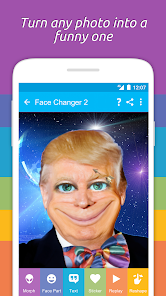
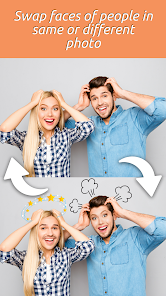
Face Changer 2 is a playful photo editing tool from Scoompa that falls squarely into the entertainment and novelty app category. You basically snap a selfie or pick a photo from your gallery, and the app swaps your face onto pre-made templates or celebrity bodies. It's the kind of thing you'd download on a lazy Sunday to mess around with friends or create weird profile pictures for group chats. On Google Play, it's been installed over 10 million times and is free to download, though you'll run into ads between edits. The first impression after launching is pretty straightforward — you're hit with a grid of wacky templates, and the interface doesn't try to be anything more than a quick fun tool. No lengthy registration or tutorial, which honestly feels refreshing if you just want to jump in.
Diving into actual use, the experience is a bit of a mixed bag. You pick a template — say, a muscular body or a historical figure — then snap or upload a face. The face detection usually works fine in good lighting, but things get wonky if you have glasses or an angled shot. After the swap, you can tweak things like skin tone blending or resize the face to fit better, but the controls are basic sliders that don't always give precise results. The app's main flow is template selection, face capture, adjustment, then save or share. One thing I noticed is that the undo button is hidden behind a long press, which took me a few accidental saves to figure out. For casual use, it's smooth enough, but if you're expecting polished edge detection like you'd see in more advanced editing apps, you'll be let down.
After using it for a while, I think Face Changer 2 is best for people who want a quick laugh without overthinking things. It's not something you'd use for serious photo editing, and the novelty wears off after maybe 20 minutes. Compared to apps like Reface or FaceApp, this one feels more limited — those apps offer video face swaps or aging filters, while this just sticks to static image templates. The ads are persistent, popping up after every single swap, which gets annoying fast and made me consider uninstalling it more than once. Still, for a free app that doesn't ask for your email or bombard you with subscriptions, it's a decent time-waster. I'd keep it installed if I were planning a group game night where everyone makes silly edits, but otherwise it's easy to forget about once the initial giggles fade.
features
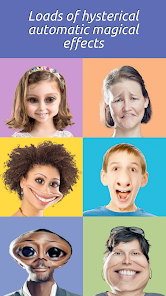
- 🤡 Face Changer 2's core hook is its massive library of over 100 templates, from movie characters to memes. Compared to Reface, which focuses more on video and GIF swaps, this app keeps it simple with static images. The variety is solid for casual fun, but the templates aren't updated often, unlike Reface's weekly drops.
- 🤡 The face blend tool lets you adjust skin tone matching, which is a step up from older apps like Face Swap Live. It's not perfect — sometimes the color picker feels off — but it helps the swapped face look slightly less like a sticker slapped on. For a free app, that's a nice touch.
- 🤡 Face Changer 2's standout is its no-nonsense offline mode. You can swap faces without internet once the templates are downloaded, unlike FaceApp which needs a connection for most filters. That makes it handy during commutes or flights when you're bored and data is limited.
pros
- 🙌 The app is completely free with no forced subscriptions, unlike FaceApp which locks cool filters behind a paywall. You just deal with ads, which is fair.
- 🙌 Face detection works fast, even on mid-range phones. I tested it on a budget Android, and swaps took under two seconds, which beats Reface's longer rendering times.
- 🙌 No account creation needed. You open the app, use it, and leave — no spam emails or data tracking fears. Compared to PicsArt, which nags you to sign up, this feels liberating.
cons
- 😤 Ads are relentless — a full-screen popup after every single swap. Reface and FaceApp show fewer ads and offer ad-free paid versions, but Face Changer 2 doesn't even have an option to pay for removal.
- 😤 The template quality is hit or miss. Some are high-res, but others look pixelated and blurry, like low-effort JPEG crops. Reface's templates are generally sharper and better curated.
- 😤 No video support whatsoever. If you want to swap faces in a short clip, you're out of luck. Apps like Doublicat (Reface) let you do that in seconds, making Face Changer 2 feel outdated.
- 😤 The undo button is poorly designed — long press is not intuitive. I've lost several good edits because I tapped instead of holding, and there's no confirmation dialog to stop accidental saves.
Articles
![]()
Guide
How to Update Google Play Store on Android 2026
![]()
Guide
How to Download Older Versions of Android Apps
![]()
Guide
How to Download Apps Without Google Play Store
![]()
Guide
What Is an APK File for Android?
If you use an Android phone, you may have seen the term APK while searching for apps or games online. Some websites offer an APK download instead of a Google Play install button. Some users also mention APK files when talking about apps that are not available in their region, older app versions, or Android games downloaded outside the Play Store.
![]()
Guide
How to Install Games from Google Play for Beginners
Installing games on an Android phone is usually simple, but for beginners, the process can still feel confusing at first. You may not know where to search, which button to tap, whether the game is safe, or why Google Play sometimes asks for account settings, storage access, or payment information. If you are using an Android phone for the first time, learning how to install games from Google Play is one of the easiest ways to get started.
![]()
Guide
How Useful Gemini Is for Everyday Questions and Quick Tasks
emini feels different from many AI apps because it is not only trying to be a chatbot. After using it for everyday questions, quick writing, image understanding, and planning, I think its biggest strength is convenience.
![]()
Guide
What to Know Before Downloading APKs
For many Android users, downloading an APK is a common way to install apps and games. Sometimes an app is not available in a certain country.
![]()
Guide
ChatGPT Review: Is It Still the Best AI App in 2026?
![]()
Guide
Seedance 2.0 vs Sora: The Future of AI Video Generation
The AI video race has intensified dramatically over the past two years. Platforms like Sora from OpenAI and Luma Dream Machine pushed the boundaries of text-to-video realism. Yet, despite their impressive outputs, most tools still operate as probabilistic generators—you describe a scene, and the model interprets it. Control remains limited. With the February 2026 release of Seedance 2.0, developed by ByteDance, the paradigm shifted. Internally known as Jimeng 2.0, Seedance does not position itself as just another video model. It positions itself as an AI Director. Rather than guessing what you want, Seedance 2.0 allows you to direct what happens. This distinction defines everything that follows.









Recommended Apps
![]()
Home Design 3D
Anuman4.2
![]()
Truth or Dare Game - Party App
Chouic4.8
![]()
Photo Collage Maker
Scoompa4.7![]()
Learn to Draw Flower
Creative APPS4.2![]()
FIFA World Cup 2026™
FIFA2.8![]()
Mirror Plus: Mirror with Light
Digitalchemy, LLC4.4![]()
Meitu- Photo Editor & AI Art
Meitu (China) Limited4.5![]()
Perplexity - Ask Anything
PerplexityAI4.7![]()
GhostTube SLS Camera Alternate
GhostTube4![]()
Boom Chip Blast: 2-Player
Black Pyramid 3D Games Studio0![]()
Healthy Benefits+
Solutran, Inc.4.5![]()
Deepcheck AI Search Assistant
rohe.ai4![]()
Idol Prank Video Call & Chat
LightCode Solutions4![]()
Face Shape - Pretty Scale
GlintTec Apps3.9![]()
Plant App - Plant Identifier
ScaleUp4.6











































