
Skin Editor 3D for Minecraft

10M+
Installs
Remoro Studios
Developer
-
Productivity
Category
-
Rated for 3+
Content Rating
-
remoro.studios@gmail.com
Developer Email
-
http://remoro-studios.com/privacy_policy
Privacy Policy
Screenshots
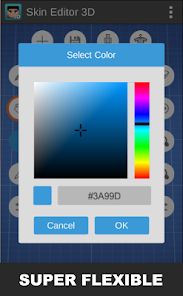
editor reviews
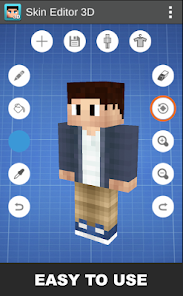
You know how everyone wants their Minecraft character to stand out? That's exactly why I grabbed Skin Editor 3D for Minecraft from the Google Play Store. It's a utility app, not a game itself, but a tool for designing and editing your own player skins right on your phone. After a quick install and launch—no registration needed, just a free download with some optional ads—I was pretty impressed. The very first screen gives you a 3D model of Steve, and you can start painting on him immediately. It's got a clean, modern look that doesn't feel cluttered, which is rare for a free app in this niche. The install count is decent for an indie tool, and while there are in-app purchases for extra presets, you can do plenty without spending a cent.
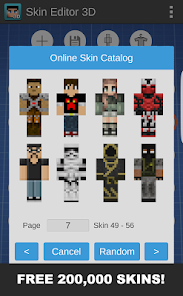
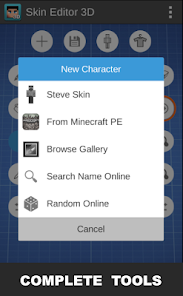
Using this editor is actually kind of fun. After the initial launch, you're dropped onto a rotating 3D model where each body part—head, torso, arms, legs—is selectable. You pick a color from a simple palette, then tap a pixel on the model to paint it. What I found really smooth is the zoom gesture; you can pinch to really get into the small details, like eyes on the head or stripes on a sleeve. The undo button saves a lot of frustration if you mess up a pixel. A practical tip: if you want to see how your skin looks in different game situations, you can rotate the model freely or even preview a simple walking animation. The only slightly confusing moment was finding the "import" button for an existing skin—it's buried in a small menu icon, not on the main toolbar. But once you know that, daily use is straightforward: pick a part, paint, export to your Minecraft character profile.
After messing around for a week, I think this app nails it for casual skin makers. Kids who just want to add a green hat or a red cape will love how fast it is. Serious builders might prefer Novaskin or Minecraft's own editor because those offer layering and more precise controls. What makes this different is the sheer simplicity—you don't need to learn any fancy tools. I kept it installed because it's perfect for quick edits when I'm bored on the bus. That said, if you only use default skins, you don't need it. And sometimes the ads pop up right after you finish a nice design, which is a bit annoying. For five bucks, it's a solid alternative to paying for Minecraft's premium skin packs.
features
- 🎨 Real-time 3D preview – Unlike Minecraft's basic 2D skin editor, Skin Editor 3D lets you rotate the model and see how each pixel looks from every angle instantly. While Novaskin offers this on web, this app does it offline on mobile.
- 🖌️ Simple tap-to-paint system – No complicated layers or brushes. You just choose a color and tap a pixel. Compared to tools like Skinseed, which have a steeper learning curve, this feels more intuitive for kids or casual users.
- 📤 Direct export to Minecraft – You can save your skin directly to your device and upload it to your Minecraft profile in one or two steps. Other editors often require manual file management or third-party sharing apps.
- 🔄 Built-in animation preview – You can see your skin walking or jumping before you save it. This is a standout feature because most mobile editors only show a static model.
pros
- ✅ Completely free for basic use – Unlike Novaskin's premium subscription for advanced features, this app gives you solid painting tools and 3D preview without paying a cent.
- ✅ No account needed – You can start editing right after download. Other tools like Minecraft's own editor force you to log in, which is a hassle if you just want a quick skin.
- ✅ Lightweight and fast – The app takes up under 50MB and loads instantly. Compared to Blender or other 3D editors, it's designed specifically for Minecraft skins, so no bloat.
cons
- ❌ Limited color palette – You can't create custom colors easily; you're stuck with whatever presets are there. In Skinseed, you can pick any hex color you want.
- ❌ Occasional full-screen ads – After a few edits, a video ad plays that you have to wait through. Novaskin's mobile web version doesn't have this annoyance.
- ❌ No layer system – If you paint over a mistake, you lose the original pixel. More advanced tools like PMCSkin3D allow undo layers or separate design layers.
Articles
![]()
Guide
How to Update Google Play Store on Android 2026
![]()
Guide
How to Download Older Versions of Android Apps
![]()
Guide
How to Download Apps Without Google Play Store
![]()
Guide
What Is an APK File for Android?
If you use an Android phone, you may have seen the term APK while searching for apps or games online. Some websites offer an APK download instead of a Google Play install button. Some users also mention APK files when talking about apps that are not available in their region, older app versions, or Android games downloaded outside the Play Store.
![]()
Guide
How to Install Games from Google Play for Beginners
Installing games on an Android phone is usually simple, but for beginners, the process can still feel confusing at first. You may not know where to search, which button to tap, whether the game is safe, or why Google Play sometimes asks for account settings, storage access, or payment information. If you are using an Android phone for the first time, learning how to install games from Google Play is one of the easiest ways to get started.
![]()
Guide
How Useful Gemini Is for Everyday Questions and Quick Tasks
emini feels different from many AI apps because it is not only trying to be a chatbot. After using it for everyday questions, quick writing, image understanding, and planning, I think its biggest strength is convenience.
![]()
Guide
What to Know Before Downloading APKs
For many Android users, downloading an APK is a common way to install apps and games. Sometimes an app is not available in a certain country.
![]()
Guide
ChatGPT Review: Is It Still the Best AI App in 2026?
![]()
Guide
Seedance 2.0 vs Sora: The Future of AI Video Generation
The AI video race has intensified dramatically over the past two years. Platforms like Sora from OpenAI and Luma Dream Machine pushed the boundaries of text-to-video realism. Yet, despite their impressive outputs, most tools still operate as probabilistic generators—you describe a scene, and the model interprets it. Control remains limited. With the February 2026 release of Seedance 2.0, developed by ByteDance, the paradigm shifted. Internally known as Jimeng 2.0, Seedance does not position itself as just another video model. It positions itself as an AI Director. Rather than guessing what you want, Seedance 2.0 allows you to direct what happens. This distinction defines everything that follows.









Recommended Apps
![]()
Home Design 3D
Anuman4.2
![]()
Truth or Dare Game - Party App
Chouic4.8
![]()
Photo Collage Maker
Scoompa4.7![]()
Learn to Draw Flower
Creative APPS4.2![]()
FIFA World Cup 2026™
FIFA2.8![]()
Mirror Plus: Mirror with Light
Digitalchemy, LLC4.4![]()
Meitu- Photo Editor & AI Art
Meitu (China) Limited4.5![]()
Perplexity - Ask Anything
PerplexityAI4.7![]()
GhostTube SLS Camera Alternate
GhostTube4![]()
Boom Chip Blast: 2-Player
Black Pyramid 3D Games Studio0![]()
Healthy Benefits+
Solutran, Inc.4.5![]()
Deepcheck AI Search Assistant
rohe.ai4![]()
Idol Prank Video Call & Chat
LightCode Solutions4![]()
Face Shape - Pretty Scale
GlintTec Apps3.9![]()
Plant App - Plant Identifier
ScaleUp4.6











































