
Video Live Wallpaper Maker

10M+
Installs
ZipoApps
Developer
-
Productivity
Category
-
Rated for 3+
Content Rating
-
support.videowallpaper@zipoapps.com
Developer Email
-
https://zipoapps.com/videowallpaper/privacy
Privacy Policy
Screenshots
editor reviews
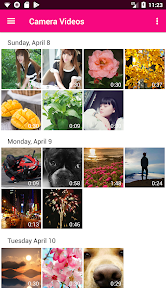
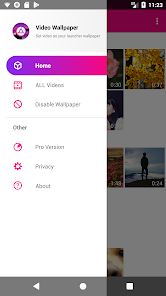
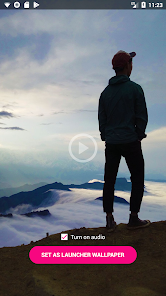
Video Live Wallpaper Maker by ZipoApps is exactly what the name suggests — an Android tool that lets you turn any short video clip into a moving wallpaper for your home or lock screen. It's a customization app, sitting in the same category as other wallpaper switchers and launcher enhancers. The main thing people use it for is to make their phone feel less static, more alive, whether that's with a looping clip of rain on a window, a pet running around, or a concert snippet. You download it from Google Play, and the number of installs is pretty decent considering it's a niche tool, though I don't remember the exact figure. It's free to install, but once you open it, you quickly see that the real juice comes from in-app purchases. No forced registration, which is nice, and ads pop up occasionally but not in an annoying, every-click way. My first impression after launching it was that the interface looks a bit dated — the layout works but doesn't scream polish. Still, it gets the job done without overwhelming you with options right off the bat.
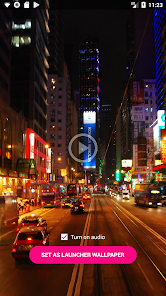
When you actually start using it, the experience is mostly straightforward. You pick a video from your gallery, trim it if needed, and then preview how it looks as a wallpaper. The app lets you adjust the aspect ratio and crop the clip, which is handy since phone screens come in all shapes now. There's a simple onboarding screen that shows you the basics, but honestly, you can figure it out without it. The main actions are just import > trim > apply. I did notice that the trimming slider can be a bit finicky if you want precise cuts — it's not as smooth as what you'd get in a proper video editor. One small tip: if you want to avoid battery drain, keep the video short and loop-friendly. The app doesn't have any fancy settings for battery optimization, which is a bit disappointing. During daily use, the wallpaper ran fine on my mid-range phone, but I could feel a slight lag when switching apps occasionally.
After using it for a week, I'd say it's a solid choice if you're into personalizing your phone and don't mind the occasional hiccup. People who enjoy changing their wallpaper regularly, like me, will probably keep it installed. But if you're someone who just sets a static image and forgets it, this app adds little value. Compared to something like KLWP or even the built-in live wallpaper options on some phones, Video Live Wallpaper Maker is simpler but way less powerful. You can't add interactive elements or complex animations — it's just video on a loop. The main difference is the ease of use. I think the target audience is casual users who want a quick way to spice up their screen without learning a whole customization platform. I'll probably keep it installed on my phone for a while, but I could see uninstalling it if the battery drain becomes noticeable over time.
features
- 🎬 Import and trim any video from your gallery to set as a live wallpaper — simple drag-and-trim interface for the casual user.
- 🖼️ Adjust aspect ratio and crop the clip to fit your specific phone screen, which is more flexible than what you get in some stock phone settings.
- ⚡ Preview before applying, so you can see how the loop looks and whether it's smooth enough on your device before committing.
pros
- 💡 Much easier to use than KLWP or Muzei — no need to learn complex setups or install extra plugins for basic video functionality.
- 💡 Supports videos directly from your gallery, unlike many wallpaper apps that force you to use their own clips or a limited library.
- 💡 No account or internet required after downloading — works fully offline for the basic video-to-wallpaper conversion.
cons
- 🔋 No battery optimization settings at all — the video just plays in a loop, which can drain your battery faster than optimized competitors like Wave Live Wallpapers.
- 🔋 The trimming tool is imprecise — compared to something like Video Maker's editor, you can't get frame-accurate cuts very easily.
- 🔋 The interface feels outdated and lacks modern design touches — KLWP and even Google's own wallpaper picker look cleaner and more intuitive.
Articles
![]()
Guide
How to Update Google Play Store on Android 2026
![]()
Guide
How to Download Older Versions of Android Apps
![]()
Guide
How to Download Apps Without Google Play Store
![]()
Guide
What Is an APK File for Android?
If you use an Android phone, you may have seen the term APK while searching for apps or games online. Some websites offer an APK download instead of a Google Play install button. Some users also mention APK files when talking about apps that are not available in their region, older app versions, or Android games downloaded outside the Play Store.
![]()
Guide
How to Install Games from Google Play for Beginners
Installing games on an Android phone is usually simple, but for beginners, the process can still feel confusing at first. You may not know where to search, which button to tap, whether the game is safe, or why Google Play sometimes asks for account settings, storage access, or payment information. If you are using an Android phone for the first time, learning how to install games from Google Play is one of the easiest ways to get started.
![]()
Guide
How Useful Gemini Is for Everyday Questions and Quick Tasks
emini feels different from many AI apps because it is not only trying to be a chatbot. After using it for everyday questions, quick writing, image understanding, and planning, I think its biggest strength is convenience.
![]()
Guide
What to Know Before Downloading APKs
For many Android users, downloading an APK is a common way to install apps and games. Sometimes an app is not available in a certain country.
![]()
Guide
ChatGPT Review: Is It Still the Best AI App in 2026?
![]()
Guide
Seedance 2.0 vs Sora: The Future of AI Video Generation
The AI video race has intensified dramatically over the past two years. Platforms like Sora from OpenAI and Luma Dream Machine pushed the boundaries of text-to-video realism. Yet, despite their impressive outputs, most tools still operate as probabilistic generators—you describe a scene, and the model interprets it. Control remains limited. With the February 2026 release of Seedance 2.0, developed by ByteDance, the paradigm shifted. Internally known as Jimeng 2.0, Seedance does not position itself as just another video model. It positions itself as an AI Director. Rather than guessing what you want, Seedance 2.0 allows you to direct what happens. This distinction defines everything that follows.









Recommended Apps
![]()
Home Design 3D
Anuman4.2
![]()
Truth or Dare Game - Party App
Chouic4.8
![]()
Photo Collage Maker
Scoompa4.7![]()
Learn to Draw Flower
Creative APPS4.2![]()
FIFA World Cup 2026™
FIFA2.8![]()
Mirror Plus: Mirror with Light
Digitalchemy, LLC4.4![]()
Meitu- Photo Editor & AI Art
Meitu (China) Limited4.5![]()
Perplexity - Ask Anything
PerplexityAI4.7![]()
GhostTube SLS Camera Alternate
GhostTube4![]()
Boom Chip Blast: 2-Player
Black Pyramid 3D Games Studio0![]()
Healthy Benefits+
Solutran, Inc.4.5![]()
Deepcheck AI Search Assistant
rohe.ai4![]()
Idol Prank Video Call & Chat
LightCode Solutions4![]()
Face Shape - Pretty Scale
GlintTec Apps3.9![]()
Plant App - Plant Identifier
ScaleUp4.6











































