
Horoscope For Today

500K+
Installs
KaApps
Developer
-
Lifestyle
Category
-
Rated for 3+
Content Rating
-
kadotwoapp@gmail.com
Developer Email
-
https://sites.google.com/view/horoscope-fortodayhro12/
Privacy Policy
Screenshots
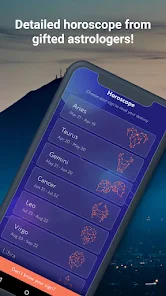
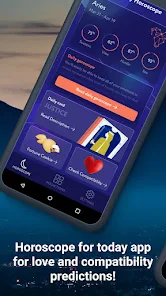
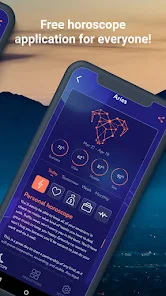
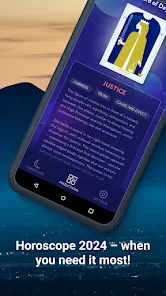
editor reviews
Horoscope For Today is a straightforward astrology app that lands somewhere between a daily pick-me-up and a personalized horoscope feed. You download and install it from the Google Play store, where it sits with a solid install count and remains free to use. After launching the app for the first time, the initial impression is clean and bright—no clutter, no aggressive sign-up nagging. You just pick your zodiac sign and you're in. It feels like one of those apps you grab on a whim when you're curious about what the stars have in store, without any heavy commitment. There's no forced registration, but like many free apps, it does offer optional in-app purchases and occasional ads, which pop up without ruining the flow.
Once you start using it, the experience is pretty hands-off. You land on today's forecast for your sign automatically, which is exactly what most people want. Swiping left or right lets you check other signs, and there's a simple settings menu where you can change your sign if you entered it wrong. The daily horoscopes cover love, career, and health in a few short lines—nothing too deep, but enough to read in under a minute. I found that the app reloads the horoscope each time you open it, which is good if you check it in the morning and again at night. The only slightly confusing part is the ad placement; sometimes a video ad plays right as you swipe, which can interrupt the flow. A small tip: turn off your Wi-Fi if you want to browse without ads loading, since the daily reads are stored locally after first load.
After a few weeks of using Horoscope For Today, I can see why it sticks around on phones. It is perfect for someone who wants a quick, no-fuss astrology fix without diving into detailed birth charts or transit tracking. But if you are into more serious astrology apps like Co–Star or The Pattern, this one will feel shallow. It does not offer personalized charts or push notifications for planetary shifts. What makes it different is the simplicity—you open it, read your sign, and close it. That is both its strength and its limit. I kept it installed because it takes two seconds to check, but I can see myself uninstalling it if I ever want more depth. It is a casual app for casual believers.
features
- 🌞 Daily Horoscope Refresh – The app auto-updates each day, so you always see the current forecast without manually pulling down or waiting. In contrast, apps like Daily Horoscope sometimes require tapping a refresh button or watching an ad to get new content.
- 🚫 No Sign-Up Required – You pick your zodiac sign and start reading immediately. No email, no account creation, no permission requests. This is a big deal compared to apps like Co–Star, which demand your exact birth time and location before showing anything.
- 📱 Lightweight and Fast – The app loads in under a second, even on older phones. Unlike The Pattern, which drags through loading screens and syncing, this one just opens and shows the text. No fancy animations, no waiting.
- 🔀 Quick Sign Switching – Swiping left or right lets you check any zodiac sign instantly. In apps like Horoscope.com, you often have to go back to a menu and reselect, which feels clunky after a while.
pros
- 👍 Zero Friction Start – Compared to TimePassages, which asks for birth details and location upfront, Horoscope For Today is refreshingly simple. You just pick a sign and you are done. No data anxiety.
- 👍 Clean Visual Design – The interface is minimal and uses a soft color palette. It is less busy than Daily Horoscope, which sometimes feels like a news feed with too many banners and buttons.
- 👍 Battery Friendly – Since there is no background location tracking or persistent notifications, the app barely touches your battery. Co–Star, by contrast, runs periodic checks for astrological transits, which drains more power over time.
- 👍 No Social Gimmicks – Some apps push social features or community forums, but this one keeps it purely about the horoscope. No feeds, no friend requests, just the stars.
cons
- 👎 Shallow Content Depth – The horoscopes are very short and general. If you are used to AstroMatrix or The Pattern, which give detailed personality breakdowns, this app will feel like a fortune cookie.
- 👎 No Push Notifications – You have to remember to open the app yourself. Apps like Daily Horoscope send daily reminders at a set time, which helps build a habit. This one does not.
- 👎 Ad Interruptions on Swipe – The biggest annoyance is that video ads sometimes play when you switch signs. In Horoscope.com, ads appear less frequently and are mostly static banners, which are easier to ignore.
- 👎 No Personalization – There is no way to save multiple signs, add birth chart details, or get transit alerts. For anyone beyond casual interest, apps like TimePassages offer much more without being overwhelming.
Articles
![]()
Guide
How to Update Google Play Store on Android 2026
![]()
Guide
How to Download Older Versions of Android Apps
![]()
Guide
How to Download Apps Without Google Play Store
![]()
Guide
What Is an APK File for Android?
If you use an Android phone, you may have seen the term APK while searching for apps or games online. Some websites offer an APK download instead of a Google Play install button. Some users also mention APK files when talking about apps that are not available in their region, older app versions, or Android games downloaded outside the Play Store.
![]()
Guide
How to Install Games from Google Play for Beginners
Installing games on an Android phone is usually simple, but for beginners, the process can still feel confusing at first. You may not know where to search, which button to tap, whether the game is safe, or why Google Play sometimes asks for account settings, storage access, or payment information. If you are using an Android phone for the first time, learning how to install games from Google Play is one of the easiest ways to get started.
![]()
Guide
How Useful Gemini Is for Everyday Questions and Quick Tasks
emini feels different from many AI apps because it is not only trying to be a chatbot. After using it for everyday questions, quick writing, image understanding, and planning, I think its biggest strength is convenience.
![]()
Guide
What to Know Before Downloading APKs
For many Android users, downloading an APK is a common way to install apps and games. Sometimes an app is not available in a certain country.
![]()
Guide
ChatGPT Review: Is It Still the Best AI App in 2026?
![]()
Guide
Seedance 2.0 vs Sora: The Future of AI Video Generation
The AI video race has intensified dramatically over the past two years. Platforms like Sora from OpenAI and Luma Dream Machine pushed the boundaries of text-to-video realism. Yet, despite their impressive outputs, most tools still operate as probabilistic generators—you describe a scene, and the model interprets it. Control remains limited. With the February 2026 release of Seedance 2.0, developed by ByteDance, the paradigm shifted. Internally known as Jimeng 2.0, Seedance does not position itself as just another video model. It positions itself as an AI Director. Rather than guessing what you want, Seedance 2.0 allows you to direct what happens. This distinction defines everything that follows.









Recommended Apps
![]()
Home Design 3D
Anuman4.2
![]()
Truth or Dare Game - Party App
Chouic4.8
![]()
Photo Collage Maker
Scoompa4.7![]()
Learn to Draw Flower
Creative APPS4.2![]()
FIFA World Cup 2026™
FIFA2.8![]()
Mirror Plus: Mirror with Light
Digitalchemy, LLC4.4![]()
Meitu- Photo Editor & AI Art
Meitu (China) Limited4.5![]()
Perplexity - Ask Anything
PerplexityAI4.7![]()
GhostTube SLS Camera Alternate
GhostTube4![]()
Boom Chip Blast: 2-Player
Black Pyramid 3D Games Studio0![]()
Healthy Benefits+
Solutran, Inc.4.5![]()
Deepcheck AI Search Assistant
rohe.ai4![]()
Idol Prank Video Call & Chat
LightCode Solutions4![]()
Face Shape - Pretty Scale
GlintTec Apps3.9![]()
Plant App - Plant Identifier
ScaleUp4.6












































