
AI Art Photo Editor, AI Filter

5M+
Installs
Smart AI DEV
Developer
-
Generative AI
Category
-
Rated for 3+
Content Rating
-
summerdaysc@outlook.com
Developer Email
-
https://coolsummerdev.com/avatar-privacy-policy
Privacy Policy
Screenshots

editor reviews
I came across AI Art Photo Editor, AI Filter from Smart AI DEV after searching for ways to spice up my social media photos without installing a dozen different apps. It's basically a photo editing tool that leans heavily into AI-powered filters and artistic transformations. When you first open it after downloading from the Google Play or App Store, which was free by the way, the interface feels fairly modern but a bit cluttered. You get a sense that it wants to do a lot, but the first impression might be that it tries too hard to sell you on premium features right away. There's no forced registration, which is nice, but you do see ads and prompts to upgrade to a paid version before you even try a basic edit.
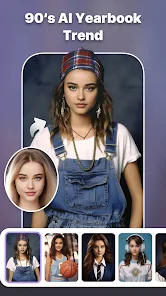
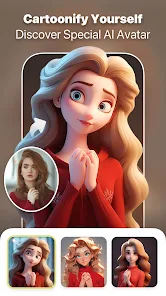
Once you get past the initial splash screen and that pushy premium popup, the actual editing experience is pretty smooth. You pick a photo from your gallery, and the app gives you a row of AI filter options like oil painting, cartoon, or sketch. I tested the cartoon filter on a selfie, and it took maybe ten seconds, which felt quick. The process is simple: tap a filter, wait for the AI to process, and then you can save or share the result. There's also an eraser tool for removing backgrounds, but it was a bit hit-or-miss with stray edges. One tip is to adjust the filter intensity slider, which is hidden under a small settings icon, so keep an eye out for that. The onboarding doesn't explain much, so you learn by trial and error.
After a few days of use, I think this app shines for someone who wants quick, flashy effects like turning a mundane photo into a piece of digital art without learning complex editing software. But for daily photo touch-ups like brightness or color correction, it feels overkill since apps like Snapseed or Adobe Lightroom handle those basics better. The AI filters are genuinely fun, but the constant push to subscribe or watch ads gets annoying fast. I kept it installed because the artistic styles are unique, but I can see someone uninstalling it if they just want a simple filter for Instagram. It's a niche tool for creative experiments, not a primary editor.
features
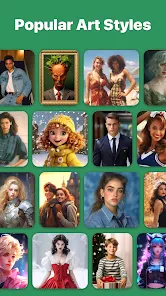
- 🎨 AI-powered artistic filters let you turn any photo into a painting, sketch, or cartoon in seconds, which sets it apart from basic editors like Snapseed that focus on manual adjustments. The outstanding feature is the real-time style transfer that feels quite responsive, though the results can look a bit overprocessed with high-contrast photos.
- 🖌️ Background eraser with edge detection works for simple subjects, but it struggles with hair or transparent objects compared to TouchRetouch, which offers more precision. Still, for a quick cutout, it's passable for casual use.
- ⚡ Batch processing support lets you apply the same filter to multiple photos at once, saving time if you're editing a bunch of vacation shots. Adobe Lightroom has this too, but it's less common in free AI filter apps. The speed is decent, but ads interrupt the batch workflow, which dampens the convenience.
- 📱 One-tap sharing to social platforms is integrated, so you can go from edit to post on Instagram or Twitter without extra steps. PicsArt offers similar sharing but with more social features, while this app keeps it clean and direct.
pros
- 👍 The AI filter quality is genuinely above average for a free app; the oil painting effect looks more natural than what I saw in Prisma, which sometimes distorts faces badly. It handles skin tones decently.
- 👍 No account signup required for basic use, so you can jump right in without giving away personal data. Many photo editors like PicsArt force you to create a profile to save work, but here you can just edit and go.
- 👍 The app offers a generous preview before you commit to a filter, showing a small before-and-after comparison. Snapseed has this too, but here it's more visually intuitive with a slider.
cons
- 👎 The free version is heavily ad-supported, with a video ad popping up after almost every edit. This is far more intrusive than what you get in similar apps like YouCam Perfect, which spaces ads out better. It kills the flow when you just want to try different filters.
- 👎 Premium subscription is pushed aggressively, with countdown timers on offers that create a false sense of urgency. Apps like Facetune are upfront about costs, but this feels like a bait-and-switch when you realize many good filters are locked.
- 👎 Background removal quality is inconsistent, especially on photos with messy edges or light hair. TouchRetouch or the free version of Remove.bg does it better, so don't rely on this for professional work.
- 👎 No undo button in the editing screen, so if you accidentally apply a filter, you have to reload the photo from scratch. Most basic editors like Google Photos have an undo, so this feels like an oversight.
Articles
![]()
Guide
How to Update Google Play Store on Android 2026
![]()
Guide
How to Download Older Versions of Android Apps
![]()
Guide
How to Download Apps Without Google Play Store
![]()
Guide
What Is an APK File for Android?
If you use an Android phone, you may have seen the term APK while searching for apps or games online. Some websites offer an APK download instead of a Google Play install button. Some users also mention APK files when talking about apps that are not available in their region, older app versions, or Android games downloaded outside the Play Store.
![]()
Guide
How to Install Games from Google Play for Beginners
Installing games on an Android phone is usually simple, but for beginners, the process can still feel confusing at first. You may not know where to search, which button to tap, whether the game is safe, or why Google Play sometimes asks for account settings, storage access, or payment information. If you are using an Android phone for the first time, learning how to install games from Google Play is one of the easiest ways to get started.
![]()
Guide
How Useful Gemini Is for Everyday Questions and Quick Tasks
emini feels different from many AI apps because it is not only trying to be a chatbot. After using it for everyday questions, quick writing, image understanding, and planning, I think its biggest strength is convenience.
![]()
Guide
What to Know Before Downloading APKs
For many Android users, downloading an APK is a common way to install apps and games. Sometimes an app is not available in a certain country.
![]()
Guide
ChatGPT Review: Is It Still the Best AI App in 2026?
![]()
Guide
Seedance 2.0 vs Sora: The Future of AI Video Generation
The AI video race has intensified dramatically over the past two years. Platforms like Sora from OpenAI and Luma Dream Machine pushed the boundaries of text-to-video realism. Yet, despite their impressive outputs, most tools still operate as probabilistic generators—you describe a scene, and the model interprets it. Control remains limited. With the February 2026 release of Seedance 2.0, developed by ByteDance, the paradigm shifted. Internally known as Jimeng 2.0, Seedance does not position itself as just another video model. It positions itself as an AI Director. Rather than guessing what you want, Seedance 2.0 allows you to direct what happens. This distinction defines everything that follows.









Recommended Apps
![]()
Home Design 3D
Anuman4.2
![]()
Truth or Dare Game - Party App
Chouic4.8
![]()
Photo Collage Maker
Scoompa4.7![]()
Learn to Draw Flower
Creative APPS4.2![]()
FIFA World Cup 2026™
FIFA2.8![]()
Mirror Plus: Mirror with Light
Digitalchemy, LLC4.4![]()
Meitu- Photo Editor & AI Art
Meitu (China) Limited4.5![]()
Perplexity - Ask Anything
PerplexityAI4.7![]()
GhostTube SLS Camera Alternate
GhostTube4![]()
Boom Chip Blast: 2-Player
Black Pyramid 3D Games Studio0![]()
Healthy Benefits+
Solutran, Inc.4.5![]()
Deepcheck AI Search Assistant
rohe.ai4![]()
Idol Prank Video Call & Chat
LightCode Solutions4![]()
Face Shape - Pretty Scale
GlintTec Apps3.9![]()
Plant App - Plant Identifier
ScaleUp4.6












































