
Retake AI: Face & Photo Editor

1M+
Installs
Codeway Dijital
Developer
-
Video Players & Editors
Category
-
Rated for 3+
Content Rating
-
retake@codeway.co
Developer Email
-
https://static.selfai.art/retake-privacy-en.html
Privacy Policy
Screenshots

editor reviews
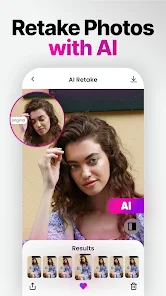
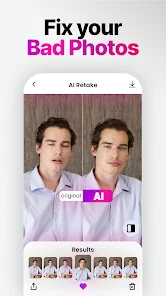
Retake AI is a photo editing app developed by Codeway Dijital that uses AI to enhance and retouch face photos. It falls under the utility and photography category on both Google Play and App Store. After downloading and launching Retake AI, I found the first impression quite clean – the interface is minimal with no clutter. You can choose a photo from your gallery and instantly apply face enhancements like skin smoothing, blemish removal, or facial reshaping. It feels like a tool for quick touch-ups rather than deep editing, which makes sense for casual users who want a better selfie without spending hours in Photoshop.
After using Retake AI for a week, I can describe the hands-on experience as simple but effective. The app asks for camera or photo library permissions immediately, then you pick an image. The main screen has one big button for processing, and the AI automatically detects faces. It shows sliders for intensity of retouching – I dialed them down because default settings can look a bit plastic. The onboarding walks you through each step like selecting a photo, applying filters, and saving. One small tip is to use bright, well-lit photos because the AI works best when it can clearly see facial features. I found the process smooth except for occasional hangs when processing high-resolution images, which took a few seconds longer than expected. The app saves edited versions without overwriting originals, which is handy for comparing before and after.
After using Retake AI for a while, I think it's great for people who post selfies on social media and want quick improvements. It lacks the manual control of something like FaceTune, but if you just want one-tap retouching, it's hard to beat. Who may not need it are professional editors or those who want artistic filters – this app is strictly for face beautification. What sets it apart from apps like YouCam Perfect is how quickly it processes – just one tap and you get respectable results. I kept it installed because it saves time when I need a polished selfie fast. However, I might uninstall it if I find a free alternative that does the same thing without ads. Retake AI runs occasional promotional pop-ups, which gets annoying. Codeway Dijital has a history of making utility apps, and this one fits their pattern of simple, AI-driven tools.
features
- 🤖 AI Face Enhancement: Retake AI automatically detects faces and applies smoothing, blemish removal, and reshaping. Compared to Adobe Photoshop Camera, which focuses more on artistic filters, Retake AI is purely about making faces look better with less effort. Its standout feature is the real-time preview of retouching intensity before saving.
- 🎨 One-Tap Processing: You don't need to manually adjust dozens of sliders – the AI handles everything with a single tap. This is much faster than FaceTune, where you have to paint over skin areas manually. Retake AI's outstanding feature is its speed: from import to export, it takes under 10 seconds for most photos.
- 📸 Face Reshaping Tools: Beyond basic retouching, Retake AI offers subtle facial structure adjustments like jawline or cheekbone tweaks. While FaceApp has similar features, Retake AI keeps them more natural-looking and less cartoonish. The standout is that you can preview changes in real time without paying extra charges.
pros
- 👍 Speed Over Manual Editors: Retake AI finishes retouching in seconds, whereas FaceTune requires you to slowly paint over areas. This makes it ideal for quick edits before posting stories.
- 👍 Natural Results: Unlike YouCam Perfect which sometimes over-smooths faces, Retake AI preserves skin texture better. It doesn't give that plastic doll look unless you push sliders too high.
- 👍 Free Core Features: Most basic retouching features are free without watermarks. FaceApp locks many face swaps behind a paywall, but Retake AI keeps skin smoothing and blemish removal accessible to free users.
- 👍 Clean Interface: It doesn't bombard you with unnecessary options like Remini, which tries to upsell constantly. Retake AI's design is focused and easy to navigate.
cons
- 👎 Limited Creativity: You can't add artistic filters or backgrounds like in PicsArt. This app strictly does face enhancement, so it won't replace a full photo editor for creative projects.
- 👎 Heavy on Older Phones: On a four-year-old device, the app lags when processing high-resolution photos. By contrast, FaceTune runs smoother on dated hardware.
- 👎 Occasional Oversharpening: Sometimes the AI makes skin look unnaturally sharp around the edges. This is less noticeable in Adobe Photoshop Camera, which handles edge detection better.
- 👎 Ads During Workflow: Free version shows pop-up ads after each save, which interrupts the editing flow. YouCam Perfect shows fewer ads per session.
Articles
![]()
Guide
How to Update Google Play Store on Android 2026
![]()
Guide
How to Download Older Versions of Android Apps
![]()
Guide
How to Download Apps Without Google Play Store
![]()
Guide
What Is an APK File for Android?
If you use an Android phone, you may have seen the term APK while searching for apps or games online. Some websites offer an APK download instead of a Google Play install button. Some users also mention APK files when talking about apps that are not available in their region, older app versions, or Android games downloaded outside the Play Store.
![]()
Guide
How to Install Games from Google Play for Beginners
Installing games on an Android phone is usually simple, but for beginners, the process can still feel confusing at first. You may not know where to search, which button to tap, whether the game is safe, or why Google Play sometimes asks for account settings, storage access, or payment information. If you are using an Android phone for the first time, learning how to install games from Google Play is one of the easiest ways to get started.
![]()
Guide
How Useful Gemini Is for Everyday Questions and Quick Tasks
emini feels different from many AI apps because it is not only trying to be a chatbot. After using it for everyday questions, quick writing, image understanding, and planning, I think its biggest strength is convenience.
![]()
Guide
What to Know Before Downloading APKs
For many Android users, downloading an APK is a common way to install apps and games. Sometimes an app is not available in a certain country.
![]()
Guide
ChatGPT Review: Is It Still the Best AI App in 2026?
![]()
Guide
Seedance 2.0 vs Sora: The Future of AI Video Generation
The AI video race has intensified dramatically over the past two years. Platforms like Sora from OpenAI and Luma Dream Machine pushed the boundaries of text-to-video realism. Yet, despite their impressive outputs, most tools still operate as probabilistic generators—you describe a scene, and the model interprets it. Control remains limited. With the February 2026 release of Seedance 2.0, developed by ByteDance, the paradigm shifted. Internally known as Jimeng 2.0, Seedance does not position itself as just another video model. It positions itself as an AI Director. Rather than guessing what you want, Seedance 2.0 allows you to direct what happens. This distinction defines everything that follows.









Recommended Apps
![]()
Home Design 3D
Anuman4.2
![]()
Truth or Dare Game - Party App
Chouic4.8
![]()
Photo Collage Maker
Scoompa4.7![]()
Learn to Draw Flower
Creative APPS4.2![]()
FIFA World Cup 2026™
FIFA2.8![]()
Mirror Plus: Mirror with Light
Digitalchemy, LLC4.4![]()
Meitu- Photo Editor & AI Art
Meitu (China) Limited4.5![]()
Perplexity - Ask Anything
PerplexityAI4.7![]()
GhostTube SLS Camera Alternate
GhostTube4![]()
Boom Chip Blast: 2-Player
Black Pyramid 3D Games Studio0![]()
Healthy Benefits+
Solutran, Inc.4.5![]()
Deepcheck AI Search Assistant
rohe.ai4![]()
Idol Prank Video Call & Chat
LightCode Solutions4![]()
Face Shape - Pretty Scale
GlintTec Apps3.9![]()
Plant App - Plant Identifier
ScaleUp4.6











































