

AI Video Art Creator - Livensa

500K+
Installs
FERASET
Developer
-
Video Players & Editors
Category
-
Rated for 3+
Content Rating
-
info@feraset.co
Developer Email
-
https://www.feraset.co/privacy.html
Privacy Policy
Screenshots
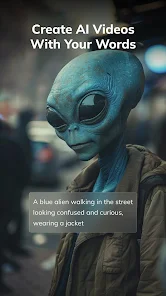
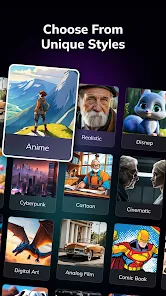
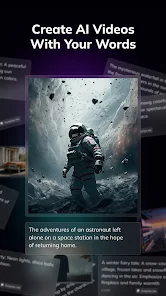

editor reviews
I stumbled upon AI Video Art Creator – Livensa while browsing for something to jazz up my social media posts. It's one of those mobile apps that transforms your ordinary clips into something that looks more like a moving painting or an animated sketch. Basically, you throw in a video, pick an art style, and the app processes it to give you a completely different visual vibe. It's free to download from both Google Play and the App Store, though like most apps in this space, you'll run into watermarked exports unless you opt for in-app purchases. The install count seems decent enough, nothing massive, but it's got a loyal niche following. My first impression after launching it was actually pretty positive – the interface is clean, no overwhelming clutter, and it gets straight to the point.
The real hands-on experience starts once you grant it access to your gallery. You pick a video, and then you're shown a lineup of artistic filters – stuff like oil painting, watercolor, sketch, and even a few that mimic famous art movements. The processing time depends on your video length; a 15-second clip takes maybe half a minute, which feels reasonable. What threw me off at first was that the preview is locked behind a watermark, so you can't really see the full effect without committing to a purchase. Still, the workflow is straightforward: select your video, choose a style, adjust the intensity slider, and hit generate. One small tip – keep your clips under 30 seconds for the best results, because longer videos sometimes lose coherence in the style transfer. The onboarding is minimal, no tutorial, but honestly, you don't need one. It's intuitive enough that you'll figure it out in under a minute.
After messing around with it for a few days, I can say it's a neat tool if you're into experimental content creation. It's not going to replace proper desktop software like Runway ML or even the more robust mobile options like CapCut, but it has a certain charm for quick, artistic edits. Who would enjoy this? Probably people who love aesthetics – Instagram artists, TikTok creators who want something dreamy, or just casual users who want their vacation clips to look like miniature paintings. Who might not need it? Anyone looking for high-fidelity, photorealistic edits. The app's standout trait is how accessible it makes artistic video transformation, but the watermark and limited export quality hold it back. I kept it installed mostly because it's fun to play with on a slow afternoon, but I can see someone uninstalling it once the novelty wears off, especially if they're not willing to pay for the full unlock.
features
- 🎨 Style variety: Livensa offers around 20+ artistic filters, from classic oil painting to modern glitch art. In comparison, Pika Labs focuses more on AI-generated video from scratch, not style transfer over existing clips. Livensa wins on pre-recorded video transformation range.
- ⚡ Processing speed: A 15-second clip renders in about 25 seconds on a mid-range phone. CapCut's style transfer features can take up to a minute for similar results, so Livensa feels snappier for quick edits.
- 🖼️ Detail preservation: Unlike many competitors that blur faces or distort backgrounds, Livensa keeps the core subject recognizable. Apps like VN Video Editor sometimes sacrifice clarity for style, but Livensa balances both fairly well.
- 🔧 Intensity adjustment: You can tweak how strong the effect is using a slider, which most similar apps lack entirely. This gives you control over whether the output looks like a subtle texture or a full-blown painting.
pros
- 🌐 No account needed: You can start editing immediately without signing up. That's a big plus compared to apps like InShot or KineMaster, which push you to create an account before touching basic features.
- 💡 Simple interface: Everything is on one screen – choose video, pick style, adjust, export. Other apps like FilmoraGo bury similar tools under multiple menus, so Livensa feels refreshingly direct.
- 📱 Lightweight app: It doesn't eat up tons of storage or drain your battery excessively compared to heavier editors like Adobe Premiere Rush. Great for older phones or quick edits on the go.
cons
- 💧 Heavy watermark: Every export has a giant watermark unless you pay up. Most similar apps, like CapCut, at least offer a lighter logo or an option to remove it with a single purchase. Livensa's watermark is aggressive and distracting.
- ⏳ Limited export resolution: Free exports cap at 720p, while even basic competitors like VLLO offer 1080p without paying. For a video art app, the lower resolution kills the visual impact.
- 📥 No batch processing: You have to render each video one by one. Apps like Picsart allow queuing multiple clips, which saves time if you're making a series of stylized videos.
- 🔄 Style inconsistency: Some filters work well on fast-motion clips but look terrible on static ones, and vice versa. Unlike Dream by WOMBO which adapts styles more intelligently, Livensa applies a one-size-fits-all algorithm that sometimes misses the mark.
Articles
![]()
Guide
How to Update Google Play Store on Android 2026
![]()
Guide
How to Download Older Versions of Android Apps
![]()
Guide
How to Download Apps Without Google Play Store
![]()
Guide
What Is an APK File for Android?
If you use an Android phone, you may have seen the term APK while searching for apps or games online. Some websites offer an APK download instead of a Google Play install button. Some users also mention APK files when talking about apps that are not available in their region, older app versions, or Android games downloaded outside the Play Store.
![]()
Guide
How to Install Games from Google Play for Beginners
Installing games on an Android phone is usually simple, but for beginners, the process can still feel confusing at first. You may not know where to search, which button to tap, whether the game is safe, or why Google Play sometimes asks for account settings, storage access, or payment information. If you are using an Android phone for the first time, learning how to install games from Google Play is one of the easiest ways to get started.
![]()
Guide
How Useful Gemini Is for Everyday Questions and Quick Tasks
emini feels different from many AI apps because it is not only trying to be a chatbot. After using it for everyday questions, quick writing, image understanding, and planning, I think its biggest strength is convenience.
![]()
Guide
What to Know Before Downloading APKs
For many Android users, downloading an APK is a common way to install apps and games. Sometimes an app is not available in a certain country.
![]()
Guide
ChatGPT Review: Is It Still the Best AI App in 2026?
![]()
Guide
Seedance 2.0 vs Sora: The Future of AI Video Generation
The AI video race has intensified dramatically over the past two years. Platforms like Sora from OpenAI and Luma Dream Machine pushed the boundaries of text-to-video realism. Yet, despite their impressive outputs, most tools still operate as probabilistic generators—you describe a scene, and the model interprets it. Control remains limited. With the February 2026 release of Seedance 2.0, developed by ByteDance, the paradigm shifted. Internally known as Jimeng 2.0, Seedance does not position itself as just another video model. It positions itself as an AI Director. Rather than guessing what you want, Seedance 2.0 allows you to direct what happens. This distinction defines everything that follows.









Recommended Apps
![]()
Home Design 3D
Anuman4.2
![]()
Truth or Dare Game - Party App
Chouic4.8
![]()
Photo Collage Maker
Scoompa4.7![]()
Learn to Draw Flower
Creative APPS4.2![]()
FIFA World Cup 2026™
FIFA2.8![]()
Mirror Plus: Mirror with Light
Digitalchemy, LLC4.4![]()
Meitu- Photo Editor & AI Art
Meitu (China) Limited4.5![]()
Perplexity - Ask Anything
PerplexityAI4.7![]()
GhostTube SLS Camera Alternate
GhostTube4![]()
Boom Chip Blast: 2-Player
Black Pyramid 3D Games Studio0![]()
Healthy Benefits+
Solutran, Inc.4.5![]()
Deepcheck AI Search Assistant
rohe.ai4![]()
Idol Prank Video Call & Chat
LightCode Solutions4![]()
Face Shape - Pretty Scale
GlintTec Apps3.9![]()
Plant App - Plant Identifier
ScaleUp4.6











































