

NAMA: Flower language keyboard

10K+
Installs
Andromeda App
Developer
-
Productivity
Category
-
Rated for 3+
Content Rating
-
elaineeyui@gmail.com
Developer Email
-
https://sites.google.com/view/andromedalab/home
Privacy Policy
Screenshots
editor reviews
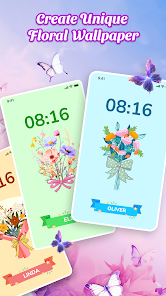
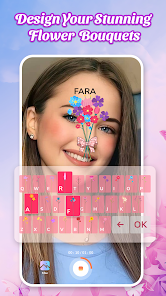
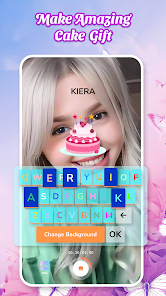
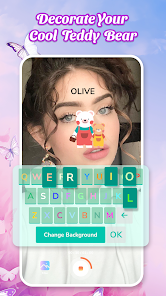
Flower Language Keyboard is a typing tool developed by Andromeda App that lets you express yourself through floral imagery. It's a customization keyboard app, meaning its main purpose is to replace your phone's default keyboard with one that feels more personal and visually interesting. When I first heard about it, I thought it sounded like a playful niche thing—something you'd download if you're into flowers or want a softer look for your chats. On Google Play and the App Store, it sits under the tools or personalization category, with a decent install count though not massive. It's free to download, and I noticed it does have ads, plus optional in-app purchases for extra flower packs. After launching it, the first impression is bright and cheerful, with a clean interface that asks for permissions pretty standardly. I didn't feel overwhelmed; it felt like a fun detour from the usual bare-bones keyboards.
Once I started using it, the hands-on experience was mostly smooth. The onboarding walks you through enabling the keyboard in your system settings, which is a typical hurdle for third-party keyboards, but the steps were clear. The main actions involve typing normally, but every key press triggers a small floral animation—like a tiny rose or daisy blooming at the edge of the screen. You can also pick a theme from a gallery of flower designs, like lavender fields or cherry blossoms, and adjust the font style to match. In daily use, I found myself typing slower at first because I kept watching the animations, but after a day, it felt natural. A practical tip: if you want to avoid the ads, you can swipe down on the keyboard to hide the banner without buying anything. There were a few confusing moments, like when I accidentally tapped a flower button that opened a menu for custom sticker packs—it wasn't immediately obvious what it did. Overall, it's a keyboard that adds a layer of charm without breaking your flow too much.
After using it for a while, I have a mixed but fair take. People who enjoy personalizing their devices, especially those into nature or aesthetic themes, will probably keep this app installed. It's different from something like Gboard or SwiftKey, which focus on typing speed and predictive text; here, the priority is visual delight. However, if you need a keyboard for work or fast communication, you might find the animations a bit distracting or the autocorrect less sharp. I compared it mentally to Aesthetic Keyboard, another cute keyboard app, but Flower Language Keyboard feels more consistent in its floral theme—it doesn't try to be too many things. Uninstalling it came to mind when I missed the speedy predictions of my default keyboard, but I kept it for casual chatting because it makes texting feel less boring. It's not revolutionary, but it fills a specific, lighthearted need.
features
- 🌼 The standout feature is the living wallpaper-style animations. Each flower reacts to your typing, growing, swaying, or even wilting if you stop typing, which makes the keyboard feel alive. It's far more interactive than the static themes in Gboard, where you just change a background color.
- 🌼 Another neat point is the custom sticker maker. You can overlay small flowers on your texts, like sending a "thanks" with a tiny sunflower. SwiftKey offers sticker packs too, but here the stickers match your keyboard theme automatically, saving you from hunting for a set.
- 🌼 There's also a silent mode for the animations—you can turn off the visual effects without losing the theme art. This is useful if you're in a meeting but still want a pretty keyboard. I haven't seen that granularity in other custom keyboards, which often force all-or-nothing effects.
pros
- 💪 The flower catalog is huge, with seasonal updates. I found rare blooms like forget-me-nots and peonies, not just generic roses. Other apps like Fancy Keyboard usually recycle the same 10 flower designs.
- 💪 Battery usage is surprisingly low. I worried the animations would drain my phone, but after a week, I didn't notice a hit. That's better than Cute Keyboard HD, which ate through my battery in days.
- 💪 The font pairings are hand-drawn, not just standard system fonts. Each flower theme has a cursive or bold style that fits the mood, giving a more polished look compared to Aesthetic Keyboard's default options.
cons
- 😤 The autocorrect is weak. I made typos like "teh" for "the," and it didn't fix them—Gboard would have caught that instantly. This makes it less reliable for fast typing.
- 😤 Ad placements are intrusive. A banner sits between the prediction bar and the keys, sometimes taking up a fifth of the screen. SwiftKey has ads too, but they're smaller and less in the way.
- 😤 The learning curve for special features is steep. The flower reaction menu isn't explained well—I had to guess my way through adding custom blooms. Other keyboards like Microsoft SwiftKey have better tutorials.
Articles
![]()
Guide
How to Update Google Play Store on Android 2026
![]()
Guide
How to Download Older Versions of Android Apps
![]()
Guide
How to Download Apps Without Google Play Store
![]()
Guide
What Is an APK File for Android?
If you use an Android phone, you may have seen the term APK while searching for apps or games online. Some websites offer an APK download instead of a Google Play install button. Some users also mention APK files when talking about apps that are not available in their region, older app versions, or Android games downloaded outside the Play Store.
![]()
Guide
How to Install Games from Google Play for Beginners
Installing games on an Android phone is usually simple, but for beginners, the process can still feel confusing at first. You may not know where to search, which button to tap, whether the game is safe, or why Google Play sometimes asks for account settings, storage access, or payment information. If you are using an Android phone for the first time, learning how to install games from Google Play is one of the easiest ways to get started.
![]()
Guide
How Useful Gemini Is for Everyday Questions and Quick Tasks
emini feels different from many AI apps because it is not only trying to be a chatbot. After using it for everyday questions, quick writing, image understanding, and planning, I think its biggest strength is convenience.
![]()
Guide
What to Know Before Downloading APKs
For many Android users, downloading an APK is a common way to install apps and games. Sometimes an app is not available in a certain country.
![]()
Guide
ChatGPT Review: Is It Still the Best AI App in 2026?
![]()
Guide
Seedance 2.0 vs Sora: The Future of AI Video Generation
The AI video race has intensified dramatically over the past two years. Platforms like Sora from OpenAI and Luma Dream Machine pushed the boundaries of text-to-video realism. Yet, despite their impressive outputs, most tools still operate as probabilistic generators—you describe a scene, and the model interprets it. Control remains limited. With the February 2026 release of Seedance 2.0, developed by ByteDance, the paradigm shifted. Internally known as Jimeng 2.0, Seedance does not position itself as just another video model. It positions itself as an AI Director. Rather than guessing what you want, Seedance 2.0 allows you to direct what happens. This distinction defines everything that follows.









Recommended Apps
![]()
Home Design 3D
Anuman4.2
![]()
Truth or Dare Game - Party App
Chouic4.8
![]()
Photo Collage Maker
Scoompa4.7![]()
Learn to Draw Flower
Creative APPS4.2![]()
FIFA World Cup 2026™
FIFA2.8![]()
Mirror Plus: Mirror with Light
Digitalchemy, LLC4.4![]()
Meitu- Photo Editor & AI Art
Meitu (China) Limited4.5![]()
Perplexity - Ask Anything
PerplexityAI4.7![]()
GhostTube SLS Camera Alternate
GhostTube4![]()
Boom Chip Blast: 2-Player
Black Pyramid 3D Games Studio0![]()
Healthy Benefits+
Solutran, Inc.4.5![]()
Deepcheck AI Search Assistant
rohe.ai4![]()
Idol Prank Video Call & Chat
LightCode Solutions4![]()
Face Shape - Pretty Scale
GlintTec Apps3.9![]()
Plant App - Plant Identifier
ScaleUp4.6












































