
Skin Maker & 3D Editor

1M+
Installs
Pixelvoid Games Ltd
Developer
-
Adventure
Category
-
Everyone
Content Rating
-
support@pixelvoidgames.com
Developer Email
-
https://pixelvoidgames.com/policy.html
Privacy Policy
Screenshots
editor reviews
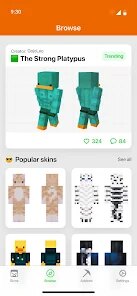
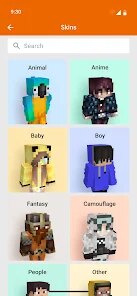
Alright, let's talk about Skin Maker & 3D Editor. This isn't your typical action-packed mobile game; it's a creative sandbox first and foremost. Developed by Pixelvoid Games Ltd, this app falls squarely into the simulation and creativity genre on Android and iOS. You can download and install it directly from the Google Play Store and the App Store, and it's completely free to grab. First launched a couple of years ago, it's seen a steady install base, currently sitting somewhere between 1 and 5 million downloads on Google Play alone. It's a pure mobile experience—no PC or console versions on Steam or Xbox, which actually makes sense for a touch-based editor. The best part? It's free to download and play with no forced paywalls. There are in-app purchases, mostly for premium skin templates or exclusive texture packs, but they're optional. You can easily spend hours making custom skins without spending a dime. Most purchases range from $1.99 to $9.99, which is pretty standard for mobile apps nowadays.
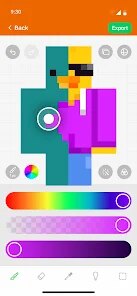
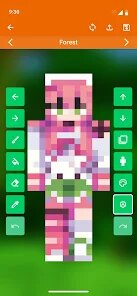
So, how do you actually play with this? The core loop is surprisingly addictive. You start by picking a base model—usually a humanoid character—and then you go wild with the 3D editor. The app uses a layer system similar to professional software, so you can paint, add decals, and adjust colors with precision. The best part for me is the real-time 3D preview. You can rotate the model, zoom in on details, and see how your skin looks from every angle before you even finalize it. My favorite feature has to be the "mirror paint" tool. It saves so much time when you're trying to make symmetrical designs, like armor or logos. It's incredibly satisfying to create a cool skin from scratch, then export it and use it in other games or share it with the community. The app is basically a mobile version of something like a simplified Blender or Skinseed, but way more accessible for quick edits.
When I compare it to similar apps like "Skin Editor for Minecraft" or "Novaskin," Skin Maker & 3D Editor stands out because of its actual 3D editing capability. Most other skin editors on Android are just 2D flat editors that wrap around a cube. This one lets you paint directly onto a 3D model, which feels much more natural. It's not trying to be a full-blown game; it's a tool. If you're tired of the clunky, low-resolution tools out there, this app feels like a genuine upgrade. I recommend it because it strikes that perfect balance between being powerful enough for decent creations and simple enough for a quick session on your phone. No complicated install guides or PC required—just download it and start making. For anyone who loves customizing characters in games like Minecraft or Roblox, this is a must-try.
features
- 🎨 Real-time 3D Painting: Unlike 2D flat editors, you paint directly onto a 3D model. Rotate, zoom, and see your changes instantly from any angle, making it feel like a professional tool right on your phone.
- 🖌️ Layer-based Editing: Use multiple layers for your designs, similar to Photoshop. You can add shadows, highlights, or separate parts of the skin without ruining the base, giving you total creative control.
- ✨ Mirror Paint Mode: One stroke on one side automatically copies it to the other. Perfect for making symmetrical armor, faces, or logos. It cuts design time in half compared to apps like Skinseed that lack this feature.
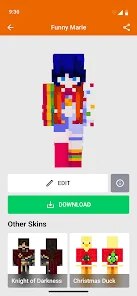
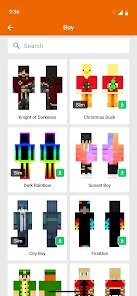
- 📤 Export and Share: You can export your finished skins as PNG files or directly share them with other apps. The community gallery inside the app lets you browse and download other players' creations for inspiration.
pros
- 🚀 User-Friendly Interface: The controls are intuitive even for beginners. You don't need a tutorial to start painting; just tap and drag. It's way more approachable than the clunky menus in "Skin Editor for Minecraft."
- ⚡ Smooth Performance: It runs smoothly on most Android devices, even older ones. No lag when rotating the 3D model or applying textures, which is a huge plus over heavier apps that crash frequently.
- 💡 No Watermark on Exports: Unlike free versions of many similar apps, this one doesn't force a watermark on your exported skins. Your creations look clean and professional, which is a big deal for sharing online.
cons
- 🔇 Limited Template Library: The default selection of base models is pretty small. You're mostly stuck with humanoids. For a true sandbox, I wish there were animal or monster templates to play with, like what you get in "Roblox Studio."
- 💸 Premium Content Can Be Pricey: While the base app is free, some of the cooler texture packs and extra tools are locked behind in-app purchases. If you want the full experience, you might end up spending $10-15, which feels steep for a mobile editor.
- 🔄 Export Compatibility Issues: Sometimes the exported skins don't line up perfectly with certain games. I had a few skins look stretched or misaligned when I tried to import them into a third-party app. It's a minor hassle but annoying when it happens.
Articles
![]()
Guide
How to Update Google Play Store on Android 2026
![]()
Guide
How to Download Older Versions of Android Apps
![]()
Guide
How to Download Apps Without Google Play Store
![]()
Guide
What Is an APK File for Android?
If you use an Android phone, you may have seen the term APK while searching for apps or games online. Some websites offer an APK download instead of a Google Play install button. Some users also mention APK files when talking about apps that are not available in their region, older app versions, or Android games downloaded outside the Play Store.
![]()
Guide
How to Install Games from Google Play for Beginners
Installing games on an Android phone is usually simple, but for beginners, the process can still feel confusing at first. You may not know where to search, which button to tap, whether the game is safe, or why Google Play sometimes asks for account settings, storage access, or payment information. If you are using an Android phone for the first time, learning how to install games from Google Play is one of the easiest ways to get started.
![]()
Guide
How Useful Gemini Is for Everyday Questions and Quick Tasks
emini feels different from many AI apps because it is not only trying to be a chatbot. After using it for everyday questions, quick writing, image understanding, and planning, I think its biggest strength is convenience.
![]()
Guide
What to Know Before Downloading APKs
For many Android users, downloading an APK is a common way to install apps and games. Sometimes an app is not available in a certain country.
![]()
Guide
ChatGPT Review: Is It Still the Best AI App in 2026?
![]()
Guide
Seedance 2.0 vs Sora: The Future of AI Video Generation
The AI video race has intensified dramatically over the past two years. Platforms like Sora from OpenAI and Luma Dream Machine pushed the boundaries of text-to-video realism. Yet, despite their impressive outputs, most tools still operate as probabilistic generators—you describe a scene, and the model interprets it. Control remains limited. With the February 2026 release of Seedance 2.0, developed by ByteDance, the paradigm shifted. Internally known as Jimeng 2.0, Seedance does not position itself as just another video model. It positions itself as an AI Director. Rather than guessing what you want, Seedance 2.0 allows you to direct what happens. This distinction defines everything that follows.









Recommended Apps
![]()
My Supermarket Simulator 3D®
Game District LLC3.9

![]()
Fortnite
Epic Games, Inc4![]()
Poppy Playtime Chapter 3
Mob Entertainment4.2![]()
Diamond Painting ASMR Coloring
CrazyLabs LTD4.5![]()
Real Bus Simulator : Bus Games
Solo Studio Inc3.2![]()
Sprunki All Phases Beat Maker
Gotstar Studio0![]()
Looper!
Kwalee (Ltd)4.2![]()
Gugu Gaga Penguin: Mini Games
Kids Games LLC3![]()
KPop Demon Hunter Wallpaper
Highlights Devloper0![]()
Count Masters: Stickman Games
Freeplay Inc4.6![]()
Scary Teacher 3D
Z & K Games4.3![]()
Papa's Wingeria HD
Flipline Studios4.6![]()
Who's Your Daddy?!
Evil Tortilla Games Incorporated2.7![]()
AFK Arena
LilithGames4.6![]()
Hungry Balls
HYPERCELL4.6












































