

AI Hug Video Maker: JoyTu

100K+
Installs
JoyTu AI
Developer
-
Generative AI
Category
-
Rated for 12+
Content Rating
-
dreamerstudiodev@gmail.com
Developer Email
-
https://sites.google.com/view/avatarme/
Privacy Policy
Screenshots
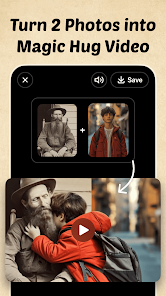
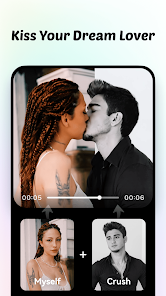
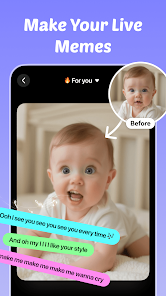

editor reviews
You know those apps that pop up on your feed promising to turn a still photo into a touching video moment? That's exactly what AI Hug Video Maker: JoyTu is. It's one of those AI-driven video generation tools that's been floating around on Google Play lately. The idea is simple: you upload a picture of yourself or someone else, and the app animates it into a hugging scene with a preset character or style. For someone like me who's always curious about these viral AI gimmicks, I downloaded it just to see if it actually delivers something that feels real or just another cheesy filter. The first impression after launching was actually decent — the interface is clean and doesn't bombard you with ads immediately, which is rare for free apps in this category. You do have to register or sign in, but it's quick with a Google or email account. The install count seems decent enough, though I didn't see an exact number, and it's free to download with in-app purchases for extra features.
Once you get past the onboarding, the actual hands-on experience is where things get a bit mixed. You pick a photo from your gallery — preferably a clear, front-facing shot — and then choose from a handful of preset hugging animations. The app processes it within maybe 15 to 20 seconds, which feels reasonable. The result is a short looping video where the person in your photo appears to be embraced by a cartoonish or semi-realistic figure. The movements are smooth enough that you might smile at first, but after a few loops, you start noticing the edges where the AI stitched things together. For example, if your photo has a weird background or if the face isn't perfectly aligned, the hug can look more like an awkward lean than an actual embrace. On the plus side, navigating between templates and previewing results is straightforward — no hidden menus or confusing buttons. I did wish there were more customization options, like adjusting the hug intensity or the character's appearance, but what's there is usable.
After using JoyTu for a while, I think it's one of those apps that's fun for a specific kind of user — maybe someone who wants to surprise a friend with a silly but heartfelt video or someone who just loves testing AI tools. But for me, the novelty wore off pretty fast. It's not something I'd keep on my phone for daily use because the results, while impressive for a free app, still feel gimmicky. Compared to other AI video apps like Reface or Lensa, JoyTu feels more limited in scope — it only does hugging animations, nothing else. The app does what it promises, but I'd only recommend it if you're okay with a one-time laugh rather than a serious tool.
features
- 🤖 The main feature is turning a static photo into a hugging animation. You upload a face, pick a template, and the AI does the rest. It's more specific than something like Reface, which does face swaps in general videos. JoyTu sticks to one emotional action, which makes the output feel more focused but less versatile.
- 🖼️ There are multiple hugging styles — romantic, friendly, and even some cartoonish ones. Each template has a different vibe, so you're not stuck with just one look. Compared to apps like Lensa or Avatar Maker, JoyTu is less about creating an avatar and more about animating an existing photo in a preset scene.
- ⚡ Processing time is short — around 15 seconds for a standard video. That's faster than some other AI video apps I've tried, which can take a minute or more. But the trade-off is that the output quality isn't as crisp as something like PicsArt's motion effects.
pros
- 👍 No watermarks on the free version — that's a big plus. Most free apps slap a huge logo on your output, but JoyTu keeps it clean unless you want to remove the small one in the corner, which costs a few bucks. Compared to Reface, where free output is heavily branded, this feels more generous.
- 👍 Simple to use from start to finish. The UI is straightforward — no layers, timelines, or complex edits. If you've used an app like CapCut or InShot, you'll find JoyTu much more casual. It's designed for quick fun, not professional editing.
- 👍 Low barrier to entry. You don't need a high-end phone or a perfect photo. Even with a slightly blurry selfie, the AI manages to produce something recognizable. Apps like Wonder Dynamics or Deep Nostalgia require clearer inputs, so JoyTu is more forgiving.
cons
- 👎 Very limited template library. There are only about 10-12 hugging styles, and after trying a few, you've seen them all. Reface or Lensa offer hundreds of filters and effects, so JoyTu feels shallow after a few uses.
- 👎 The results can be creepy. If the AI misaligns the face or if the lighting in your photo is off, the hug looks like the person is being grabbed by a ghost. It lacks the polish that apps like Movavi or Adobe Premiere Rush bring to motion graphics.
- 👎 No real video export control. You can't change resolution, frame rate, or length. What the AI gives you is what you have to accept. Other tools let you adjust the clip length or add music, but JoyTu is very “one-click-and-done.”
- 👎 Occasional app crashes on older devices. I tried it on a mid-range phone, and it froze twice during processing. On a newer Samsung, it worked fine, but the stability isn't as rock-solid as mainstream editors like KineMaster or VivaVideo.
Articles
![]()
Guide
How to Update Google Play Store on Android 2026
![]()
Guide
How to Download Older Versions of Android Apps
![]()
Guide
How to Download Apps Without Google Play Store
![]()
Guide
What Is an APK File for Android?
If you use an Android phone, you may have seen the term APK while searching for apps or games online. Some websites offer an APK download instead of a Google Play install button. Some users also mention APK files when talking about apps that are not available in their region, older app versions, or Android games downloaded outside the Play Store.
![]()
Guide
How to Install Games from Google Play for Beginners
Installing games on an Android phone is usually simple, but for beginners, the process can still feel confusing at first. You may not know where to search, which button to tap, whether the game is safe, or why Google Play sometimes asks for account settings, storage access, or payment information. If you are using an Android phone for the first time, learning how to install games from Google Play is one of the easiest ways to get started.
![]()
Guide
How Useful Gemini Is for Everyday Questions and Quick Tasks
emini feels different from many AI apps because it is not only trying to be a chatbot. After using it for everyday questions, quick writing, image understanding, and planning, I think its biggest strength is convenience.
![]()
Guide
What to Know Before Downloading APKs
For many Android users, downloading an APK is a common way to install apps and games. Sometimes an app is not available in a certain country.
![]()
Guide
ChatGPT Review: Is It Still the Best AI App in 2026?
![]()
Guide
Seedance 2.0 vs Sora: The Future of AI Video Generation
The AI video race has intensified dramatically over the past two years. Platforms like Sora from OpenAI and Luma Dream Machine pushed the boundaries of text-to-video realism. Yet, despite their impressive outputs, most tools still operate as probabilistic generators—you describe a scene, and the model interprets it. Control remains limited. With the February 2026 release of Seedance 2.0, developed by ByteDance, the paradigm shifted. Internally known as Jimeng 2.0, Seedance does not position itself as just another video model. It positions itself as an AI Director. Rather than guessing what you want, Seedance 2.0 allows you to direct what happens. This distinction defines everything that follows.









Recommended Apps
![]()
Home Design 3D
Anuman4.2
![]()
Truth or Dare Game - Party App
Chouic4.8
![]()
Photo Collage Maker
Scoompa4.7![]()
Learn to Draw Flower
Creative APPS4.2![]()
FIFA World Cup 2026™
FIFA2.8![]()
Mirror Plus: Mirror with Light
Digitalchemy, LLC4.4![]()
Meitu- Photo Editor & AI Art
Meitu (China) Limited4.5![]()
Perplexity - Ask Anything
PerplexityAI4.7![]()
GhostTube SLS Camera Alternate
GhostTube4![]()
Boom Chip Blast: 2-Player
Black Pyramid 3D Games Studio0![]()
Healthy Benefits+
Solutran, Inc.4.5![]()
Deepcheck AI Search Assistant
rohe.ai4![]()
Idol Prank Video Call & Chat
LightCode Solutions4![]()
Face Shape - Pretty Scale
GlintTec Apps3.9![]()
Plant App - Plant Identifier
ScaleUp4.6












































