

Pet To Human - Pet into Human

100+
Installs
Applax Pte. Ltd.
Developer
-
Generative AI
Category
-
Everyone
Content Rating
-
team@applax.co
Developer Email
-
https://pettohuman.app/privacy
Privacy Policy
Screenshots
editor reviews
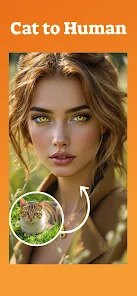
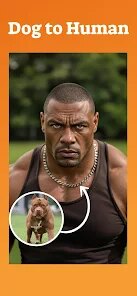
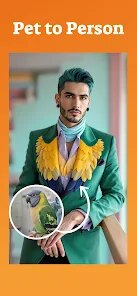
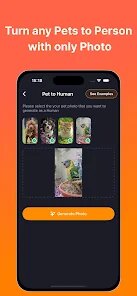
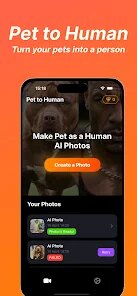
Pet To Human is a quirky photo-editing app that transforms pictures of your pets into human-like portraits using AI. It's available for free on both Google Play and the App Store, with a modest install count that suggests it's carved out a small but dedicated audience. You just download it, launch it, and you're greeted with a simple interface that asks for a photo of your cat, dog, or any furry friend. No mandatory sign-up, just a quick tap to see what the algorithm spits out. I installed it out of sheer curiosity after seeing a friend's hilarious result, and my first impression was that it's surprisingly polished for a niche tool. The app does have optional in-app purchases for more styles or faster processing, and ads pop up occasionally, but they're not aggressive enough to ruin the fun.
After uploading a picture of my golden retriever, the app took about twenty seconds to generate a human version. The interface is clean, with a big upload button front and center, and a few toggle options for adjusting style, like cartoonish or realistic. I swiped through the results, which showed my dog with a human face, complete with a goofy smile and a jacket that matched her fur color. The onboarding is straightforward: you pick a photo, wait a bit, and then you can save or share the result. I noticed that the app works best with well-lit, front-facing pet shots; a blurry action shot of my cat came out looking like a melted candle. A practical tip is to crop the pet's face tightly before uploading, as the AI struggles with cluttered backgrounds. The whole process feels smooth, but the processing time can drag on a bit if you're not on Wi-Fi.
After a few days of testing, I'd say this app is perfect for pet owners who want a laugh or a unique profile picture, but it's not something you'll use daily. The results are genuinely entertaining, especially if you share them with friends who know the animal, but the novelty wears off fast. Compared to similar apps like FaceApp or Meitu, Pet To Human focuses exclusively on animals, which is both its charm and its limit. The AI isn't as refined as pricier tools; sometimes the human faces look generic, like a stock photo. I kept it installed for future pet photos, but I can see others uninstalling after a few tries. It's a fun gimmick, not a serious productivity tool, and that's fine.
features
- 🖼️ The standout feature is the AI transformation itself, which maps your pet's facial features onto a human face with surprising accuracy. Unlike HumanPetAI, which often produces cartoonish blur, this app keeps the original expression, like a dog's floppy ears becoming a hairstyle or a cat's whiskers turning into facial hair. It's not perfect, but when it works, the results are shareable gold.
- 📸 The app offers a few style presets beyond the default, such as “vintage painting” or “anime,” which sets it apart from straightforward tools like PetPortrait. You can toggle between these without re-uploading, saving time. The “cartoon” mode gave my cat a Studio Ghibli look, which was a nice touch for aesthetic-loving users.
- ⚡ Processing speed is decent for a free app, usually under thirty seconds, but it can lag with older phones. Compared to Swag Pet, which crashes often, Pet To Human holds up well. There's no batch processing, but the single-image focus keeps it lean and less bloated.
pros
- 🐾 Pet To Human excels at retaining breed-specific traits, like a pug's wrinkled face or a husky's blue eyes, while competitors like AnimalFace often ignore these details, leading to generic results. My corgi's stubby legs weren't perfectly transferred, but the app kept his short fur texture in the hair.
- 📷 The free version includes most features, with ads that are skippable, unlike PetAI, which hides decent styles behind a paywall. For casual users, it's a generous offering, letting you test the gimmick without commitment.
- 🎯 Its niche focus feels refreshing compared to broader apps like FaceApp, where the pet feature is an afterthought. The design is pet-centric, making the experience feel intentional.
cons
- 🐕 The AI frequently fails with dark or mixed-breed fur, producing muddy colors, while HumanPetAI handles contrast better. My black lab came out looking like a shadow, which was disappointing for a quick laugh.
- 📉 There's no undo or history feature, so if you accidentally delete a result, you're stuck re-uploading and paying token credits. Competing apps like PetMagic let you revisit previous edits, which feels more user-friendly.
- 📛 Ads appear after every two transformations, breaking the flow, unlike PetLens which only shows banner ads. After generating three images, I hit an ad that took fifteen seconds, which killed the fun for group sharing.
Articles
![]()
Guide
How to Update Google Play Store on Android 2026
![]()
Guide
How to Download Older Versions of Android Apps
![]()
Guide
How to Download Apps Without Google Play Store
![]()
Guide
What Is an APK File for Android?
If you use an Android phone, you may have seen the term APK while searching for apps or games online. Some websites offer an APK download instead of a Google Play install button. Some users also mention APK files when talking about apps that are not available in their region, older app versions, or Android games downloaded outside the Play Store.
![]()
Guide
How to Install Games from Google Play for Beginners
Installing games on an Android phone is usually simple, but for beginners, the process can still feel confusing at first. You may not know where to search, which button to tap, whether the game is safe, or why Google Play sometimes asks for account settings, storage access, or payment information. If you are using an Android phone for the first time, learning how to install games from Google Play is one of the easiest ways to get started.
![]()
Guide
How Useful Gemini Is for Everyday Questions and Quick Tasks
emini feels different from many AI apps because it is not only trying to be a chatbot. After using it for everyday questions, quick writing, image understanding, and planning, I think its biggest strength is convenience.
![]()
Guide
What to Know Before Downloading APKs
For many Android users, downloading an APK is a common way to install apps and games. Sometimes an app is not available in a certain country.
![]()
Guide
ChatGPT Review: Is It Still the Best AI App in 2026?
![]()
Guide
Seedance 2.0 vs Sora: The Future of AI Video Generation
The AI video race has intensified dramatically over the past two years. Platforms like Sora from OpenAI and Luma Dream Machine pushed the boundaries of text-to-video realism. Yet, despite their impressive outputs, most tools still operate as probabilistic generators—you describe a scene, and the model interprets it. Control remains limited. With the February 2026 release of Seedance 2.0, developed by ByteDance, the paradigm shifted. Internally known as Jimeng 2.0, Seedance does not position itself as just another video model. It positions itself as an AI Director. Rather than guessing what you want, Seedance 2.0 allows you to direct what happens. This distinction defines everything that follows.









Recommended Apps
![]()
Home Design 3D
Anuman4.2
![]()
Truth or Dare Game - Party App
Chouic4.8
![]()
Photo Collage Maker
Scoompa4.7![]()
Learn to Draw Flower
Creative APPS4.2![]()
FIFA World Cup 2026™
FIFA2.8![]()
Mirror Plus: Mirror with Light
Digitalchemy, LLC4.4![]()
Meitu- Photo Editor & AI Art
Meitu (China) Limited4.5![]()
Perplexity - Ask Anything
PerplexityAI4.7![]()
GhostTube SLS Camera Alternate
GhostTube4![]()
Boom Chip Blast: 2-Player
Black Pyramid 3D Games Studio0![]()
Healthy Benefits+
Solutran, Inc.4.5![]()
Deepcheck AI Search Assistant
rohe.ai4![]()
Idol Prank Video Call & Chat
LightCode Solutions4![]()
Face Shape - Pretty Scale
GlintTec Apps3.9![]()
Plant App - Plant Identifier
ScaleUp4.6












































