

Bipolar Test

10K+
Installs
Inquiry Health LLC
Developer
-
Health & Fitness
Category
-
Everyone
Content Rating
-
moodtools@gmail.com
Developer Email
-
https://inquiryhealth.com/testprivacypolicy/index.html
Privacy Policy
Screenshots
editor reviews
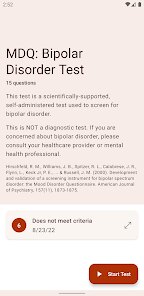
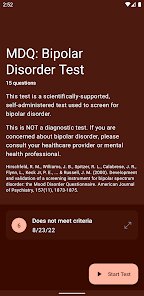
Bipolar Test is a mental health screening tool available on both Google Play and the App Store, designed to help users assess their mood patterns and potential signs of bipolar disorder. It falls under the medical and health app category, mainly offering a structured questionnaire based on clinically recognized screening methods. A normal user might download this app out of personal curiosity or concern after experiencing mood swings, sleep changes, or energy fluctuations. When I first launched the app after installing it from the Play Store, the interface felt clean and intentionally simple, with no flashy graphics or overwhelming data requests. The free download process was straightforward, and there was no immediate push for registration or payment, which made the initial impression feel safe rather than salesy. However, it quickly became clear that while the screening is free, certain reports or detailed breakdowns require an in-app purchase, so the transparency around that could be better.
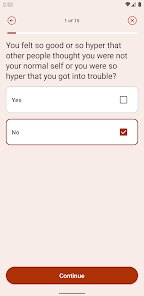
After going through the screening process, the hands-on experience is fairly simple. The onboarding walks you through a mood history section first, asking about past episodes of high or low energy, then moves into a series of multiple-choice questions. Each question focuses on a specific timeframe, like the past two weeks or your lifetime, which helps build a clearer picture. Moving through the app, the main actions are answering questions and then viewing your results, which are presented as a risk score rather than a medical diagnosis. The interface is smooth for the most part, though I found the phrasing of some questions a bit repetitive, which made the process feel longer than it needed to be. A practical tip I picked up is to answer honestly without overthinking each question, because the app's value comes from raw input, not overanalyzed answers. There were no major confusing moments, but the lack of a progress bar made me wonder how much longer the questionnaire would take.
After using Bipolar Test for a while, I think it serves a specific purpose well, but it is not for everyone. People who are already in therapy or under psychiatric care might find it too basic compared to the detailed assessments their doctor provides, while someone just starting to question their mental health could find it a helpful first step. What makes it different from similar apps like Moodpath or MindDoc is how narrowly focused it is on bipolar screening rather than broader mental health tracking. That focus helps avoid information overload, but it also means the app does not offer daily tracking, coping strategies, or community support after the test. I can see someone keeping it installed if they want to retake the screening after a few months to see if their mood patterns have shifted, but because there is no ongoing feature beyond the questionnaire, many users might uninstall it after a single use. It feels like a useful tool for a specific moment, not a daily companion.
features
- 🧠 The standout feature is the app's structured screening based on the Mood Disorder Questionnaire (MDQ), a clinically recognized tool, which gives the results more credibility than a random online quiz. Unlike Daylio, which focuses on mood journaling without any clinical validation, Bipolar Test directly ties its questions to established diagnostic criteria, making the output feel more reliable for someone truly concerned about bipolar disorder.
- 🧠 Another notable feature is the lifetime and recent episode assessment, which separates past manic or hypomanic episodes from current depression. This two-pronged approach helps distinguish between a temporary low mood and a recurring pattern, whereas apps like Youper tend to blend emotional states into a single daily log without this historical context.
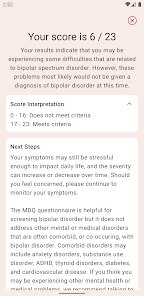
- 🧠 The app also provides a clear risk-level result rather than a hard diagnosis, which is important because no screening tool can replace a professional evaluation. This careful wording reduces the risk of false reassurance or unnecessary panic, unlike some apps that claim to detect disorders without proper disclaimers.
pros
- ✅ One major strength is the privacy-first approach: the app does not require an account or email to take the test, unlike MindDoc which pushes for user registration before you can see any content. This makes Bipolar Test feel less intrusive and quicker to use.
- ✅ The app's language is neutral and non-judgmental, which helps users feel comfortable answering honestly. Compared to some self-help apps that use overly positive motivational language, this tool keeps a medical tone that suits the screening context.
- ✅ It also loads fast on older devices, a small but real advantage over heavier apps like Moodpath, which can lag on budget phones due to its richer animations and daily tracking widgets.
cons
- ❌ The biggest downside is the lack of post-assessment support. After you get your result, the app offers no coping tips, crisis resources, or guidance on next steps, whereas apps like MindDoc at least suggest contacting a therapist or offer mood tracking. Users feeling anxious after a high-risk result are left hanging.
- ❌ The app only screens for bipolar disorder, so if your result is negative but you still feel off, it offers no alternative insight. Compared to Moodpath, which screens for depression, anxiety, and bipolar, this narrow focus feels limiting.
- ❌ Some users might find the in-app purchase for full reports frustrating, especially since the app markets itself as free. The report content is useful, but paying for it after already answering a long questionnaire can feel like a bait-and-switch compared to apps like Daylio that unlock all features through a one-time subscription model.
Articles
![]()
Guide
How to Update Google Play Store on Android 2026
![]()
Guide
How to Download Older Versions of Android Apps
![]()
Guide
How to Download Apps Without Google Play Store
![]()
Guide
What Is an APK File for Android?
If you use an Android phone, you may have seen the term APK while searching for apps or games online. Some websites offer an APK download instead of a Google Play install button. Some users also mention APK files when talking about apps that are not available in their region, older app versions, or Android games downloaded outside the Play Store.
![]()
Guide
How to Install Games from Google Play for Beginners
Installing games on an Android phone is usually simple, but for beginners, the process can still feel confusing at first. You may not know where to search, which button to tap, whether the game is safe, or why Google Play sometimes asks for account settings, storage access, or payment information. If you are using an Android phone for the first time, learning how to install games from Google Play is one of the easiest ways to get started.
![]()
Guide
How Useful Gemini Is for Everyday Questions and Quick Tasks
emini feels different from many AI apps because it is not only trying to be a chatbot. After using it for everyday questions, quick writing, image understanding, and planning, I think its biggest strength is convenience.
![]()
Guide
What to Know Before Downloading APKs
For many Android users, downloading an APK is a common way to install apps and games. Sometimes an app is not available in a certain country.
![]()
Guide
ChatGPT Review: Is It Still the Best AI App in 2026?
![]()
Guide
Seedance 2.0 vs Sora: The Future of AI Video Generation
The AI video race has intensified dramatically over the past two years. Platforms like Sora from OpenAI and Luma Dream Machine pushed the boundaries of text-to-video realism. Yet, despite their impressive outputs, most tools still operate as probabilistic generators—you describe a scene, and the model interprets it. Control remains limited. With the February 2026 release of Seedance 2.0, developed by ByteDance, the paradigm shifted. Internally known as Jimeng 2.0, Seedance does not position itself as just another video model. It positions itself as an AI Director. Rather than guessing what you want, Seedance 2.0 allows you to direct what happens. This distinction defines everything that follows.









Recommended Apps
![]()
Home Design 3D
Anuman4.2
![]()
Truth or Dare Game - Party App
Chouic4.8
![]()
Photo Collage Maker
Scoompa4.7![]()
Learn to Draw Flower
Creative APPS4.2![]()
FIFA World Cup 2026™
FIFA2.8![]()
Mirror Plus: Mirror with Light
Digitalchemy, LLC4.4![]()
Meitu- Photo Editor & AI Art
Meitu (China) Limited4.5![]()
Perplexity - Ask Anything
PerplexityAI4.7![]()
GhostTube SLS Camera Alternate
GhostTube4![]()
Boom Chip Blast: 2-Player
Black Pyramid 3D Games Studio0![]()
Healthy Benefits+
Solutran, Inc.4.5![]()
Deepcheck AI Search Assistant
rohe.ai4![]()
Idol Prank Video Call & Chat
LightCode Solutions4![]()
Face Shape - Pretty Scale
GlintTec Apps3.9![]()
Plant App - Plant Identifier
ScaleUp4.6












































