
Monster Girl Maker 2

5M+
Installs
GHOULKISS
Developer
-
Simulation
Category
-
Everyone
Content Rating
-
ghoulkiss.dev@gmail.com
Developer Email
-
https://www.privacypolicies.com/privacy/view/929ca7252b201c6be1e29b268bc9c1e1
Privacy Policy
Screenshots
editor reviews
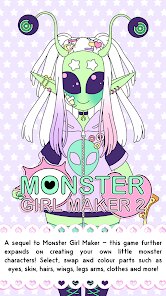
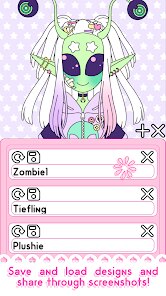
So I finally gave Monster Girl Maker 2 a shot, and honestly, it's exactly what the name suggests—a casual character creation game where you design and customize monster girls. It's a sandbox-style app, more about creativity than actual gameplay, so if you're looking for a story or quests, this isn't it. You mainly use it to tweak appearances, mix traits, and save your creations. I downloaded it from Google Play after seeing a friend mess around with it, and the install size was pretty small, which was nice since my storage is always full. The app is free to download, but I quickly noticed there are optional in-app purchases for extra parts and outfits, and there are occasional ads unless you buy the premium version. First impression after launch? The interface is super colorful and a bit chaotic—tons of sliders and buttons crammed into one screen. It felt overwhelming for a few seconds, but that initial shock passed fast once I started tapping around.
Once I actually started using it, the experience was a mix of fun and frustration. The onboarding is basically nonexistent—you're just dropped into the editor with a default character and left to figure things out. I spent the first five minutes randomly adjusting tail length and eye shape, just to see what each slider did. The main actions are selecting body parts, changing colors, and stacking features like horns, wings, or scales. A common usage step would be picking a base species, then layering accessories—I made a cat-girl with dragon wings and a snake tail, which looked ridiculous but was hilarious. Some moments felt smooth, like how responsive the color picker is. But other parts were confusing—the layers for clothing and skin sometimes overlapped weirdly, and I accidentally deleted a wing twice. A small practical tip: save your character early, because the app doesn't auto-save. Also, the zoom and rotation controls are a bit touchy, so move slowly.
After playing with it for a while, I have a pretty solid opinion. People who enjoy character creation for its own sake—like making weird hybrids or specific anime-inspired designs—will probably love this. But if you want a game with progression, battles, or even a simple plot, this app will bore you fast. What makes it different from apps like the original Monster Girl Maker or even Picrew is the sheer amount of customization—hundreds of parts and color options. But the trade-off is that the interface feels cluttered, and the lack of guidance can be annoying. I can see myself keeping it installed for lazy afternoons when I just want to mess around with designs. However, I'd probably uninstall it if I needed storage for something more engaging, because after creating five or six characters, the novelty starts to wear off. It's a niche tool, not a long-term game.
features
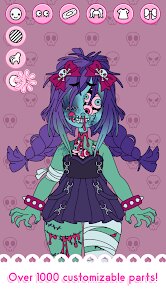
- 👾 The biggest draw is the sheer volume of customization—hundreds of parts like wings, tails, horns, and outfits. Compared to Monster Girl Maker 1, which felt limited, MGM2 gives you way more freedom to combine different species traits.
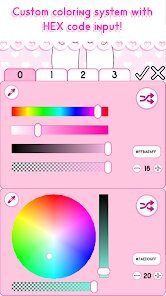
- 👾 The color wheel and gradient options are impressively detailed. You can adjust almost every hue, from skin tone to eye shine. Apps like Charat or Picrew often have preset palettes, so this level of control stands out.
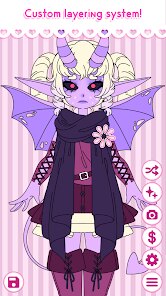
- 👾 The layer system allows you to stack accessories without them clipping as much as you'd expect. For a mobile app, the engine handles overlays pretty well—I stacked five different items without major glitches.
pros
- ⭐ One clear strength is the art style—it's cute and consistent, with a hand-drawn anime look that feels polished. In comparison, apps like Custom Cast or Doll Divine sometimes have mismatched art between different parts.
- ⭐ Another strength is the free base content. While there are IAPs, the free options are generous enough to keep you busy for hours. Stuff like Gacha Club gives you less flexibility without spending money.
- ⭐ The app handles undo and redo smoothly, which is a lifesaver during experiments. Other character creators often make you manually reset sliders.
cons
- 💥 The main weakness is the cluttered interface—everything is on one screen with tiny buttons. Apps like Mii Maker are way more intuitive for beginners.
- 💥 There's no proper search or category sorting for parts. If you want a specific horn style, you have to scroll through dozens of options. Picrew does this much better with tags.
- 💥 Performance can lag when too many layers are active, especially on older phones. I experienced a few frame drops and a crash. No other mobile character creator I've tried was that unstable.
- 💥 The lack of an undo button for individual actions is frustrating—you can only undo the last big step, not revert a single slider change.
Articles
![]()
Guide
How to Update Google Play Store on Android 2026
![]()
Guide
How to Download Older Versions of Android Apps
![]()
Guide
How to Download Apps Without Google Play Store
![]()
Guide
What Is an APK File for Android?
If you use an Android phone, you may have seen the term APK while searching for apps or games online. Some websites offer an APK download instead of a Google Play install button. Some users also mention APK files when talking about apps that are not available in their region, older app versions, or Android games downloaded outside the Play Store.
![]()
Guide
How to Install Games from Google Play for Beginners
Installing games on an Android phone is usually simple, but for beginners, the process can still feel confusing at first. You may not know where to search, which button to tap, whether the game is safe, or why Google Play sometimes asks for account settings, storage access, or payment information. If you are using an Android phone for the first time, learning how to install games from Google Play is one of the easiest ways to get started.
![]()
Guide
How Useful Gemini Is for Everyday Questions and Quick Tasks
emini feels different from many AI apps because it is not only trying to be a chatbot. After using it for everyday questions, quick writing, image understanding, and planning, I think its biggest strength is convenience.
![]()
Guide
What to Know Before Downloading APKs
For many Android users, downloading an APK is a common way to install apps and games. Sometimes an app is not available in a certain country.
![]()
Guide
ChatGPT Review: Is It Still the Best AI App in 2026?
![]()
Guide
Seedance 2.0 vs Sora: The Future of AI Video Generation
The AI video race has intensified dramatically over the past two years. Platforms like Sora from OpenAI and Luma Dream Machine pushed the boundaries of text-to-video realism. Yet, despite their impressive outputs, most tools still operate as probabilistic generators—you describe a scene, and the model interprets it. Control remains limited. With the February 2026 release of Seedance 2.0, developed by ByteDance, the paradigm shifted. Internally known as Jimeng 2.0, Seedance does not position itself as just another video model. It positions itself as an AI Director. Rather than guessing what you want, Seedance 2.0 allows you to direct what happens. This distinction defines everything that follows.









Recommended Apps
![]()
Home Design 3D
Anuman4.2
![]()
Truth or Dare Game - Party App
Chouic4.8
![]()
Photo Collage Maker
Scoompa4.7![]()
Learn to Draw Flower
Creative APPS4.2![]()
FIFA World Cup 2026™
FIFA2.8![]()
Mirror Plus: Mirror with Light
Digitalchemy, LLC4.4![]()
Meitu- Photo Editor & AI Art
Meitu (China) Limited4.5![]()
Perplexity - Ask Anything
PerplexityAI4.7![]()
GhostTube SLS Camera Alternate
GhostTube4![]()
Boom Chip Blast: 2-Player
Black Pyramid 3D Games Studio0![]()
Healthy Benefits+
Solutran, Inc.4.5![]()
Deepcheck AI Search Assistant
rohe.ai4![]()
Idol Prank Video Call & Chat
LightCode Solutions4![]()
Face Shape - Pretty Scale
GlintTec Apps3.9![]()
Plant App - Plant Identifier
ScaleUp4.6











































