

iControl: Easy Widgets Themes

10M+
Installs
Fancy keyboard for theme apps
Developer
-
Productivity
Category
-
Teen
Content Rating
-
cekalsid@gmail.com
Developer Email
-
https://icontrol-themes.web.app/privacy-policy
Privacy Policy
Screenshots
editor reviews
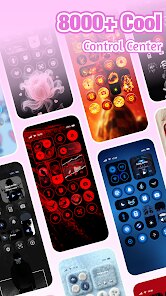
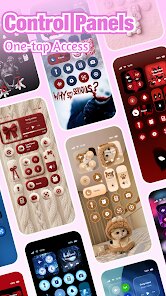
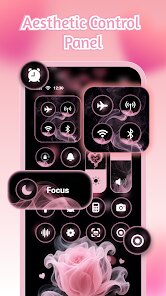
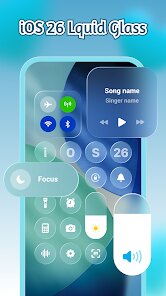
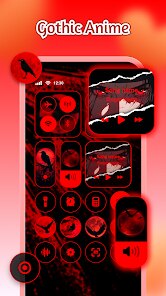
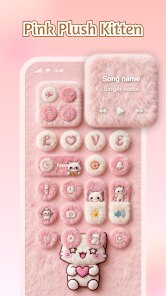
So iControl: Easy Widgets Themes is basically a customization app you grab from the Play Store if you are bored with how your phone looks. It is one of those theme and widget makers that lets you slap custom clocks, weather panels, battery bars, and photo frames right onto your home screen. A lot of people download this kind of app because they want their phone to feel personal rather than just the same stock look everyone else has. You do not need to register an account to start playing with it, which is nice. The first time you launch it, the interface shows you a bunch of widget previews immediately, so you are not stuck staring at a blank page wondering what to do. There are free options available, but naturally some of the nicer widget packs or extra theme elements are locked behind in-app purchases. You will see a few ads pop up now and then, but they are not too aggressive compared to some other apps in this category.
Once you start actually using iControl, the experience is mostly drag and drop. You pick a widget style, adjust the transparency or color, resize it, and then place it on your screen. The onboarding is pretty straightforward, though sometimes the touch targets feel a tiny bit small if your fingers are not precise. There is a preview mode that shows how everything will look before you commit, which saves a lot of trial and error. For daily use, if you want to change your theme every few weeks, this app makes it easy enough. But if you are someone who just wants the widgets to blend in and then forget about them, the constant need to tweak alignment or refresh the preview can get a little annoying. I noticed that the weather widget updates slower than I would like sometimes, and the clock fonts, while stylish, are not always the easiest to read at a glance.
After using it for a while, I think iControl is great for people who enjoy messing around with their phone's aesthetics and want more variety than what the default launcher offers. But if you are the type who just wants a clean, functional widget that updates fast and stays out of your way, you might get frustrated with the extra steps required to make things look right. Compared to something like KWGT, iControl is way easier to use and does not need you to learn any complex settings. On the other hand, it does not offer the same deep level of customization either. I kept it installed because changing widgets every couple of weeks feels fun, but I can see why someone who values simplicity would uninstall it after a week and just go back to using a basic clock widget from their phone's default tools.
features
- 🧩 Widget style variety - This is where iControl really stands out compared to, say, Hola Launcher. You get dozens of different widget designs for clocks, weather, calendars, and even photo frames. Each one comes with adjustable transparency, color, and size. Other launcher apps usually give you maybe five or six generic options and call it a day, but iControl actually tries to offer something for different visual tastes.
- ⚙️ Drag-and-drop editing - Unlike some heavier customization tools that make you type in coordinates or fiddle with grid numbers, iControl lets you just grab a widget and drop it anywhere on the screen. It is not as precise as something like Nova Launcher's widget system, but for the average user who just wants things to look decent, it works well enough without a learning curve.
- ⏱️ Real-time preview - Before you apply any widget to your home screen, you can see exactly how it will look with your current wallpaper and icon arrangement. This saves you from the back-and-forth of applying something, checking it, then undoing it. Most theme apps skip this feature entirely, so you end up wasting time testing things blindly.
- 🎨 Theme packs included - You do not have to hunt around online for third-party resources. The app comes bundled with multiple theme packs that match widget styles, so your whole home screen can feel cohesive. Other apps often leave you to mix and match yourself, which can end up looking messy unless you have a good eye for design.
pros
- 💡 Quick setup - Compared to something like Action Launcher, iControl takes way less time to get your home screen looking different. You just pick a widget, resize it, and you are done, no extra menus to dig into.
- 💡 No launcher replacement needed - Unlike many theme apps that force you to install a whole new launcher and lose your current setup, iControl works on top of your existing home screen. That makes it less risky to try out.
- 💡 Low learning curve - Where apps like KLWP require understanding of formulas and layers, iControl is friendly for anyone who just wants to point and click. My mom could figure it out in five minutes.
- 💡 Lightweight performance - It does not drain your battery in the background like some live wallpaper apps or overly complex widget tools do. After a week of use, I did not notice any unusual battery drain on my phone.
cons
- ⛔ Limited widget customization depth - When you compare it with KWGT, iControl feels restrictive. You cannot edit individual elements within a widget, like changing a clock hand style or adjusting a shadow layer. What you see in the preview is basically what you get, minus color and transparency tweaks.
- ⛔ Slower weather updates - The weather widget sometimes lags behind the actual conditions by an hour or more, which is annoying if you rely on it to decide whether to grab an umbrella. Other apps like Weather Timeline or even the default Google widget are much more reliable in this regard.
- ⛔ Occasional ad interruptions - While the ads are not constant, they do pop up at moments when you are just trying to preview a widget, which breaks the flow. Apps like Buzz Launcher handle ad placement more gracefully by keeping them in a separate section.
- ⛔ Widget alignment issues - On some phones with non-standard screen resolutions, widgets can appear slightly misaligned or get cut off at the edges. I tested it on a Samsung Galaxy A54 and had to adjust the grid settings manually to fix it, which is something you should not need to do.
Articles
![]()
Guide
How to Update Google Play Store on Android 2026
![]()
Guide
How to Download Older Versions of Android Apps
![]()
Guide
How to Download Apps Without Google Play Store
![]()
Guide
What Is an APK File for Android?
If you use an Android phone, you may have seen the term APK while searching for apps or games online. Some websites offer an APK download instead of a Google Play install button. Some users also mention APK files when talking about apps that are not available in their region, older app versions, or Android games downloaded outside the Play Store.
![]()
Guide
How to Install Games from Google Play for Beginners
Installing games on an Android phone is usually simple, but for beginners, the process can still feel confusing at first. You may not know where to search, which button to tap, whether the game is safe, or why Google Play sometimes asks for account settings, storage access, or payment information. If you are using an Android phone for the first time, learning how to install games from Google Play is one of the easiest ways to get started.
![]()
Guide
How Useful Gemini Is for Everyday Questions and Quick Tasks
emini feels different from many AI apps because it is not only trying to be a chatbot. After using it for everyday questions, quick writing, image understanding, and planning, I think its biggest strength is convenience.
![]()
Guide
What to Know Before Downloading APKs
For many Android users, downloading an APK is a common way to install apps and games. Sometimes an app is not available in a certain country.
![]()
Guide
ChatGPT Review: Is It Still the Best AI App in 2026?
![]()
Guide
Seedance 2.0 vs Sora: The Future of AI Video Generation
The AI video race has intensified dramatically over the past two years. Platforms like Sora from OpenAI and Luma Dream Machine pushed the boundaries of text-to-video realism. Yet, despite their impressive outputs, most tools still operate as probabilistic generators—you describe a scene, and the model interprets it. Control remains limited. With the February 2026 release of Seedance 2.0, developed by ByteDance, the paradigm shifted. Internally known as Jimeng 2.0, Seedance does not position itself as just another video model. It positions itself as an AI Director. Rather than guessing what you want, Seedance 2.0 allows you to direct what happens. This distinction defines everything that follows.









Recommended Apps
![]()
Home Design 3D
Anuman4.2
![]()
Truth or Dare Game - Party App
Chouic4.8
![]()
Photo Collage Maker
Scoompa4.7![]()
Learn to Draw Flower
Creative APPS4.2![]()
FIFA World Cup 2026™
FIFA2.8![]()
Mirror Plus: Mirror with Light
Digitalchemy, LLC4.4![]()
Meitu- Photo Editor & AI Art
Meitu (China) Limited4.5![]()
Perplexity - Ask Anything
PerplexityAI4.7![]()
GhostTube SLS Camera Alternate
GhostTube4![]()
Boom Chip Blast: 2-Player
Black Pyramid 3D Games Studio0![]()
Healthy Benefits+
Solutran, Inc.4.5![]()
Deepcheck AI Search Assistant
rohe.ai4![]()
Idol Prank Video Call & Chat
LightCode Solutions4![]()
Face Shape - Pretty Scale
GlintTec Apps3.9![]()
Plant App - Plant Identifier
ScaleUp4.6












































