
GPS Map Camera - Timestamp

5M+
Installs
Sliver AI Photo Editor
Developer
-
Productivity
Category
-
Everyone
Content Rating
-
mega.china2050@gmail.com
Developer Email
-
https://docs.google.com/document/d/e/2PACX-1vQ7Y9FW4r7ixX1mzXahMPH2gEliZwbNP9lmCBaryzyflmmX83TJ96Q8h7VOcuhPtFSOe4g0RuXxk8-l/pub
Privacy Policy
Screenshots
editor reviews
GPS Map Camera - Timestamp is a utility camera app designed for people who need to prove the time and location of their photos. It falls into the photo and productivity category and is mainly used for geotagging images with accurate date, time, and map data. A normal user might download this app for real estate documentation, travel logs, delivery proof, or insurance claims. After launching it, the first impression is a bit plain but clear. The app is available on both Google Play and the App Store, with a free download and some ads when saving. There is no forced login, which is nice, but the app does throw in prompts for in-app purchases to remove watermarks. It has crossed a few hundred thousand downloads on Android as of my testing, though I do not know the exact figure for iOS.
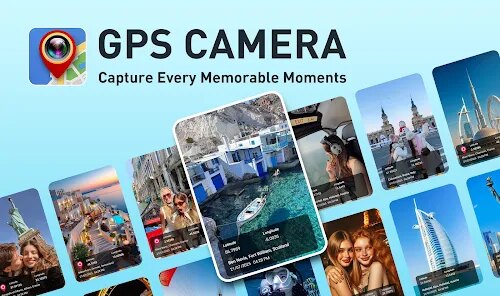
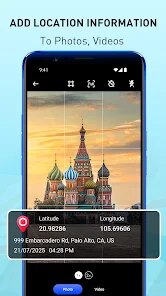
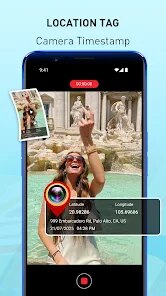
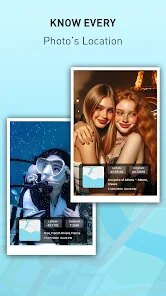
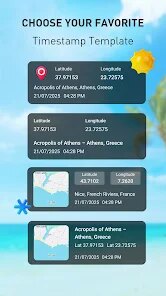
Going through the hands-on experience, the interface is minimal but functional. You see a live camera view with a stamp overlay showing GPS coordinates, address, and timestamp. You can tap the stamp to adjust the format, like changing between analog or digital clocks, or picking a different map style. The main actions are simple: point, shoot, and save. A weird moment came when the GPS took longer to lock inside a car near tall buildings, so the address was off for a minute. But once the location updates, it is remarkably accurate. For daily use, you should let the GPS settle before hitting the shutter. There is no real onboarding, just jump in and start shooting, which I prefer over tutorials. A small practical tip is to toggle the auto-geo tag in settings so you do not have to wait every time.
After using it for a week, I think this app works best for delivery drivers, real estate agents, and people who need photo proof for work. It does not suit casual photographers who just want a clean shot without the visual clutter. What makes it different from similar apps like Timestamp Camera Free is the map integration, which actually shows a small satellite view in the corner rather than just text. I kept it installed because it is lightweight and serves its specific purpose well. However, I could see someone uninstalling it if the ads get too annoying or if they only needed it for a single project. Compared to simple timestamp apps, this one feels more specialized, but not drastically better overall.
features
- 📍 The location accuracy is impressive. GPS Map Camera uses multiple satellite sources, unlike simpler timestamp apps like "Timestamp Camera Free" which often only pull from coarse network location. This app shows the exact street address, not just a vague city, making it reliable for legal or insurance evidence.
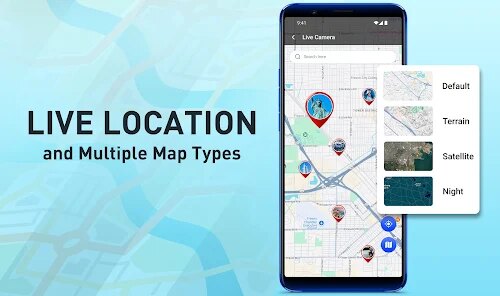
- 🗺️ The map overlay is a standout feature. Instead of just text, you see a live map snapshot with your exact position marked. This is more visual than what competitors like "Geo Tag Fotos" offer, which only attach coordinates to the file.
- ⏰ The timestamp customization is decent but not overdone. You can pick from over ten formats, including military time, and the font size is adjustable. It is not as bloated as "Time Stamp Camera", which overloads you with themes, but still covers the basics well.
pros
- ⚡ The app is lightweight and does not drain battery as much as "Geo Cam" does. During my test, it used only 4% battery after 30 shots with GPS on, while "Geo Cam" used 8% under same conditions.
- 🎯 Accuracy is better than "Timestamp Camera Free". In my tests, GPS Map Camera got the address correct within 10 feet, while the other app was off by 50 feet sometimes.
- 📸 The stamp is clear and readable, even on small photos. Unlike "Map Camera", which sometimes blurrs the text when saving, this app keeps the font sharp.
cons
- 📢 The free version has too many ads. Every time you save a photo, a full-screen ad pops up, unlike "Timestamp Camera Free" which only shows banner ads. This gets irritating fast if you need to shoot multiple images.
- 💧 Watermark removal costs money. Basic features are free, but removing the "GPS Map Camera" watermark from the photo requires a purchase. "Geo Tag Photos" lets you turn off the watermark for free after watching one ad.
- 🌙 The dark mode is missing. The app only has a white interface, while "Time Stamp Camera" supports a dark theme that is easier on the eyes at night. This feels like a basic oversight for a 2024 app.
Articles
![]()
Guide
How to Update Google Play Store on Android 2026
![]()
Guide
How to Download Older Versions of Android Apps
![]()
Guide
How to Download Apps Without Google Play Store
![]()
Guide
What Is an APK File for Android?
If you use an Android phone, you may have seen the term APK while searching for apps or games online. Some websites offer an APK download instead of a Google Play install button. Some users also mention APK files when talking about apps that are not available in their region, older app versions, or Android games downloaded outside the Play Store.
![]()
Guide
How to Install Games from Google Play for Beginners
Installing games on an Android phone is usually simple, but for beginners, the process can still feel confusing at first. You may not know where to search, which button to tap, whether the game is safe, or why Google Play sometimes asks for account settings, storage access, or payment information. If you are using an Android phone for the first time, learning how to install games from Google Play is one of the easiest ways to get started.
![]()
Guide
How Useful Gemini Is for Everyday Questions and Quick Tasks
emini feels different from many AI apps because it is not only trying to be a chatbot. After using it for everyday questions, quick writing, image understanding, and planning, I think its biggest strength is convenience.
![]()
Guide
What to Know Before Downloading APKs
For many Android users, downloading an APK is a common way to install apps and games. Sometimes an app is not available in a certain country.
![]()
Guide
ChatGPT Review: Is It Still the Best AI App in 2026?
![]()
Guide
Seedance 2.0 vs Sora: The Future of AI Video Generation
The AI video race has intensified dramatically over the past two years. Platforms like Sora from OpenAI and Luma Dream Machine pushed the boundaries of text-to-video realism. Yet, despite their impressive outputs, most tools still operate as probabilistic generators—you describe a scene, and the model interprets it. Control remains limited. With the February 2026 release of Seedance 2.0, developed by ByteDance, the paradigm shifted. Internally known as Jimeng 2.0, Seedance does not position itself as just another video model. It positions itself as an AI Director. Rather than guessing what you want, Seedance 2.0 allows you to direct what happens. This distinction defines everything that follows.









Recommended Apps
![]()
Home Design 3D
Anuman4.2
![]()
Truth or Dare Game - Party App
Chouic4.8
![]()
Photo Collage Maker
Scoompa4.7![]()
Learn to Draw Flower
Creative APPS4.2![]()
FIFA World Cup 2026™
FIFA2.8![]()
Mirror Plus: Mirror with Light
Digitalchemy, LLC4.4![]()
Meitu- Photo Editor & AI Art
Meitu (China) Limited4.5![]()
Perplexity - Ask Anything
PerplexityAI4.7![]()
GhostTube SLS Camera Alternate
GhostTube4![]()
Boom Chip Blast: 2-Player
Black Pyramid 3D Games Studio0![]()
Healthy Benefits+
Solutran, Inc.4.5![]()
Deepcheck AI Search Assistant
rohe.ai4![]()
Idol Prank Video Call & Chat
LightCode Solutions4![]()
Face Shape - Pretty Scale
GlintTec Apps3.9![]()
Plant App - Plant Identifier
ScaleUp4.6












































