

Perfect365 Video Makeup Editor

1M+
Installs
Perfect365, Inc.
Developer
-
Video Players & Editors
Category
-
Everyone
Content Rating
-
android@perfect365.com
Developer Email
-
https://www.perfect365.com/about/privacy-policy/
Privacy Policy
Screenshots
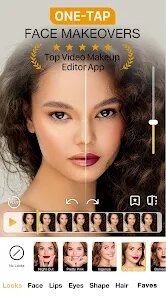
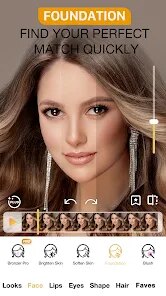
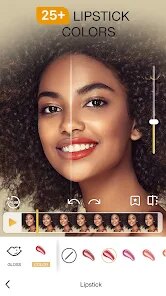
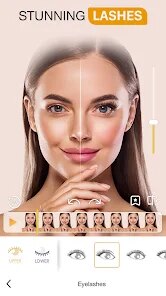
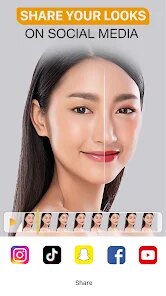
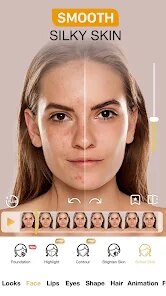
editor reviews
Perfect365 Video Makeup Editor is a beauty application developed by Perfect365, Inc., available for free on Google Play with optional in-app purchases. The app focuses on applying virtual makeup and enhancement effects to both photos and videos, aiming to offer a polished, retouched look without needing actual cosmetics. While the base install provides a decent set of tools, it includes advertisements between functions, and unlocking the more advanced filters and effects often requires purchasing the premium version.
Getting started with this application is straightforward: after the download and install process, users can import a photo or record a live video from the camera. The core mechanism involves face detection technology, which automatically maps key facial landmarks. From there, I could adjust sliders for skin smoothing, blemish removal, and even reshape aspects like eye size or jawline, all while seeing the updates in real time. The editing felt responsive, and I noticed that the app attempts to maintain natural skin texture rather than applying an overly airbrushed effect, which was a pleasant surprise for a free tool.
In comparison to similar beauty editing apps like YouCam Perfect or FaceApp, Perfect365 distinguishes itself by giving more granular control over specific facial features instead of relying solely on preset filters. Where some competitors focus on quick one-tap transformations, this editor allows adjustments like lip color intensity or cheekbone definition separately. That said, the interface feels slightly busier, with multiple icons and menus that might take a moment to navigate compared to the cleaner layouts found in some rival applications.
features
- The real-time preview during video editing is a strong point. I could see makeup adjustments applied as the clip played, which helped avoid rendering and re-exporting just to check the look. Similar apps often require applying effects first and then previewing, so this felt more efficient.
- Its library of virtual makeup looks is extensive, ranging from everyday natural styles to more dramatic evening appearances. Each look is customizable, so I could tweak the foundation shade or eye shadow color individually rather than applying a full preset. This level of detail is not always present in comparable apps, which tend to lock combinations.
- One feature I found particularly useful is the ability to save custom presets. After spending time creating a specific makeup combination, I could store it for reuse on other photos or videos. This avoids repeating the same adjustments each time, though the saved presets are only accessible within the same device unless manually exported.
- Performance on older devices can be sluggish. On my mid-range phone, applying multiple effects to a video clip caused noticeable lag during real-time previews, and occasionally the app would freeze for a few seconds before resuming.
pros
- I no longer need to physically apply makeup for quick video calls or social media posts; the app gives a similar polished look in seconds.
- Saving customized presets means I can maintain consistency across various photos without recreating the same adjustments each time.
- The skin smoothing tool helps reduce visible imperfections without making my face look artificially plastic, which I appreciate for keeping a natural appearance.
cons
- Ads appear between editing sessions and after exporting results, which can interrupt the workflow and feel slightly intrusive.
- The premium subscription is necessary to access most of the high-quality filters and effects, as the free version offers only a limited selection.
- Battery consumption is noticeably higher when using the video editing function, draining my phone's power faster than standard photo editing apps.
Articles
![]()
Guide
How to Update Google Play Store on Android 2026
![]()
Guide
How to Download Older Versions of Android Apps
![]()
Guide
How to Download Apps Without Google Play Store
![]()
Guide
What Is an APK File for Android?
If you use an Android phone, you may have seen the term APK while searching for apps or games online. Some websites offer an APK download instead of a Google Play install button. Some users also mention APK files when talking about apps that are not available in their region, older app versions, or Android games downloaded outside the Play Store.
![]()
Guide
How to Install Games from Google Play for Beginners
Installing games on an Android phone is usually simple, but for beginners, the process can still feel confusing at first. You may not know where to search, which button to tap, whether the game is safe, or why Google Play sometimes asks for account settings, storage access, or payment information. If you are using an Android phone for the first time, learning how to install games from Google Play is one of the easiest ways to get started.
![]()
Guide
How Useful Gemini Is for Everyday Questions and Quick Tasks
emini feels different from many AI apps because it is not only trying to be a chatbot. After using it for everyday questions, quick writing, image understanding, and planning, I think its biggest strength is convenience.
![]()
Guide
What to Know Before Downloading APKs
For many Android users, downloading an APK is a common way to install apps and games. Sometimes an app is not available in a certain country.
![]()
Guide
ChatGPT Review: Is It Still the Best AI App in 2026?
![]()
Guide
Seedance 2.0 vs Sora: The Future of AI Video Generation
The AI video race has intensified dramatically over the past two years. Platforms like Sora from OpenAI and Luma Dream Machine pushed the boundaries of text-to-video realism. Yet, despite their impressive outputs, most tools still operate as probabilistic generators—you describe a scene, and the model interprets it. Control remains limited. With the February 2026 release of Seedance 2.0, developed by ByteDance, the paradigm shifted. Internally known as Jimeng 2.0, Seedance does not position itself as just another video model. It positions itself as an AI Director. Rather than guessing what you want, Seedance 2.0 allows you to direct what happens. This distinction defines everything that follows.









Recommended Apps
![]()
Home Design 3D
Anuman4.2
![]()
Truth or Dare Game - Party App
Chouic4.8
![]()
Photo Collage Maker
Scoompa4.7![]()
Learn to Draw Flower
Creative APPS4.2![]()
FIFA World Cup 2026™
FIFA2.8![]()
Mirror Plus: Mirror with Light
Digitalchemy, LLC4.4![]()
Meitu- Photo Editor & AI Art
Meitu (China) Limited4.5![]()
Perplexity - Ask Anything
PerplexityAI4.7![]()
GhostTube SLS Camera Alternate
GhostTube4![]()
Boom Chip Blast: 2-Player
Black Pyramid 3D Games Studio0![]()
Healthy Benefits+
Solutran, Inc.4.5![]()
Deepcheck AI Search Assistant
rohe.ai4![]()
Idol Prank Video Call & Chat
LightCode Solutions4![]()
Face Shape - Pretty Scale
GlintTec Apps3.9![]()
Plant App - Plant Identifier
ScaleUp4.6











































