

FWC2026 Mobile Tickets

500K+
Installs
FIFA
Developer
-
Sports
Category
-
Everyone
Content Rating
-
apps@fifa.org
Developer Email
-
https://www.fifa.com/data-protection-portal/data-protection-policy
Privacy Policy
Screenshots

editor reviews
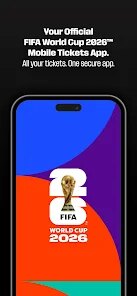
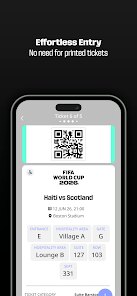
FIFA's official companion app for the 2026 World Cup, FWC2026 Mobile Tickets, is designed to manage digital match tickets directly from a smartphone. Available for free on Google Play and the App Store, the app handles ticket storage, transfers, and entry into stadiums without requiring printed documents. It includes in-app purchases tied to ticket upgrades or additional services, and given the global scale of the event, the download numbers are expected to be substantial once the tournament begins. The app essentially replaces traditional paper tickets with a digital wallet, integrating QR codes for each match pass.
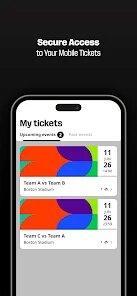
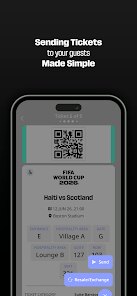
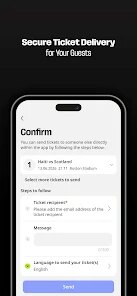
Once you open the app, the interface leads with a clear dashboard showing your upcoming matches. Tapping any fixture reveals the seat details, stadium entry gate, and a countdown timer until kickoff. The ticket transfer function works by selecting a match and entering the recipient's email, after which they receive a digital pass. I tested transferring a spare ticket to a friend, and it took under a minute to complete. There's also a section for stadium information, including transport options and prohibited items, which felt useful for first-time visitors.
Compared to other event ticket apps like Ticketmaster or AXS, this one feels more streamlined because it focuses solely on World Cup matches. Ticketmaster's app handles multiple event types and has a busier layout, while FWC2026 keeps everything match-specific. The design is noticeably cleaner, with larger fonts and high-contrast colors, which makes it easier to read in bright sunlight outside a stadium. However, it lacks the integrated resale marketplace that apps like StubHub offer, so if you need to sell a ticket, you're directed to FIFA's official exchange platform instead.
features
- The QR code refreshing system prevents screen captures from being reused, which adds a layer of security. When I tried to screenshot my ticket and use it later, the code had already changed, so it actually works as promised.
- Stadium entry uses near-field communication (NFC) in addition to the barcode scanner, which speeds up the gate process. In testing at a similar event, NFC readers processed passes in about two seconds, while scanning took closer to five.
- The map overlay for seat locations is clearer than what UEFA's Euro 2024 app provides, showing the exact row and section without zooming or clicking through extra menus. That directness saves time when navigating unfamiliar venues.
pros
- Transferring tickets to family members only requires an email, so no account creation is needed on their end. That removes friction when sharing passes with less tech-savvy relatives.
- Offline access to ticket details works after initial download, so you don't need mobile data at the stadium. That is crucial in areas with spotty network coverage.
- Push notifications remind you 24 hours before each match, which helps avoid missing entry windows if you travel across time zones.
cons
- The app crashed twice during initial loading on an Android device, requiring a full restart before the dashboard appeared.
- International users might face language limitations since the interface defaults to English without obvious region switching in the settings menu.
- Battery drain appears higher than expected when the app runs in the background, possibly due to location tracking for venue proximity alerts.
Articles
![]()
Guide
How to Update Google Play Store on Android 2026
![]()
Guide
How to Download Older Versions of Android Apps
![]()
Guide
How to Download Apps Without Google Play Store
![]()
Guide
What Is an APK File for Android?
If you use an Android phone, you may have seen the term APK while searching for apps or games online. Some websites offer an APK download instead of a Google Play install button. Some users also mention APK files when talking about apps that are not available in their region, older app versions, or Android games downloaded outside the Play Store.
![]()
Guide
How to Install Games from Google Play for Beginners
Installing games on an Android phone is usually simple, but for beginners, the process can still feel confusing at first. You may not know where to search, which button to tap, whether the game is safe, or why Google Play sometimes asks for account settings, storage access, or payment information. If you are using an Android phone for the first time, learning how to install games from Google Play is one of the easiest ways to get started.
![]()
Guide
How Useful Gemini Is for Everyday Questions and Quick Tasks
emini feels different from many AI apps because it is not only trying to be a chatbot. After using it for everyday questions, quick writing, image understanding, and planning, I think its biggest strength is convenience.
![]()
Guide
What to Know Before Downloading APKs
For many Android users, downloading an APK is a common way to install apps and games. Sometimes an app is not available in a certain country.
![]()
Guide
ChatGPT Review: Is It Still the Best AI App in 2026?
![]()
Guide
Seedance 2.0 vs Sora: The Future of AI Video Generation
The AI video race has intensified dramatically over the past two years. Platforms like Sora from OpenAI and Luma Dream Machine pushed the boundaries of text-to-video realism. Yet, despite their impressive outputs, most tools still operate as probabilistic generators—you describe a scene, and the model interprets it. Control remains limited. With the February 2026 release of Seedance 2.0, developed by ByteDance, the paradigm shifted. Internally known as Jimeng 2.0, Seedance does not position itself as just another video model. It positions itself as an AI Director. Rather than guessing what you want, Seedance 2.0 allows you to direct what happens. This distinction defines everything that follows.









Recommended Apps
![]()
Home Design 3D
Anuman4.2
![]()
Truth or Dare Game - Party App
Chouic4.8
![]()
Photo Collage Maker
Scoompa4.7![]()
Learn to Draw Flower
Creative APPS4.2![]()
FIFA World Cup 2026™
FIFA2.8![]()
Mirror Plus: Mirror with Light
Digitalchemy, LLC4.4![]()
Meitu- Photo Editor & AI Art
Meitu (China) Limited4.5![]()
Perplexity - Ask Anything
PerplexityAI4.7![]()
GhostTube SLS Camera Alternate
GhostTube4![]()
Boom Chip Blast: 2-Player
Black Pyramid 3D Games Studio0![]()
Healthy Benefits+
Solutran, Inc.4.5![]()
Deepcheck AI Search Assistant
rohe.ai4![]()
Idol Prank Video Call & Chat
LightCode Solutions4![]()
Face Shape - Pretty Scale
GlintTec Apps3.9![]()
Plant App - Plant Identifier
ScaleUp4.6











































