

Food Allergy Scanner - Bokha

10K+
Installs
Alexandre Grisey
Developer
-
Food & Drink
Category
-
Everyone
Content Rating
-
grisey.alexandre@gmail.com
Developer Email
-
https://alex0x47.github.io/bokha/privacy/
Privacy Policy
Screenshots

editor reviews
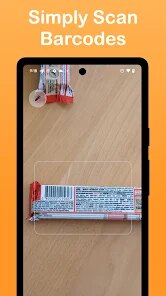
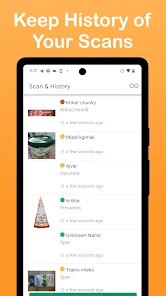
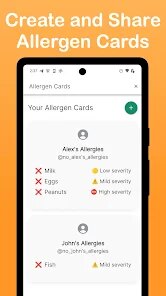
Food allergies require constant vigilance, and the Food Allergy Scanner - Bokha app available on Google Play offers a practical tool for managing this daily concern. Developed by Alexandre Grisey, this application focuses on helping users identify potentially allergenic ingredients in packaged foods by scanning barcodes. It is free to download and install, though it does contain advertisements and offers in-app purchases for additional functionality. The app has seen a modest number of installs, making it a more niche option compared to mainstream dietary apps.
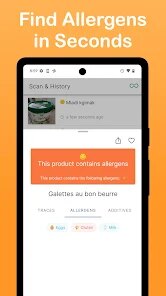
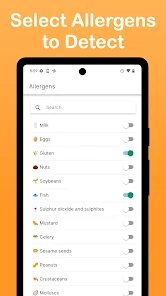
Scanning a product's barcode brings up a detailed ingredient list with potential allergens highlighted in color. The database contains a wide variety of international products, which I found quite impressive during my testing. Users can customize their allergen profile within the settings, selecting from common triggers like gluten, dairy, or nuts. The app then flags any matching ingredients in scanned products. While the scanning process is generally quick, I did notice that some smaller or local brands were not recognized, which required manual ingredient lookup instead.
Comparing this to apps like Yuka or Open Food Facts, Bokha takes a more focused approach on allergen detection rather than general nutritional scoring. Yuka provides a broader health rating system, while Bokha zeroes in specifically on allergy concerns. The interface feels slightly less polished than some competitors, but the allergen-specific functionality is genuinely useful. For someone who only needs ingredient scanning for allergy reasons rather than overall nutritional analysis, this app fills a specific gap quite effectively.
features
- The customizable allergen profile is the core feature. Setting up my list of triggers took only a minute, and subsequent scans automatically highlighted any matching ingredients. This saves considerable time compared to reading every label manually. Similar apps often require more configuration or offer less precise filtering.
- Barcode scanning works reliably under good lighting conditions. Holding the phone steady over a package typically brings up results within two seconds. Poor lighting or damaged barcodes sometimes cause failures, but this is common across scanning apps. The product database seems reasonably comprehensive for European and North American brands.
- Manual ingredient lookup compensates for database gaps. When a barcode scan fails on a local product, typing the ingredient list manually still provides allergen analysis. This feature ensures the app remains useful even with unfamiliar products, though it requires more effort than scanning.
- The visual highlighting of allergens on ingredient lists uses clear color coding that makes dangerous ingredients easy to spot at a glance. Red markers for confirmed allergens and yellow for potential cross-contamination risks provide useful differentiation without overcomplicating the display.
pros
- Reduces time spent reading ingredient lists in stores. Quick scans replace several minutes of label examination per product.
- Provides peace of mind when trying unfamiliar brands. Knowing an app has checked the ingredients reduces anxiety about hidden allergens.
- Helps identify unexpected sources of allergens. Some products contain ingredients I would not have recognized as problematic without the app's database.
cons
- Occasional database gaps for smaller or regional brands. Not every product in my local store was recognized, which required manual entry.
- Ads appear between scans and can feel intrusive during rapid shopping trips. The paid version removes these but requires an additional purchase.
- Barcode scanning struggles with curved or reflective packaging. Certain bottles and cans required multiple attempts before successful recognition.
Articles
![]()
Guide
How to Update Google Play Store on Android 2026
![]()
Guide
How to Download Older Versions of Android Apps
![]()
Guide
How to Download Apps Without Google Play Store
![]()
Guide
What Is an APK File for Android?
If you use an Android phone, you may have seen the term APK while searching for apps or games online. Some websites offer an APK download instead of a Google Play install button. Some users also mention APK files when talking about apps that are not available in their region, older app versions, or Android games downloaded outside the Play Store.
![]()
Guide
How to Install Games from Google Play for Beginners
Installing games on an Android phone is usually simple, but for beginners, the process can still feel confusing at first. You may not know where to search, which button to tap, whether the game is safe, or why Google Play sometimes asks for account settings, storage access, or payment information. If you are using an Android phone for the first time, learning how to install games from Google Play is one of the easiest ways to get started.
![]()
Guide
How Useful Gemini Is for Everyday Questions and Quick Tasks
emini feels different from many AI apps because it is not only trying to be a chatbot. After using it for everyday questions, quick writing, image understanding, and planning, I think its biggest strength is convenience.
![]()
Guide
What to Know Before Downloading APKs
For many Android users, downloading an APK is a common way to install apps and games. Sometimes an app is not available in a certain country.
![]()
Guide
ChatGPT Review: Is It Still the Best AI App in 2026?
![]()
Guide
Seedance 2.0 vs Sora: The Future of AI Video Generation
The AI video race has intensified dramatically over the past two years. Platforms like Sora from OpenAI and Luma Dream Machine pushed the boundaries of text-to-video realism. Yet, despite their impressive outputs, most tools still operate as probabilistic generators—you describe a scene, and the model interprets it. Control remains limited. With the February 2026 release of Seedance 2.0, developed by ByteDance, the paradigm shifted. Internally known as Jimeng 2.0, Seedance does not position itself as just another video model. It positions itself as an AI Director. Rather than guessing what you want, Seedance 2.0 allows you to direct what happens. This distinction defines everything that follows.









Recommended Apps
![]()
Home Design 3D
Anuman4.2
![]()
Truth or Dare Game - Party App
Chouic4.8
![]()
Photo Collage Maker
Scoompa4.7![]()
Learn to Draw Flower
Creative APPS4.2![]()
FIFA World Cup 2026™
FIFA2.8![]()
Mirror Plus: Mirror with Light
Digitalchemy, LLC4.4![]()
Meitu- Photo Editor & AI Art
Meitu (China) Limited4.5![]()
Perplexity - Ask Anything
PerplexityAI4.7![]()
GhostTube SLS Camera Alternate
GhostTube4![]()
Boom Chip Blast: 2-Player
Black Pyramid 3D Games Studio0![]()
Healthy Benefits+
Solutran, Inc.4.5![]()
Deepcheck AI Search Assistant
rohe.ai4![]()
Idol Prank Video Call & Chat
LightCode Solutions4![]()
Face Shape - Pretty Scale
GlintTec Apps3.9![]()
Plant App - Plant Identifier
ScaleUp4.6












































