

Medic Scanner - skin analyze

100K+
Installs
Investment Analytics
Developer
-
Health & Fitness
Category
-
Everyone
Content Rating
-
help@enzomind.com
Developer Email
-
https://medicscanner.com/en/polityka-prywatnosci
Privacy Policy
Screenshots


editor reviews
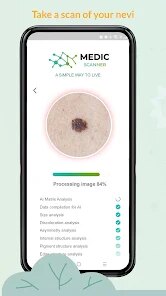
For anyone curious about what's happening on their skin, Medic Scanner – skin analyze offers a quick and straightforward way to get some initial clues. Available on Google Play, this app uses your phone's camera to examine skin spots, moles, or other visible marks and provides a basic analysis based on visual patterns. It's free to download and install, though like many apps in this space, it includes ads and offers in-app purchases for more detailed reports or history tracking. The idea is simple: point, scan, and get a readout that might help you decide whether to consult a dermatologist in person.
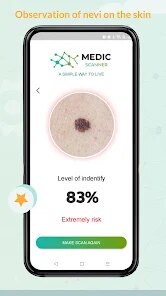
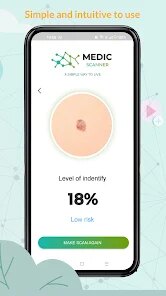
Getting started with Medic Scanner is fairly intuitive. After you install the app, it asks for camera permission and then walks you through positioning the area of interest within a frame on screen. The app analyzes the image and returns a classification with labels like “benign,” “suspicious,” or “requires monitoring,” along with a short description of what those terms mean. During my tests, the interface felt clean and uncluttered, which made the process feel less clinical and more accessible. I appreciated that it didn't overwhelm me with medical jargon, though I did wonder how accurate the results really were without professional training data backing them up.
Comparing Medic Scanner to other skin analysis tools, such as SkinVision or Miiskin, reveals some clear differences. SkinVision, for instance, uses a more established algorithm and offers direct access to dermatologist reviews, but its subscription model is pricier. Medic Scanner, on the other hand, keeps things lighter and more budget-friendly, which might appeal to casual users who just want a second opinion now and then. However, it doesn't store images for long-term monitoring the way Miiskin does, so if you're tracking a mole over weeks or months, you might need to take your own notes. It feels more like a quick check-in tool than a full skincare companion.
features
- The scanning process is genuinely fast. Point the camera at a spot, hold still for a couple of seconds, and the app returns an analysis almost immediately. That speed makes it easy to scan several marks in one sitting without losing patience.
- Results are presented in simple language. Instead of showing complex medical terms, the app uses plain labels and short explanations, which helps reduce anxiety if the result happens to be less than ideal. You can tap through for more detail, but it never forces technical depth on you.
- One comparison worth noting: unlike SkinVision, which requires a subscription for full reports, Medic Scanner offers basic scans for free and only charges for extras like saving histories or removing ads. That's a big plus if you're testing the waters before committing financially.
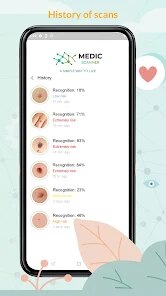
- On the downside, the app doesn't seem to learn from your previous scans. Unlike some competitors that build a timeline for ongoing monitoring, Medic Scanner treats each scan as a standalone event. That limits its usefulness if you're trying to detect changes over time.
pros
- It gives you a quick, non-invasive way to check a spot before deciding to see a doctor. That alone can save time and reduce worry.
- No account or sign-up is required for basic use, so you can scan immediately after download and install. That makes it ideal for one-off checks when you notice something new.
- The free tier covers enough features for casual use. Unless you need detailed logs or ad-free experience, you likely won't need to pay anything.
cons
- Accuracy is uncertain. Without transparent information about the training data or clinical validation, it's hard to trust the results as anything more than a rough indicator.
- Ads can interrupt the experience. After a few scans, the frequency of pop-ups increases, which makes the app feel less polished than premium alternatives.
- No cloud backup or account sync means your scan history stays on your device. If you switch phones or uninstall the app, you lose everything.
- The app occasionally misidentifies lighting conditions, suggesting you adjust the angle even when the image looks fine. This adds a bit of friction to an otherwise simple process.
Articles
![]()
Guide
How to Update Google Play Store on Android 2026
![]()
Guide
How to Download Older Versions of Android Apps
![]()
Guide
How to Download Apps Without Google Play Store
![]()
Guide
What Is an APK File for Android?
If you use an Android phone, you may have seen the term APK while searching for apps or games online. Some websites offer an APK download instead of a Google Play install button. Some users also mention APK files when talking about apps that are not available in their region, older app versions, or Android games downloaded outside the Play Store.
![]()
Guide
How to Install Games from Google Play for Beginners
Installing games on an Android phone is usually simple, but for beginners, the process can still feel confusing at first. You may not know where to search, which button to tap, whether the game is safe, or why Google Play sometimes asks for account settings, storage access, or payment information. If you are using an Android phone for the first time, learning how to install games from Google Play is one of the easiest ways to get started.
![]()
Guide
How Useful Gemini Is for Everyday Questions and Quick Tasks
emini feels different from many AI apps because it is not only trying to be a chatbot. After using it for everyday questions, quick writing, image understanding, and planning, I think its biggest strength is convenience.
![]()
Guide
What to Know Before Downloading APKs
For many Android users, downloading an APK is a common way to install apps and games. Sometimes an app is not available in a certain country.
![]()
Guide
ChatGPT Review: Is It Still the Best AI App in 2026?
![]()
Guide
Seedance 2.0 vs Sora: The Future of AI Video Generation
The AI video race has intensified dramatically over the past two years. Platforms like Sora from OpenAI and Luma Dream Machine pushed the boundaries of text-to-video realism. Yet, despite their impressive outputs, most tools still operate as probabilistic generators—you describe a scene, and the model interprets it. Control remains limited. With the February 2026 release of Seedance 2.0, developed by ByteDance, the paradigm shifted. Internally known as Jimeng 2.0, Seedance does not position itself as just another video model. It positions itself as an AI Director. Rather than guessing what you want, Seedance 2.0 allows you to direct what happens. This distinction defines everything that follows.









Recommended Apps
![]()
Home Design 3D
Anuman4.2
![]()
Truth or Dare Game - Party App
Chouic4.8
![]()
Photo Collage Maker
Scoompa4.7![]()
Learn to Draw Flower
Creative APPS4.2![]()
FIFA World Cup 2026™
FIFA2.8![]()
Mirror Plus: Mirror with Light
Digitalchemy, LLC4.4![]()
Meitu- Photo Editor & AI Art
Meitu (China) Limited4.5![]()
Perplexity - Ask Anything
PerplexityAI4.7![]()
GhostTube SLS Camera Alternate
GhostTube4![]()
Boom Chip Blast: 2-Player
Black Pyramid 3D Games Studio0![]()
Healthy Benefits+
Solutran, Inc.4.5![]()
Deepcheck AI Search Assistant
rohe.ai4![]()
Idol Prank Video Call & Chat
LightCode Solutions4![]()
Face Shape - Pretty Scale
GlintTec Apps3.9![]()
Plant App - Plant Identifier
ScaleUp4.6












































