

Idol Prank: Video Call & Chat

1M+
Installs
BUGUN SOFTWARE COMPANY LIMITED
Developer
-
Video Players & Editors
Category
-
Everyone
Content Rating
-
thanglvan@gmail.com
Developer Email
-
https://cryptofinancialsolution.com/idol-prank/privacy
Privacy Policy
Screenshots
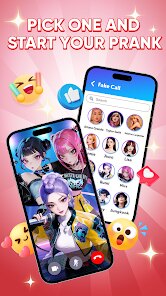
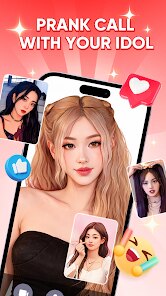
editor reviews
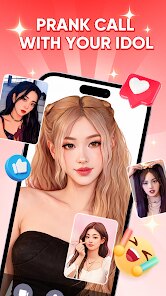
Idol Prank: Video Call & Chat, created by BUGUN SOFTWARE COMPANY LIMITED, falls into the entertainment category with a clear hook: simulating video calls and chat conversations with fictional celebrity-like characters. You can grab it directly from Google Play, where it has accumulated a substantial number of installs, reflecting its popularity among users looking for a lighthearted distraction. The app is free to download, though it does incorporate ads and offers in-app purchases, which is a fairly standard setup for this genre.
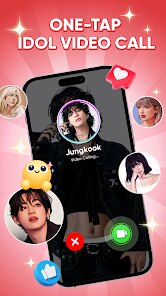
Navigating through the app is quite straightforward. Upon launching it, you select a character from a grid of colorful avatars, each representing a different persona, from friendly pop stars to brooding actors. The interaction model is simple: you initiate a fake incoming call, and the character responds with pre-recorded video clips or text messages that create the illusion of a two-way conversation. You tap through dialogue options or just watch the simulated interaction unfold, making it feel a bit like a playful interactive story rather than a complex simulation.
Looking at similar apps on the market, many focus heavily on the video call aspect but often neglect the chat component, or their characters feel static and repetitive. Idol Prank stands out because it balances both modes reasonably well, giving you the visual thrill of a fake call and the quiet fun of a text exchange. I found the character reactions to be more varied than what I have seen in other prank apps like Fake Call or Chat Simulator, which tend to rely on a narrower set of responses. That said, the visual quality of the characters is not groundbreaking, but it does not need to be for its purpose.
features
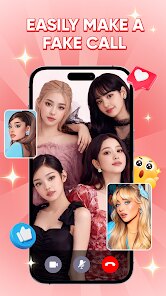
- The video call simulation is the core experience, featuring a realistic incoming call screen and ambient background noise that makes it feel surprisingly authentic. The characters have a decent range of movements and expressions, which keeps short calls entertaining without feeling overly scripted.
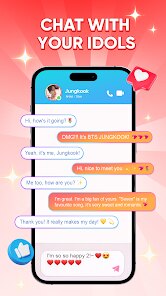
- Text chat conversations are pre-written but branch off in a few different directions based on your replies. This adds a mild layer of choice, letting you shape the interaction slightly rather than just passively watching, which I appreciated during longer sessions.
- A built-in guide section explains how to edit the character's name or photo on the call screen, adding a personalization touch that many competitors lack. This small feature makes the prank more convincing when you share it with friends.
- Compared to similar tools, the ad frequency here is moderate. You get occasional interruptions between calls, but not after every single action, which makes it less annoying than some other apps I have tried where ads pop up constantly.
pros
- It works well as a quick icebreaker, letting you show friends a funny fake call without needing any technical setup or special permissions.
- The offline mode is a real plus, since you can use it anywhere without worrying about mobile data or lag, which is handy for impromptu jokes at a gathering.
- It can serve as a light stress reliever, offering a silly but harmless way to pass a few minutes when you just want to chuckle at absurd scenarios.
cons
- The content pool feels limited after extended use, since the same video clips and chat lines start repeating fairly quickly, which can dull the novelty.
- In-app purchases push toward unlocking extra characters, and while not aggressive, the prompts do appear often enough to feel slightly pushy.
- A few characters have audio sync issues where the lip movement does not match the speech, which breaks the illusion a bit in those moments.
- The app sometimes stutters on my older phone during longer video segments, suggesting it is not fully optimized for budget devices.
Articles
![]()
Guide
How to Update Google Play Store on Android 2026
![]()
Guide
How to Download Older Versions of Android Apps
![]()
Guide
How to Download Apps Without Google Play Store
![]()
Guide
What Is an APK File for Android?
If you use an Android phone, you may have seen the term APK while searching for apps or games online. Some websites offer an APK download instead of a Google Play install button. Some users also mention APK files when talking about apps that are not available in their region, older app versions, or Android games downloaded outside the Play Store.
![]()
Guide
How to Install Games from Google Play for Beginners
Installing games on an Android phone is usually simple, but for beginners, the process can still feel confusing at first. You may not know where to search, which button to tap, whether the game is safe, or why Google Play sometimes asks for account settings, storage access, or payment information. If you are using an Android phone for the first time, learning how to install games from Google Play is one of the easiest ways to get started.
![]()
Guide
How Useful Gemini Is for Everyday Questions and Quick Tasks
emini feels different from many AI apps because it is not only trying to be a chatbot. After using it for everyday questions, quick writing, image understanding, and planning, I think its biggest strength is convenience.
![]()
Guide
What to Know Before Downloading APKs
For many Android users, downloading an APK is a common way to install apps and games. Sometimes an app is not available in a certain country.
![]()
Guide
ChatGPT Review: Is It Still the Best AI App in 2026?
![]()
Guide
Seedance 2.0 vs Sora: The Future of AI Video Generation
The AI video race has intensified dramatically over the past two years. Platforms like Sora from OpenAI and Luma Dream Machine pushed the boundaries of text-to-video realism. Yet, despite their impressive outputs, most tools still operate as probabilistic generators—you describe a scene, and the model interprets it. Control remains limited. With the February 2026 release of Seedance 2.0, developed by ByteDance, the paradigm shifted. Internally known as Jimeng 2.0, Seedance does not position itself as just another video model. It positions itself as an AI Director. Rather than guessing what you want, Seedance 2.0 allows you to direct what happens. This distinction defines everything that follows.









Recommended Apps
![]()
Home Design 3D
Anuman4.2
![]()
Truth or Dare Game - Party App
Chouic4.8
![]()
Photo Collage Maker
Scoompa4.7![]()
Learn to Draw Flower
Creative APPS4.2![]()
FIFA World Cup 2026™
FIFA2.8![]()
Mirror Plus: Mirror with Light
Digitalchemy, LLC4.4![]()
Meitu- Photo Editor & AI Art
Meitu (China) Limited4.5![]()
Perplexity - Ask Anything
PerplexityAI4.7![]()
GhostTube SLS Camera Alternate
GhostTube4![]()
Boom Chip Blast: 2-Player
Black Pyramid 3D Games Studio0![]()
Healthy Benefits+
Solutran, Inc.4.5![]()
Deepcheck AI Search Assistant
rohe.ai4![]()
Idol Prank Video Call & Chat
LightCode Solutions4![]()
Face Shape - Pretty Scale
GlintTec Apps3.9![]()
Plant App - Plant Identifier
ScaleUp4.6












































