
Ai Smart Remote

10K+
Installs
whitesandmedia
Developer
-
Lifestyle
Category
-
Everyone
Content Rating
-
contact@aismartremote.com
Developer Email
-
https://aismartremote.com/#/privacy-policy
Privacy Policy
Screenshots
editor reviews
Smart TV remotes have become more necessary than physical ones, especially when the original handset goes missing or stops responding. Ai Smart Remote, developed by whitesandmedia, offers a straightforward way to turn your phone into a universal remote for TVs, set-top boxes, and other IR-enabled devices. It is available on Google Play, installs quickly, and comes at no cost, though it does feature banner ads. The free version works well for basic control, and while there are optional in-app purchases, the core functionality remains accessible without paying anything.
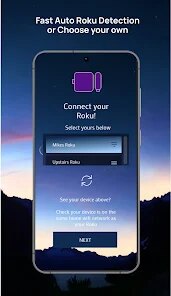
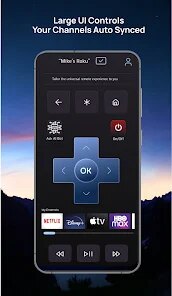
The setup process relies on your phone's built-in infrared blaster, so a compatible device is required. Once the app is opened, the first step involves selecting the device type, such as television or air conditioner, followed by the brand. From there, you are presented with a test interface where tapping a button sends a signal. The app walks through a short sequence of power or volume commands until the correct code is matched. It feels methodical, and most brands take less than a minute to synchronize. After that, the main panel appears with all standard keys laid out on a single screen, and the response time between pressing a button and seeing the device react feels instant. There is also a learning mode that captures signals from an original remote using the phone's IR port, which came in handy for some older models that were not listed in the database.
Several universal remote apps claim to be comprehensive, but many fall short when it comes to niche brands or obsolete equipment. Ai Smart Remote covers a broader range than some of its popular counterparts, yet it does not try to replicate the elaborate home automation features found in expensive alternatives. The interface leans toward the practical side, with fewer decorative elements and a more direct layout. That makes it easier to operate without hunting for settings, though it lacks the polished feel of a few competitors. Users who want to control multiple devices simultaneously might find the device switching a bit less fluid, but for those who mainly need to replace a lost TV remote, it does the job reliably.
features
- One notable aspect is the gesture-based control area on the main panel. You can swipe left or right on a designated zone to change channels, which feels natural once your thumb lands in the right spot. This genuinely saves a few taps during long browsing sessions, and it is a feature that some competing apps only offer behind a paywall.
- The custom name tagging for each saved device is another plus. When you have both a bedroom TV and a living room unit from different brands, the ability to label them clearly prevents confusion. In this regard, it behaves more thoughtfully than a remote app that lumps everything together under generic headings.
- There is also a widget that places a small remote shortcut on your home screen. This is not groundbreaking, but it avoids the extra step of opening the app each time. For a tool whose purpose is speed, this small convenience matters more than expected during daily use.
- Finally, the voice command support deserves a mention. While it only works with a few voice assistants, using a spoken command to turn on the TV feels surprisingly smooth when it is functioning. It is not a core selling point, but it adds a layer of hands-free operation that elevates the app above the plain remote emulators.
pros
- After losing the original remote for my living room TV, this app restored full control within minutes, which saved me the cost of buying a replacement.
- Adjusting the volume or input source from the couch without needing to point the phone precisely works well due to the broad IR range.
- The app remains functional without an internet connection, so it works even in offline scenarios where other smart remotes would stop responding.
cons
- The ad placement at the bottom sometimes covers the lowest row of buttons on smaller screens, which can be annoying during quick adjustments.
- IR blasters get weaker over time, and the app offers no calibration settings to compensate for reduced signal strength.
- A few less common air conditioner brands do not respond to the learning mode consistently, which leaves some devices unmanageable.
Articles
![]()
Guide
How to Update Google Play Store on Android 2026
![]()
Guide
How to Download Older Versions of Android Apps
![]()
Guide
How to Download Apps Without Google Play Store
![]()
Guide
What Is an APK File for Android?
If you use an Android phone, you may have seen the term APK while searching for apps or games online. Some websites offer an APK download instead of a Google Play install button. Some users also mention APK files when talking about apps that are not available in their region, older app versions, or Android games downloaded outside the Play Store.
![]()
Guide
How to Install Games from Google Play for Beginners
Installing games on an Android phone is usually simple, but for beginners, the process can still feel confusing at first. You may not know where to search, which button to tap, whether the game is safe, or why Google Play sometimes asks for account settings, storage access, or payment information. If you are using an Android phone for the first time, learning how to install games from Google Play is one of the easiest ways to get started.
![]()
Guide
How Useful Gemini Is for Everyday Questions and Quick Tasks
emini feels different from many AI apps because it is not only trying to be a chatbot. After using it for everyday questions, quick writing, image understanding, and planning, I think its biggest strength is convenience.
![]()
Guide
What to Know Before Downloading APKs
For many Android users, downloading an APK is a common way to install apps and games. Sometimes an app is not available in a certain country.
![]()
Guide
ChatGPT Review: Is It Still the Best AI App in 2026?
![]()
Guide
Seedance 2.0 vs Sora: The Future of AI Video Generation
The AI video race has intensified dramatically over the past two years. Platforms like Sora from OpenAI and Luma Dream Machine pushed the boundaries of text-to-video realism. Yet, despite their impressive outputs, most tools still operate as probabilistic generators—you describe a scene, and the model interprets it. Control remains limited. With the February 2026 release of Seedance 2.0, developed by ByteDance, the paradigm shifted. Internally known as Jimeng 2.0, Seedance does not position itself as just another video model. It positions itself as an AI Director. Rather than guessing what you want, Seedance 2.0 allows you to direct what happens. This distinction defines everything that follows.









Recommended Apps
![]()
Home Design 3D
Anuman4.2
![]()
Truth or Dare Game - Party App
Chouic4.8
![]()
Photo Collage Maker
Scoompa4.7![]()
Learn to Draw Flower
Creative APPS4.2![]()
FIFA World Cup 2026™
FIFA2.8![]()
Mirror Plus: Mirror with Light
Digitalchemy, LLC4.4![]()
Meitu- Photo Editor & AI Art
Meitu (China) Limited4.5![]()
Perplexity - Ask Anything
PerplexityAI4.7![]()
GhostTube SLS Camera Alternate
GhostTube4![]()
Boom Chip Blast: 2-Player
Black Pyramid 3D Games Studio0![]()
Healthy Benefits+
Solutran, Inc.4.5![]()
Deepcheck AI Search Assistant
rohe.ai4![]()
Idol Prank Video Call & Chat
LightCode Solutions4![]()
Face Shape - Pretty Scale
GlintTec Apps3.9![]()
Plant App - Plant Identifier
ScaleUp4.6












































