

Vimeo

10,000,000+
Installs
Vimeo.com, Inc.
Developer
-
Video Players & Editors
Category
-
Rated for 12+
Content Rating
-
support@vimeo.com
Developer Email
-
http://vimeo.com/privacy
Privacy Policy
Screenshots
editor reviews
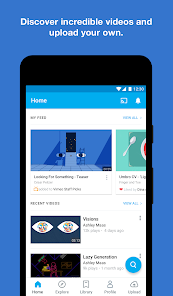
Vimeo is a video platform that's been around for ages, but it's never quite been the household name that YouTube is. It's more of a creative's hub, really. Filmmakers, video editors, musicians, and artists use it to show off their work in a way that feels a bit more polished and less cluttered. When you first download it from the App Store or Google Play – it's free to install, by the way – and launch it, the first thing that hits you is how clean everything looks. No flashy thumbnails screaming for clicks, no weirdly aggressive ads. It just feels... professional. You're greeted with a curated feed of high-quality videos, and it immediately sets a different tone than most other video apps out there.
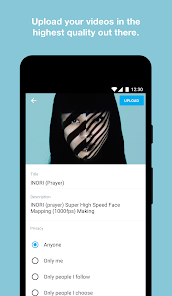
Once you start poking around, the app's interface is pretty sleek. It's not as intuitive as something like Instagram or TikTok, but it rewards patience. The onboarding doesn't throw a million tutorials at you, which I appreciated. After signing up, you can start uploading your own videos directly from your phone's gallery. The process is straightforward: you pick a video, set a title and description, choose a privacy setting (public, private, or password-protected), and then hit upload. The real hands-on experience is in the playback. The video player is buttery smooth, and you can switch between different resolutions easily. I found that scrubbing through a long video was surprisingly responsive, which isn't always the case on other platforms. A small tip: if you're watching a tutorial, you can download the video for offline viewing, which is a lifesaver for flights or commutes. The only slightly confusing bit was finding where your own uploads are stored – they're tucked away in a "My Videos" tab, not immediately obvious on the home screen.
After spending a few weeks with Vimeo, I've got mixed but mostly positive feelings. It's definitely for a specific kind of person. If you're a content creator who cares about video quality, presentation, and audience engagement without the constant noise of YouTube comments or TikTok trends, this is your spot. The lack of ads is a huge relief, and the player itself just looks better than anything else on mobile. But honestly, if you're just a casual viewer who wants to watch cat compilations or influencer vlogs, this app probably isn't for you. What sets Vimeo apart from YouTube is the community vibe – it feels smaller and more respectful. You can actually read the comments without wanting to lose brain cells. I'll likely keep it installed for watching my favorite filmmakers' updates and the occasional high-production-value short film. However, if I ever needed to reach a massive audience quickly, I'd probably jump back to YouTube without a second thought.
features
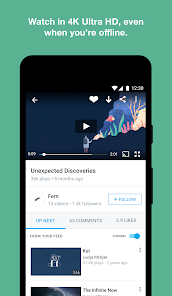
- 🍿 Video Player Quality: The video player on Vimeo is hands down one of the best I've used on mobile. No buffering, no compression artifacts, and you can manually choose 4K or HD. Compared to YouTube, which often compresses videos to save bandwidth, Vimeo streams in pristine, original quality. It's like watching a Blu-ray on your phone.
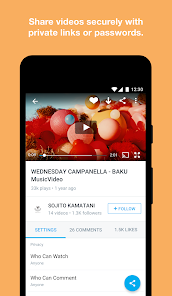
- 🎨 Privacy Controls: You can make videos password-protected or unlisted, which is great for sharing drafts with clients before going public. YouTube also has unlisted options, but Vimeo's implementation is much more straightforward and reliable. Editors swear by this feature for client feedback loops.
- 📥 Offline Downloads: The ability to download videos for offline viewing is built into the app and works without any tricks. YouTube requires a paid subscription for this, while Vimeo offers it for free with your account. That alone is a huge plus for travelers or people with shaky data plans.
pros
- 🎥 Ad-Free Experience: Vimeo doesn't show any pre-roll or mid-roll ads during playback. YouTube, on the other hand, will hit you with three ads before a 10-minute video. It's such a relief to watch a film or tutorial without interruptions.
- 💡 Curated Community: The discovery feed actually surfaces quality content instead of clickbait. Platforms like Dailymotion and Vimeo are both smaller than YouTube, but Vimeo's curation feels more artistic and less algorithmic. You won't find random prank videos next to a documentary.
- ⚙️ Customizable Player: Creators can brand their video player with a logo and choose colors, which looks incredibly professional when embedded on a website. YouTube doesn't offer this level of customization without third-party tools.
cons
- 📉 Smaller Audience Reach: If you're trying to go viral, Vimeo's not the place. YouTube has billions of active users, while Vimeo's community is niche. Your video will get fewer views by default, which can be frustrating for new creators.
- 🔒 Limited Free Uploads: The free plan only lets you upload 500 MB per week, which is tiny for high-res video. YouTube offers unlimited uploads for free. If you shoot in 4K, you'll hit Vimeo's cap in one video and be forced to upgrade.
- 🛠️ Bare-bones Editor: The mobile app has no video editing tools at all. You can't trim, add captions, or apply filters within Vimeo. Apps like TikTok or Even CapCut have built-in editors, so you have to use separate software before uploading to Vimeo.
- 💵 Pricey Subscription Plans: For serious use, you need to pay for the Pro plan, which is $20/month. YouTube has no such barrier for creators. That cost adds up quick, especially if you're just a hobbyist.
Articles
![]()
Guide
How to Update Google Play Store on Android 2026
![]()
Guide
How to Download Older Versions of Android Apps
![]()
Guide
How to Download Apps Without Google Play Store
![]()
Guide
What Is an APK File for Android?
If you use an Android phone, you may have seen the term APK while searching for apps or games online. Some websites offer an APK download instead of a Google Play install button. Some users also mention APK files when talking about apps that are not available in their region, older app versions, or Android games downloaded outside the Play Store.
![]()
Guide
How to Install Games from Google Play for Beginners
Installing games on an Android phone is usually simple, but for beginners, the process can still feel confusing at first. You may not know where to search, which button to tap, whether the game is safe, or why Google Play sometimes asks for account settings, storage access, or payment information. If you are using an Android phone for the first time, learning how to install games from Google Play is one of the easiest ways to get started.
![]()
Guide
How Useful Gemini Is for Everyday Questions and Quick Tasks
emini feels different from many AI apps because it is not only trying to be a chatbot. After using it for everyday questions, quick writing, image understanding, and planning, I think its biggest strength is convenience.
![]()
Guide
What to Know Before Downloading APKs
For many Android users, downloading an APK is a common way to install apps and games. Sometimes an app is not available in a certain country.
![]()
Guide
ChatGPT Review: Is It Still the Best AI App in 2026?
![]()
Guide
Seedance 2.0 vs Sora: The Future of AI Video Generation
The AI video race has intensified dramatically over the past two years. Platforms like Sora from OpenAI and Luma Dream Machine pushed the boundaries of text-to-video realism. Yet, despite their impressive outputs, most tools still operate as probabilistic generators—you describe a scene, and the model interprets it. Control remains limited. With the February 2026 release of Seedance 2.0, developed by ByteDance, the paradigm shifted. Internally known as Jimeng 2.0, Seedance does not position itself as just another video model. It positions itself as an AI Director. Rather than guessing what you want, Seedance 2.0 allows you to direct what happens. This distinction defines everything that follows.









Recommended Apps
![]()
Home Design 3D
Anuman4.2
![]()
Truth or Dare Game - Party App
Chouic4.8
![]()
Photo Collage Maker
Scoompa4.7![]()
Learn to Draw Flower
Creative APPS4.2![]()
FIFA World Cup 2026™
FIFA2.8![]()
Mirror Plus: Mirror with Light
Digitalchemy, LLC4.4![]()
Meitu- Photo Editor & AI Art
Meitu (China) Limited4.5![]()
Perplexity - Ask Anything
PerplexityAI4.7![]()
GhostTube SLS Camera Alternate
GhostTube4![]()
Boom Chip Blast: 2-Player
Black Pyramid 3D Games Studio0![]()
Healthy Benefits+
Solutran, Inc.4.5![]()
Deepcheck AI Search Assistant
rohe.ai4![]()
Idol Prank Video Call & Chat
LightCode Solutions4![]()
Face Shape - Pretty Scale
GlintTec Apps3.9![]()
Plant App - Plant Identifier
ScaleUp4.6












































