

Video Editor & Maker - InShot

500,000,000+
Installs
InShot Video Editor
Developer
-
Video Players & Editors
Category
-
Rated for 3+
Content Rating
-
inshot.android@inshot.com
Developer Email
-
http://inshotapp.com/website/InShotAndroid/privacypolicy.html
Privacy Policy
Screenshots
editor reviews
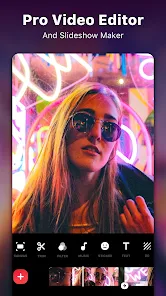
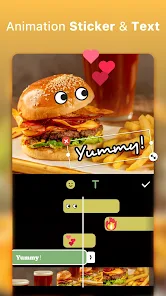
I've been using InShot for a while now, and honestly, it's one of the most straightforward video editing apps I've come across. It's a mobile-focused editor, available on both Google Play and the App Store, with a massive install base—well over 100 million downloads on Android alone. You can download it for free, though there are in-app purchases for premium features and watermarks, plus occasional ads unless you pay up. The first time you launch it, the interface feels clean and not too intimidating, which is nice because most video editors throw everything at you at once. InShot is the kind of app you grab when you just want to trim a clip, add some music, or throw in a few stickers without messing around with complicated timelines or layers. That first impression is key: it feels like a tool designed for quick edits, not professional productions.
When you actually start using InShot, it's pretty smooth. The home screen gives you straight options: Video, Photo, Collage, or Slideshow. For a basic video edit, you just pick Video, select your clip, and you're in the timeline. The controls are simple—cut, split, duplicate, or speed change. What really stands out is how fast it processes things. You can add music from your phone or their built-in library, and it blends perfectly with the original audio or replaces it. The interface is touch-friendly, so dragging transitions or trimming edges feels natural. One small trick I picked up: if you want to keep your original sound but lower its volume, just slide the original audio down to about 30% and add background music at 70%—it keeps the video balanced. There are moments where it lags slightly if your clip is high-res, but overall, the onboarding is quick and you can finish a simple edit in under five minutes.
After using InShot for a few weeks, I think it's best for casual creators—people making TikToks, Instagram Stories, or short YouTube clips. It's not built for complex projects with multiple layers or advanced color grading. Compared to apps like CapCut or KineMaster, InShot feels more polished for beginners but less powerful. CapCut gives you more freedom with keyframes and transitions, while KineMaster offers multi-track audio. InShot's strength is its simplicity; that's why I kept it installed. But for anyone needing subtitles, voiceovers, or precise layer control, it falls short. You'll likely uninstall it once you outgrow its basic toolkit. Still, for what it does, it's reliable and easy.
features
- 🎬 Trim and merge: InShot makes cutting out unwanted parts and combining clips incredibly intuitive. You just drag the edges of the clip in the timeline, and if you want to join multiple videos, it's one tap. Compared to CapCut, where you sometimes have to adjust seconds manually, InShot's slider is more forgiving and touch-optimized.
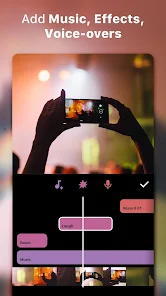
- 🎵 In-app music and sound effects: The built-in library has a decent selection for a free app. You can search by mood or genre, and it syncs automatically with your video length. Unlike Adobe Premiere Rush, which locks good audio behind a subscription, InShot gives you enough free tracks to make decent social media content without paying.
- 🖼️ Aspect ratio presets: InShot has presets for every platform—Instagram Square, TikTok 9:16, YouTube 16:9, and even custom ratios. This is a big deal because other editors often force you to crop manually or guess the right dimensions. It saves time and keeps your content from looking stretched or cut off.
pros
- 👍 No editing experience needed: You can open InShot and make a decent video in under two minutes. Apps like KineMaster have a steeper learning curve with their layer system. InShot keeps it simple, so even someone who's never edited a video can figure it out quickly.
- 👍 Fast processing: Rendering a 30-second clip usually takes about 10–20 seconds. Compare that to CapCut, which sometimes bogs down with complex exports, especially on older phones. InShot doesn't push background effects or heavy transitions, so it stays snappy.
- 👍 Clean interface: The layout is uncluttered and icons are clearly labeled. In contrast, apps like VivaVideo bury features in menus. InShot puts everything where you expect it—settings in the corner, tools at the bottom, preview on top. It reduces the frustration of hunting for tools.
cons
- 👎 Watermark on free version: If you don't pay, InShot slaps a water mark on your export. CapCut offers a watermark-free experience for free, which is a big advantage if you're just starting out and don't want to spend money. It's one of those things that pushes people to either upgrade or switch.
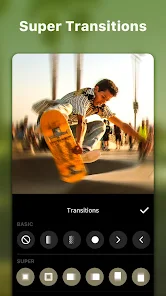
- 👎 Limited effects and transitions: InShot gives you basic fade, slide, and dissolve, but nothing flashy. Apps like CapCut have dozens of trendy transitions and glitch effects. For creators who rely on flashy edits, InShot just doesn't cut it.
- 👎 No multi-track audio: You can only have one background track at a time. If you want to layer voiceover over music, you're stuck. KineMaster and PowerDirector let you mix multiple audio tracks. InShot's limitation is frustrating when you need more control.
- 👎 Ads in the free version: You'll see a banner ad and sometimes a full-screen ad between edits. It's not overwhelming, but it does break the flow. Most other free editors like CapCut avoid this, so it's a noticeable downside.
Articles
![]()
Guide
How to Update Google Play Store on Android 2026
![]()
Guide
How to Download Older Versions of Android Apps
![]()
Guide
How to Download Apps Without Google Play Store
![]()
Guide
What Is an APK File for Android?
If you use an Android phone, you may have seen the term APK while searching for apps or games online. Some websites offer an APK download instead of a Google Play install button. Some users also mention APK files when talking about apps that are not available in their region, older app versions, or Android games downloaded outside the Play Store.
![]()
Guide
How to Install Games from Google Play for Beginners
Installing games on an Android phone is usually simple, but for beginners, the process can still feel confusing at first. You may not know where to search, which button to tap, whether the game is safe, or why Google Play sometimes asks for account settings, storage access, or payment information. If you are using an Android phone for the first time, learning how to install games from Google Play is one of the easiest ways to get started.
![]()
Guide
How Useful Gemini Is for Everyday Questions and Quick Tasks
emini feels different from many AI apps because it is not only trying to be a chatbot. After using it for everyday questions, quick writing, image understanding, and planning, I think its biggest strength is convenience.
![]()
Guide
What to Know Before Downloading APKs
For many Android users, downloading an APK is a common way to install apps and games. Sometimes an app is not available in a certain country.
![]()
Guide
ChatGPT Review: Is It Still the Best AI App in 2026?
![]()
Guide
Seedance 2.0 vs Sora: The Future of AI Video Generation
The AI video race has intensified dramatically over the past two years. Platforms like Sora from OpenAI and Luma Dream Machine pushed the boundaries of text-to-video realism. Yet, despite their impressive outputs, most tools still operate as probabilistic generators—you describe a scene, and the model interprets it. Control remains limited. With the February 2026 release of Seedance 2.0, developed by ByteDance, the paradigm shifted. Internally known as Jimeng 2.0, Seedance does not position itself as just another video model. It positions itself as an AI Director. Rather than guessing what you want, Seedance 2.0 allows you to direct what happens. This distinction defines everything that follows.









Recommended Apps
![]()
Home Design 3D
Anuman4.2
![]()
Truth or Dare Game - Party App
Chouic4.8
![]()
Photo Collage Maker
Scoompa4.7![]()
Learn to Draw Flower
Creative APPS4.2![]()
FIFA World Cup 2026™
FIFA2.8![]()
Mirror Plus: Mirror with Light
Digitalchemy, LLC4.4![]()
Meitu- Photo Editor & AI Art
Meitu (China) Limited4.5![]()
Perplexity - Ask Anything
PerplexityAI4.7![]()
GhostTube SLS Camera Alternate
GhostTube4![]()
Boom Chip Blast: 2-Player
Black Pyramid 3D Games Studio0![]()
Healthy Benefits+
Solutran, Inc.4.5![]()
Deepcheck AI Search Assistant
rohe.ai4![]()
Idol Prank Video Call & Chat
LightCode Solutions4![]()
Face Shape - Pretty Scale
GlintTec Apps3.9![]()
Plant App - Plant Identifier
ScaleUp4.6











































