
Pluto TV - Live TV and Movies

100,000,000+
Installs
Pluto, Inc.
Developer
-
Entertainment
Category
-
Rated for 12+
Content Rating
-
support@pluto.tv
Developer Email
-
https://corporate.pluto.tv/privacy-policy/
Privacy Policy
Screenshots
editor reviews
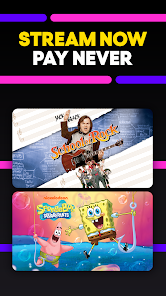
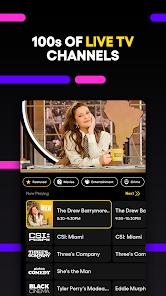
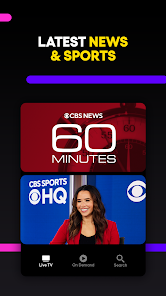
I first stumbled upon Pluto TV when I was looking for something to have on in the background while cleaning. It's a free, ad-supported streaming service that mimics the experience of traditional cable television. Instead of picking individual movies or shows on demand, you flip through a grid of live channels, each broadcasting a continuous stream of content. When you launch the app from Google Play or the App Store, it lands you right on the live TV guide, which feels almost nostalgic. There's no credit card required, no complicated sign-up process. You can just tap a channel and start watching immediately. The first impression is a bit overwhelming because there are dozens of categories, from news and sports to classic sitcoms and reality TV marathons. But once you get past the initial shock, it's surprisingly easy to just let it play.
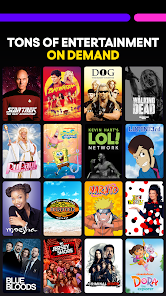
After spending a few evenings with it, the hands-on experience is pretty straightforward. The interface is organized into a vertical list of channels, and you scroll up and down to browse. Tapping a channel brings you right into the live feed. There are also on-demand sections that organize movies and shows by genre, but the heart of the app is the live experience. I found myself flipping through channels like the old days, landing on an episode of Star Trek or a random documentary. The ads are present, but they're not as frequent as regular TV. One thing I noticed is that some channels show the same few episodes on repeat, so you will see the same content if you leave it on for too long. A small tip I picked up: you can long-press a channel to get a preview of what's currently playing, which saves you from jumping into something boring.
I've been using it on and off for about a month now, and I have mixed feelings. It's fantastic for people who miss the passive experience of channel surfing or who want a free alternative to cable. If you're someone who hates choosing what to watch and just wants something to play, this app is perfect. On the other hand, if you're used to the control of Netflix or YouTube where you can pause, rewind, or skip episodes, Pluto TV will feel limiting. The biggest downside is that you can't pause live TV, and you have zero control over the schedule. As for comparisons, it's very different from apps like Tubi or Peacock. Those feel more like traditional streaming services with on-demand libraries. Pluto TV is more like a digital version of basic cable, which is both its charm and its frustration. I keep it installed for lazy Sunday mornings when I just want noise, but I often find myself opening another app when I actually want to watch something specific.
features
- 📺 The live channel guide is the standout feature. Unlike Tubi or Peacock, which are purely on-demand, Pluto TV recreates the cable TV browsing experience. You flip through channels like a real remote, finding unexpected content you wouldn't search for. It's great for passive viewing.
- 🎬 The on-demand section is a solid backup. While the live channels are the main draw, Pluto TV also offers a selection of movies and TV shows you can start manually. The library isn't as deep as services like Tubi, but it's enough to complement the live experience.
- 🆓 No sign-up or payment is needed. This is a huge advantage over apps like Hulu or Peacock that require accounts even for free tiers. With Pluto TV, you download, open, and start watching. No email, no password, no credit card.
- 📡 The channel variety is surprising. You get news, sports, reality TV, classic films, and even niche categories like horror or anime. It's like a mini cable package without the bill.
pros
- 🌟 It's completely free. No hidden costs, no trial periods. Compared to services like Hulu or YouTube TV, you get a huge amount of content without spending a cent.
- 🌟 The live channel experience feels like old TV. Apps like Netflix or Amazon Prime focus on on-demand, which can feel overwhelming. Pluto TV's channel guide removes the stress of choosing.
- 🌟 No account management is needed. Unlike Tubi or Peacock that often require registrations, Pluto TV skips all that. You just open the app and watch instantly.
cons
- ❌ You can't pause or rewind live TV. If you step away or miss a line, it's gone. This is a major limitation compared to services like YouTube TV or Hulu Live, which offer DVR features.
- ❌ Content repeats frequently. The same episodes or movies play in loops on many channels. After a few hours, you'll see the same stuff again. Tubi or Netflix have far more variety.
- ❌ The ad experience is inconsistent. Some channels have too many commercial breaks, while others have just a few. It's not as polished as services like Peacock or Hulu, which have more structured ad loads.
- ❌ No personalization or watch history. The app doesn't suggest new channels based on what you watch. It's a static list, unlike Netflix or Amazon Prime, which adapt to your taste.
Articles
![]()
Guide
How to Update Google Play Store on Android 2026
![]()
Guide
How to Download Older Versions of Android Apps
![]()
Guide
How to Download Apps Without Google Play Store
![]()
Guide
What Is an APK File for Android?
If you use an Android phone, you may have seen the term APK while searching for apps or games online. Some websites offer an APK download instead of a Google Play install button. Some users also mention APK files when talking about apps that are not available in their region, older app versions, or Android games downloaded outside the Play Store.
![]()
Guide
How to Install Games from Google Play for Beginners
Installing games on an Android phone is usually simple, but for beginners, the process can still feel confusing at first. You may not know where to search, which button to tap, whether the game is safe, or why Google Play sometimes asks for account settings, storage access, or payment information. If you are using an Android phone for the first time, learning how to install games from Google Play is one of the easiest ways to get started.
![]()
Guide
How Useful Gemini Is for Everyday Questions and Quick Tasks
emini feels different from many AI apps because it is not only trying to be a chatbot. After using it for everyday questions, quick writing, image understanding, and planning, I think its biggest strength is convenience.
![]()
Guide
What to Know Before Downloading APKs
For many Android users, downloading an APK is a common way to install apps and games. Sometimes an app is not available in a certain country.
![]()
Guide
ChatGPT Review: Is It Still the Best AI App in 2026?
![]()
Guide
Seedance 2.0 vs Sora: The Future of AI Video Generation
The AI video race has intensified dramatically over the past two years. Platforms like Sora from OpenAI and Luma Dream Machine pushed the boundaries of text-to-video realism. Yet, despite their impressive outputs, most tools still operate as probabilistic generators—you describe a scene, and the model interprets it. Control remains limited. With the February 2026 release of Seedance 2.0, developed by ByteDance, the paradigm shifted. Internally known as Jimeng 2.0, Seedance does not position itself as just another video model. It positions itself as an AI Director. Rather than guessing what you want, Seedance 2.0 allows you to direct what happens. This distinction defines everything that follows.









Recommended Apps
![]()
Home Design 3D
Anuman4.2
![]()
Truth or Dare Game - Party App
Chouic4.8
![]()
Photo Collage Maker
Scoompa4.7![]()
Learn to Draw Flower
Creative APPS4.2![]()
FIFA World Cup 2026™
FIFA2.8![]()
Mirror Plus: Mirror with Light
Digitalchemy, LLC4.4![]()
Meitu- Photo Editor & AI Art
Meitu (China) Limited4.5![]()
Perplexity - Ask Anything
PerplexityAI4.7![]()
GhostTube SLS Camera Alternate
GhostTube4![]()
Boom Chip Blast: 2-Player
Black Pyramid 3D Games Studio0![]()
Healthy Benefits+
Solutran, Inc.4.5![]()
Deepcheck AI Search Assistant
rohe.ai4![]()
Idol Prank Video Call & Chat
LightCode Solutions4![]()
Face Shape - Pretty Scale
GlintTec Apps3.9![]()
Plant App - Plant Identifier
ScaleUp4.6











































