
Google Calendar

5,000,000,000+
Installs
Google LLC
Developer
-
Productivity
Category
-
Rated for 3+
Content Rating
-
apps-help@google.com
Developer Email
-
http://www.google.com/policies/privacy
Privacy Policy
Screenshots
editor reviews
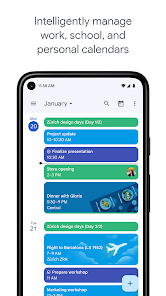
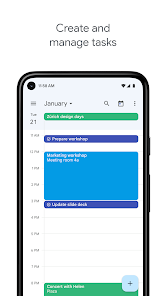
Google Calendar is a time-management app Google put out, and honestly, it's one of those things you just expect to be on your phone, like the weather widget or your contacts. It's a calendar app, yes, but it's deeply tied to everything Google does—Gmail, Drive, Meet, the whole suite. Most people download it because they already have a Google account, or because their work or school uses G Suite, so there's not much thought involved. When you first launch it, the look is clean, very material design, with that signature white space and blue accents. The main view shows your schedule in day, week, month, or "schedule" mode, which is a simple list of events. It has over 5 billion downloads on Google Play, and it's totally free—no in-app purchases, no ads, nothing to unlock. You just sign in with your Google account, and it's ready. The first impression is "oh, this is familiar and boring," but in a reassuring way, like a reliable tool that won't surprise you.
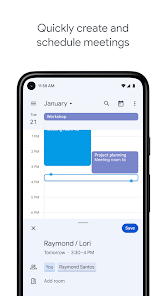
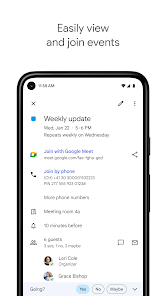
Once you start using it daily, the experience is mostly smooth, though not always exciting. Creating an event is straightforward: tap the "+" button, fill in the title, time, location, and optionally add notifications or invite people. The onboarding doesn't really exist for most people—it just works. What I found nice is how it syncs across devices automatically; add an event on your phone, and it appears on your laptop almost instantly. The "Goals" feature is a hidden gem—you tell it something like "I want to run twice a week," and it finds free slots. But the real power is in the integration with Gmail: flights, hotel reservations, and restaurant bookings appear as events automatically, without you doing anything. The only confusing moment is when you have multiple calendars (personal, work, shared ones) and accidentally create an event in the wrong one—happened to me more than once. A practical tip is to color-code your calendars; it makes the week view way more readable.
After using it for months, I think Google Calendar is the best for people who live in Google's ecosystem, which is most people. For someone who's deeply into Apple's world, Fantastical offers a prettier interface and natural language parsing, but Calendar is free and does 90% of the same job. What makes it different from competitors like Any.do or TickTick is this seamless, behind-the-scenes automation—you don't have to manually enter flights or birthdays. The app's strength is its reliability, not its flashiness. I keep it installed because I have to for work, but for personal use, I've noticed I sometimes drift to simpler apps like Microsoft's To Do for quick task management. People who hate change or don't use Google services might not care for it, but for the average Android user, it's almost impossible to avoid. I'd say it's like the default kitchen knife: not exciting, but you'll always reach for it.
features
- 📅 Smart event detection from Gmail: The standout feature for me is how it reads your inbox. Flight confirmations, hotel bookings, even restaurant reservations get plopped into your calendar automatically. In contrast, Apple Calendar relies on system-wide parsing, which works but isn't as deep. Google's version catches more obscure stuff, like a dentist appointment from a small clinic.
- 📅 Multiple calendar overlay: You can pull in other Google calendars, plus subscribable ones like sports teams or holidays. Microsoft's Outlook Calendar does this too, but Calendar's integration within the same Google ecosystem means switching between work and personal views is more fluid, no extra logins needed.
- 📅 "Goals" and "Focus" time: This feature feels unique. You define a recurring personal goal, like "exercise 3 times a week," and the app auto-schedules it around your existing events, even rescheduling if conflicts pop up. Fantastical offers time blocking too, but with a steeper learning curve and a subscription fee. Google's version is free and almost hands-off.
pros
- 🟢 It's completely free and ad-free: Compared to Fantastical, which costs money for the premium features, or TimeTree, which has ads, Google Calendar gives you the whole package without spending a cent. This is a big deal for students or anyone on a budget.
- 🟢 Universal accessibility: Almost everyone has a Google account, so sharing calendars with family or coworkers is frictionless. Apple Calendar works great between iPhones, but sharing with an Android user requires extra steps. Here, you just type their email.
- 🟢 Sync speed is absurdly fast: Edit an event on your phone, and it's on your desktop before you put the phone down. I've tried other apps like Business Calendar 2, which have delays of a few seconds. This real-time sync is a subtle but huge quality-of-life improvement.
cons
- 🔴 Weak natural language input: You cannot just type "Lunch with Sara next Tuesday at noon" and have it work. Apple Calendar and Fantastical handle this effortlessly. Google Calendar's input is clunky—you have to tap through fields, which feels outdated in 2025.
- 🔴 No dedicated to-do list integration: Reminders and tasks are shoved into a separate app (Google Tasks), and it's not smoothly linked within Calendar. TickTick and Todoist handle both tasks and events in one unified view, which is more efficient for planning.
- 🔴 Limited offline functionality: If you lose connection, you can't create new events, even though viewing existing ones works. Microsoft's Outlook Calendar is better here, allowing full offline creation that syncs later. This is a huge downside for travelers or subway commuters.
Articles
![]()
Guide
How to Update Google Play Store on Android 2026
![]()
Guide
How to Download Older Versions of Android Apps
![]()
Guide
How to Download Apps Without Google Play Store
![]()
Guide
What Is an APK File for Android?
If you use an Android phone, you may have seen the term APK while searching for apps or games online. Some websites offer an APK download instead of a Google Play install button. Some users also mention APK files when talking about apps that are not available in their region, older app versions, or Android games downloaded outside the Play Store.
![]()
Guide
How to Install Games from Google Play for Beginners
Installing games on an Android phone is usually simple, but for beginners, the process can still feel confusing at first. You may not know where to search, which button to tap, whether the game is safe, or why Google Play sometimes asks for account settings, storage access, or payment information. If you are using an Android phone for the first time, learning how to install games from Google Play is one of the easiest ways to get started.
![]()
Guide
How Useful Gemini Is for Everyday Questions and Quick Tasks
emini feels different from many AI apps because it is not only trying to be a chatbot. After using it for everyday questions, quick writing, image understanding, and planning, I think its biggest strength is convenience.
![]()
Guide
What to Know Before Downloading APKs
For many Android users, downloading an APK is a common way to install apps and games. Sometimes an app is not available in a certain country.
![]()
Guide
ChatGPT Review: Is It Still the Best AI App in 2026?
![]()
Guide
Seedance 2.0 vs Sora: The Future of AI Video Generation
The AI video race has intensified dramatically over the past two years. Platforms like Sora from OpenAI and Luma Dream Machine pushed the boundaries of text-to-video realism. Yet, despite their impressive outputs, most tools still operate as probabilistic generators—you describe a scene, and the model interprets it. Control remains limited. With the February 2026 release of Seedance 2.0, developed by ByteDance, the paradigm shifted. Internally known as Jimeng 2.0, Seedance does not position itself as just another video model. It positions itself as an AI Director. Rather than guessing what you want, Seedance 2.0 allows you to direct what happens. This distinction defines everything that follows.









Recommended Apps
![]()
Home Design 3D
Anuman4.2
![]()
Truth or Dare Game - Party App
Chouic4.8
![]()
Photo Collage Maker
Scoompa4.7![]()
Learn to Draw Flower
Creative APPS4.2![]()
FIFA World Cup 2026™
FIFA2.8![]()
Mirror Plus: Mirror with Light
Digitalchemy, LLC4.4![]()
Meitu- Photo Editor & AI Art
Meitu (China) Limited4.5![]()
Perplexity - Ask Anything
PerplexityAI4.7![]()
GhostTube SLS Camera Alternate
GhostTube4![]()
Boom Chip Blast: 2-Player
Black Pyramid 3D Games Studio0![]()
Healthy Benefits+
Solutran, Inc.4.5![]()
Deepcheck AI Search Assistant
rohe.ai4![]()
Idol Prank Video Call & Chat
LightCode Solutions4![]()
Face Shape - Pretty Scale
GlintTec Apps3.9![]()
Plant App - Plant Identifier
ScaleUp4.6












































