
Google One

1B+
Installs
Google LLC
Developer
-
Productivity
Category
-
Everyone
Content Rating
-
apps-help@google.com
Developer Email
-
http://www.google.com/policies/privacy
Privacy Policy
Screenshots
editor reviews
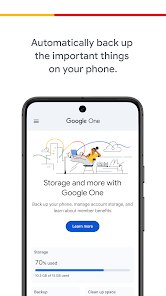
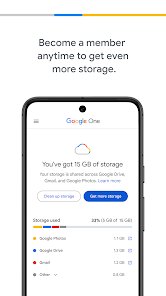
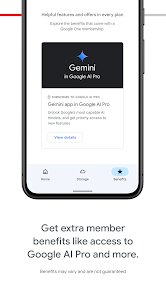
I started using Google One after Google Photos started eating into my free storage. It's basically a cloud subscription service from Google that handles backups, extra storage, and a few other perks across your Google account. A lot of people download it when they run out of space on the free 15GB tier, especially if they store lots of photos, emails, or files. After launching the app for the first time, the main screen shows a clear breakdown of how much storage you're using and what's taking it up. It's free to install from both Google Play and the App Store, but you obviously need a subscription to unlock anything beyond the basic 15GB. There are in-app purchases for monthly or yearly plans, and no ads, which is nice.
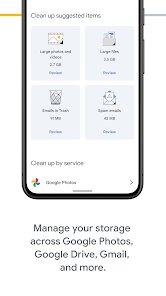
Once you're in, the app walks you through a simple setup. The interface is clean and minimal, with a storage meter right at the top. You can tap into sections like Photos, Gmail, or Drive to see exactly how much each one is eating up. Managing backups is straightforward -- you can choose what gets saved, like contacts, call history, or device data. A solid tip: if you tap the 'Storage' tab, you can delete blurry photos or large files directly from Google Photos without needing to open another app. It also handles phone backups for Android, which is seamless after the initial setup, and on iOS it works more as a storage manager for Gmail and Google services, but not full device backup.
After a few months, I can see why someone would keep this installed. If you're heavily invested in Google's ecosystem -- like storing thousands of photos or relying on Gmail for work -- the extra space becomes essential. The family plan is a good deal if you split it with others. But for someone who only uses Google occasionally, the free tier is enough. Compared to something like iCloud or OneDrive, Google One feels simpler and more tied into your everyday Google tools, but it lacks the deep system integration that Apple offers. I stuck with it mainly because the 200GB plan is cheap and the storage cleanup tools actually helped me rediscover old files I forgot about. Some people might uninstall it if they don't need cloud storage, but for anyone near the limit, it's a no-brainer.
features
- 🗂️ Storage management is where this app shines. Unlike Dropbox, which just shows you files, Google One breaks down your usage per service and even suggests what to clean. You can delete large emails or blurry photos right from the app.
- 🛡️ The VPN perk is exclusive to the 2TB plan and above. It adds a layer of protection when using public Wi-Fi. No other cloud storage app like iCloud or Box offers a built-in VPN at this price point, making it a unique add-on.
- 📱 Phone backup on Android is automatic and thorough. It saves app data, messages, and settings, so if you switch devices, your old phone comes back almost exactly as it was. Google Photos integration means all original quality images are backed up without extra steps.
- 🔍 The 'Find your space' feature scans for duplicate files, large attachments, and old screenshots. It's more proactive than Microsoft OneDrive, which only offers basic file management without cleanup suggestions.
pros
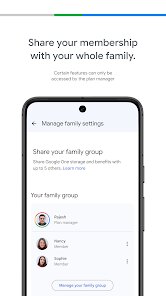
- 📶 The family plan is a standout. For $2.99 a month with the 200GB tier, up to six people share the space. iCloud Family Sharing only gives you separate accounts with no shared pool unless you pay double for Apple One.
- 🔗 Direct integration with Google Photos is a huge plus. If you shoot a lot of video or high-res pics, everything syncs instantly. Amazon Photos is limited to photos only, while Google One handles videos, documents, and backups seamlessly.
- 🔄 Storage reduction features like high-quality photo compression don't compromise clarity as much as iCloud's optimization. You can store thousands more images without feeling the pinch.
cons
- 🐌 The Windows app feels clunky compared to Google Drive's web interface. File syncing can be slow, and on macOS, the integration is nowhere near as tight as iCloud's Finder level access.
- 📉 Free tier storage is stingy. 15GB is nothing when you factor in Gmail, Drive, and Photos all sharing the same pool. Dropbox gives you only 2GB free but syncs better across platforms, whereas Microsoft OneDrive offers 5GB with Office integration.
- 🔐 The VPN feature is only available at the highest tier and can be spotty with connection drops. NordVPN or ExpressVPN are more reliable for the same money if privacy is your main concern.
- 👨👩👧👦 Customer support feels impersonal. Live chat is fast, but phone support is limited to higher tiers. iCloud's support through Apple stores is more hands-on if you run into issues.
Articles
![]()
Guide
How to Update Google Play Store on Android 2026
![]()
Guide
How to Download Older Versions of Android Apps
![]()
Guide
How to Download Apps Without Google Play Store
![]()
Guide
What Is an APK File for Android?
If you use an Android phone, you may have seen the term APK while searching for apps or games online. Some websites offer an APK download instead of a Google Play install button. Some users also mention APK files when talking about apps that are not available in their region, older app versions, or Android games downloaded outside the Play Store.
![]()
Guide
How to Install Games from Google Play for Beginners
Installing games on an Android phone is usually simple, but for beginners, the process can still feel confusing at first. You may not know where to search, which button to tap, whether the game is safe, or why Google Play sometimes asks for account settings, storage access, or payment information. If you are using an Android phone for the first time, learning how to install games from Google Play is one of the easiest ways to get started.
![]()
Guide
How Useful Gemini Is for Everyday Questions and Quick Tasks
emini feels different from many AI apps because it is not only trying to be a chatbot. After using it for everyday questions, quick writing, image understanding, and planning, I think its biggest strength is convenience.
![]()
Guide
What to Know Before Downloading APKs
For many Android users, downloading an APK is a common way to install apps and games. Sometimes an app is not available in a certain country.
![]()
Guide
ChatGPT Review: Is It Still the Best AI App in 2026?
![]()
Guide
Seedance 2.0 vs Sora: The Future of AI Video Generation
The AI video race has intensified dramatically over the past two years. Platforms like Sora from OpenAI and Luma Dream Machine pushed the boundaries of text-to-video realism. Yet, despite their impressive outputs, most tools still operate as probabilistic generators—you describe a scene, and the model interprets it. Control remains limited. With the February 2026 release of Seedance 2.0, developed by ByteDance, the paradigm shifted. Internally known as Jimeng 2.0, Seedance does not position itself as just another video model. It positions itself as an AI Director. Rather than guessing what you want, Seedance 2.0 allows you to direct what happens. This distinction defines everything that follows.









Recommended Apps
![]()
Home Design 3D
Anuman4.2
![]()
Truth or Dare Game - Party App
Chouic4.8
![]()
Photo Collage Maker
Scoompa4.7![]()
Learn to Draw Flower
Creative APPS4.2![]()
FIFA World Cup 2026™
FIFA2.8![]()
Mirror Plus: Mirror with Light
Digitalchemy, LLC4.4![]()
Meitu- Photo Editor & AI Art
Meitu (China) Limited4.5![]()
Perplexity - Ask Anything
PerplexityAI4.7![]()
GhostTube SLS Camera Alternate
GhostTube4![]()
Boom Chip Blast: 2-Player
Black Pyramid 3D Games Studio0![]()
Healthy Benefits+
Solutran, Inc.4.5![]()
Deepcheck AI Search Assistant
rohe.ai4![]()
Idol Prank Video Call & Chat
LightCode Solutions4![]()
Face Shape - Pretty Scale
GlintTec Apps3.9![]()
Plant App - Plant Identifier
ScaleUp4.6











































