

Picsart AI Photo Editor, Video

1B+
Installs
PicsArt, Inc.
Developer
-
Video Players & Editors
Category
-
Rated for 12+
Content Rating
-
support@picsart.com
Developer Email
-
https://picsart.com/privacy-policy
Privacy Policy
Screenshots
editor reviews
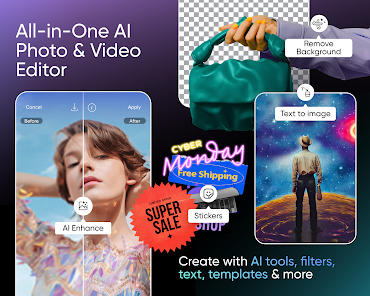
Picsart is a full-on creative suite that lives in your phone, not just another photo filter app. It lands somewhere between a casual editor and a mobile design tool, letting you mess around with photos, splice together videos, and even generate images from text prompts using its AI features. You grab it from Google Play or the App Store, and it's a free download with over a billion installs to its name—so it's clearly doing something right for a lot of people. The first time you open it, the interface hits you with a bunch of options: a big “Edit” button, a “Collage” mode, AI tools, and a whole feed of community creations that feel a bit like a social media feed mixed in with the editing tools. It's a little overwhelming at first, honestly, because there's so much going on, but most users can jump straight into a photo edit without even registering an account, though some AI features and higher-resolution exports are locked behind a subscription and in-app purchases. Ads pop up now and then, but they don't totally wreck the experience once you're in the editing flow.
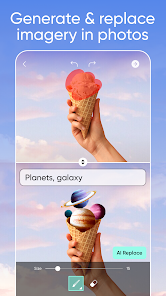
Once you start actually using Picsart, the experience is pretty hands-on and flexible. You pick a photo from your gallery, and the editing screen lays out a bottom bar with tools like crop, adjust, and effects, plus a “Remove BG” button that's surprisingly quick. The real charm is in the layers system—you can add text, stickers, or other images on top, and move them around like a mini Photoshop. For a normal user doing a quick edit, you'd probably crop the image, throw on a filter, maybe remove the background and paste in some neon text, all within a few minutes. The AI features feel like the standout part: you can type something like “pink sunset” into the AI image generator or let the app expand a photo's edges with smart fill. That said, the interface can get a little janky—sometimes you tap a tool and it takes a second to load, or you accidentally back out of a menu and lose your unsaved progress if you're not careful. A small tip is to hit the “Save” button early and often, because the app doesn't autosave drafts unless you manually stash them in your projects folder.
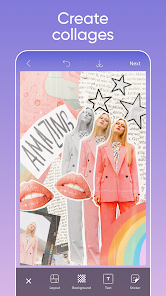
After using Picsart for a while, I've got mixed feelings about keeping it installed. It's fantastic if you're into making social media graphics or meme edits on the fly, and the AI tools actually set it apart from older editors like Snapseed or basic gallery apps that just do brightness and contrast. Someone who just wants to slap a filter on a vacation photo probably doesn't need all this clutter, though—they'd get on just fine with something simpler like VSCO or even the default iPhone editor. What keeps it on my phone is the collage maker and the text overlays, which are way more flexible than anything you find in Canva's mobile app or Adobe Express without paying for premium right away. But I can totally see why someone might uninstall it: the free version nudges you toward that subscription every few minutes, and the app feels bloated with community posts and trending edits that you might not care about. It's a solid tool if you're willing to dig through the noise, but it's not a grab-and-go editor for casual fixes.
features
- 🤖 AI-powered tools: Picsart throws in a text-to-image generator and an AI expand feature that fills in missing parts of a photo, which is a step beyond what you get in Canva's mobile app. You don't need design skills—you just type a prompt and it spits out a custom background or object, saving you from hunting through stock libraries.
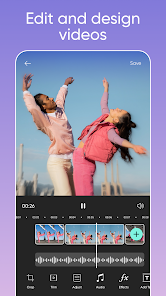
- 📸 All-in-one media editing: It doesn't force you to switch apps for different tasks. You can remove a background, layer text, and color grade a video all in the same session. Adobe Express makes you jump between separate tools for photo and video editing, but Picsart keeps everything under one roof.
- 🎨 Community-driven templates and stickers: The app has a feed where users share their edits, and you can remix those templates directly. That social twist means you get fresh design ideas without starting from scratch. VSCO doesn't offer that at all, and even Canva's templates feel more generic by comparison.
pros
- 👍 Massive sticker and font library: You get access to thousands of free stickers and fonts right after downloading, no need to hunt through third-party sites. Snapseed doesn't have any of that, and Canva hides a lot of its good stuff behind the premium paywall.
- 👍 Instant background removal: The one-tap remove background tool works surprisingly well, even on tricky images with hair or fur. Adobe Express charges for a trial period for this feature, while Picsart gives you free access with a watermark you can crop out.
- 👍 Collage maker with flexible layouts: You pick your photos and it automatically arranges them into neat grids, but you can also adjust borders, spacing, and background colors with a drag. VSCO doesn't offer collages at all, so Picsart wins here if you're making story posts.
cons
- 👎 Aggressive upsell in free version: You can't dodge the pop-ups pushing the Gold subscription. Every time you try to save a high-resolution export, a paywall blocks you. Canva's free tier feels less pushy about subscriptions.
- 👎 Cluttered interface with social feed: The main screen shoves trending edits and challenge posts in your face before you even pick a photo. It distracts you from just editing. Snapseed has a clean, no-nonsense layout that lets you focus on the work.
- 👎 Performance lag on older phones: When you stack multiple layers with high-res images, the app stutters and sometimes crashes mid-edit. VSCO runs smoother on mid-range devices because it keeps the toolset lighter and less resource-heavy.
Articles
![]()
Guide
How to Update Google Play Store on Android 2026
![]()
Guide
How to Download Older Versions of Android Apps
![]()
Guide
How to Download Apps Without Google Play Store
![]()
Guide
What Is an APK File for Android?
If you use an Android phone, you may have seen the term APK while searching for apps or games online. Some websites offer an APK download instead of a Google Play install button. Some users also mention APK files when talking about apps that are not available in their region, older app versions, or Android games downloaded outside the Play Store.
![]()
Guide
How to Install Games from Google Play for Beginners
Installing games on an Android phone is usually simple, but for beginners, the process can still feel confusing at first. You may not know where to search, which button to tap, whether the game is safe, or why Google Play sometimes asks for account settings, storage access, or payment information. If you are using an Android phone for the first time, learning how to install games from Google Play is one of the easiest ways to get started.
![]()
Guide
How Useful Gemini Is for Everyday Questions and Quick Tasks
emini feels different from many AI apps because it is not only trying to be a chatbot. After using it for everyday questions, quick writing, image understanding, and planning, I think its biggest strength is convenience.
![]()
Guide
What to Know Before Downloading APKs
For many Android users, downloading an APK is a common way to install apps and games. Sometimes an app is not available in a certain country.
![]()
Guide
ChatGPT Review: Is It Still the Best AI App in 2026?
![]()
Guide
Seedance 2.0 vs Sora: The Future of AI Video Generation
The AI video race has intensified dramatically over the past two years. Platforms like Sora from OpenAI and Luma Dream Machine pushed the boundaries of text-to-video realism. Yet, despite their impressive outputs, most tools still operate as probabilistic generators—you describe a scene, and the model interprets it. Control remains limited. With the February 2026 release of Seedance 2.0, developed by ByteDance, the paradigm shifted. Internally known as Jimeng 2.0, Seedance does not position itself as just another video model. It positions itself as an AI Director. Rather than guessing what you want, Seedance 2.0 allows you to direct what happens. This distinction defines everything that follows.









Recommended Apps
![]()
Home Design 3D
Anuman4.2
![]()
Truth or Dare Game - Party App
Chouic4.8
![]()
Photo Collage Maker
Scoompa4.7![]()
Learn to Draw Flower
Creative APPS4.2![]()
FIFA World Cup 2026™
FIFA2.8![]()
Mirror Plus: Mirror with Light
Digitalchemy, LLC4.4![]()
Meitu- Photo Editor & AI Art
Meitu (China) Limited4.5![]()
Perplexity - Ask Anything
PerplexityAI4.7![]()
GhostTube SLS Camera Alternate
GhostTube4![]()
Boom Chip Blast: 2-Player
Black Pyramid 3D Games Studio0![]()
Healthy Benefits+
Solutran, Inc.4.5![]()
Deepcheck AI Search Assistant
rohe.ai4![]()
Idol Prank Video Call & Chat
LightCode Solutions4![]()
Face Shape - Pretty Scale
GlintTec Apps3.9![]()
Plant App - Plant Identifier
ScaleUp4.6











































