

Skype for Business for Android

10M+
Installs
Microsoft Corporation
Developer
-
Business
Category
-
Rated for 3+
Content Rating
-
SFBAndroidApp@microsoft.com
Developer Email
-
https://go.microsoft.com/fwlink/?LinkId=510643
Privacy Policy
Screenshots
editor reviews
So, you've probably heard of Skype for Business, the Microsoft-made app that's basically the corporate version of regular Skype, except it's built strictly for workplaces using Office 365. It's not something you'd install on your phone for weekend calls with friends — it sits firmly in the business communication category, designed for messaging, voice calls, video meetings, and presence tracking within a company. Unlike the free Skype, you can't just download it from Google Play and sign up on the spot; you need a work or school account linked to a Microsoft subscription. The first time you open it, you're hit with a login screen that asks for your organizational email, which feels a bit stiff if you're used to consumer apps letting you register with a Google account. Once you're in, though, the interface looks clean and familiar if you've used any Microsoft Office product, but it also feels a little outdated compared to modern chat apps.
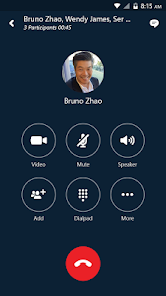
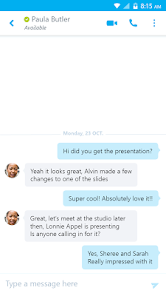
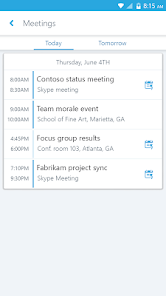
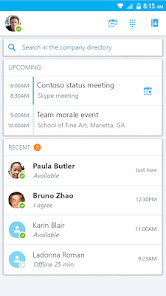
After logging in, you see your contact list pulled directly from your company's Active Directory, sorted by online status, which is actually handy for checking who's available. The main actions are straightforward: tap a contact to start a chat or initiate a call, and the call quality over mobile data surprised me — it held up better than I expected when my Wi-Fi was weak. But actually navigating around isn't always intuitive; for instance, joining a scheduled meeting requires you to tap a notification or dig into the calendar tab, and sometimes the meeting shows up there, sometimes it doesn't syncing properly. During a video call, switching between front and rear cameras is simple, but the lack of a proper mute shortcut on the main call screen frustrated me more than once. A small practical tip I picked up: turning on “low bandwidth mode” in settings helps a ton if you're commuting and your connection drops every few minutes.
After using this app for a few weeks, I'd say it's a mixed bag. If your company forces everyone onto Office 365, you'll probably keep it installed because it's the only way to join team meetings from your phone without resorting to the browser version, which is clunky. But if you're used to something like Microsoft Teams (which is actually the successor and does way more), Skype for Business feels like a relic — it lacks persistent chat history across devices, the search function barely works, and it doesn't integrate with third-party tools the way Slack does. Who should download it? Only people whose companies require it. Who shouldn't? Anyone with a choice. I ended up uninstalling it from my personal phone because it kept spamming me with notifications from my work account even after I closed the app, and the battery drain was noticeable. For what it is, it works, but it just doesn't keep up with the competition.
features
- 🌟 Integration with Microsoft ecosystem: Skype for Business syncs seamlessly with Outlook calendar and Active Directory, so you can join meetings directly from your calendar without manually dialing in. Regular Skype can't do that — you'd have to copy-paste links manually. On Android, this means less tapping around to get into a call, which is a lifesaver when you're running late to a meeting.
- 🌟 Presence status for teams: The app shows detailed presence info like “In a call,” “Away,” or “Do Not Disturb,” which is pulled from your workplace directory. Unlike WhatsApp or FaceTime, you can see if a colleague is actually busy or just idle, making it easier to decide whether to ping them. It's a small thing, but it cuts down on awkward double-messaging.
- 🌟 Call quality over mobile networks: I was honestly impressed by how stable the voice calls were on 4G LTE. Compared to Zoom's mobile app, which sometimes drops audio when the signal dips, Skype for Business seems to buffer better. The codec they use handles packet loss gracefully, so you're not constantly saying “Can you repeat that?” during a train ride.
pros
- 💪 Better corporate directory integration than Slack or Teams: Slack on Android forces you to type names into a search bar, and Teams often shows too many irrelevant results. Skype for Business pulls from Active Directory, so your entire company's org chart is right there on the contact list, status included. It makes finding the right person feel faster.
- 💪 Lightweight on resources compared to Zoom: Zoom's mobile app eats up RAM and drains battery fast during long calls. Skype for Business runs surprisingly lean — I rarely noticed my phone heating up, even during hour-long video meetings. For older Android phones, this matters a lot.
- 💪 No account registration required: Since it's tied to your work credentials, you don't need a separate Skype account or Microsoft personal account. Tap in with your work email and password, and you're done. That eliminates the friction of juggling multiple profiles.
cons
- ⚠️ Awful chat experience compared to Slack or Telegram: The messaging interface feels stuck in 2010. You can't edit sent messages, no threads, no emoji reactions, and the search function barely finds anything. If your team relies on chat-heavy communication, this app will drive you crazy.
- ⚠️ Frequent disconnection issues on Android: On Wi-Fi, the app often loses connection for no clear reason, showing “Signing in...” for minutes. Microsoft Teams handles reconnections more smoothly. I've missed the first 10 minutes of a call because it wouldn't connect properly.
- ⚠️ Notification overload with no granular control: The app sends notifications for every single status change — even when someone goes “Away” or “Available.” You cannot disable these separately from chat notifications. Compared to Google Chat, which lets you customize each alert type, this is a pain.
Articles
![]()
Guide
How to Update Google Play Store on Android 2026
![]()
Guide
How to Download Older Versions of Android Apps
![]()
Guide
How to Download Apps Without Google Play Store
![]()
Guide
What Is an APK File for Android?
If you use an Android phone, you may have seen the term APK while searching for apps or games online. Some websites offer an APK download instead of a Google Play install button. Some users also mention APK files when talking about apps that are not available in their region, older app versions, or Android games downloaded outside the Play Store.
![]()
Guide
How to Install Games from Google Play for Beginners
Installing games on an Android phone is usually simple, but for beginners, the process can still feel confusing at first. You may not know where to search, which button to tap, whether the game is safe, or why Google Play sometimes asks for account settings, storage access, or payment information. If you are using an Android phone for the first time, learning how to install games from Google Play is one of the easiest ways to get started.
![]()
Guide
How Useful Gemini Is for Everyday Questions and Quick Tasks
emini feels different from many AI apps because it is not only trying to be a chatbot. After using it for everyday questions, quick writing, image understanding, and planning, I think its biggest strength is convenience.
![]()
Guide
What to Know Before Downloading APKs
For many Android users, downloading an APK is a common way to install apps and games. Sometimes an app is not available in a certain country.
![]()
Guide
ChatGPT Review: Is It Still the Best AI App in 2026?
![]()
Guide
Seedance 2.0 vs Sora: The Future of AI Video Generation
The AI video race has intensified dramatically over the past two years. Platforms like Sora from OpenAI and Luma Dream Machine pushed the boundaries of text-to-video realism. Yet, despite their impressive outputs, most tools still operate as probabilistic generators—you describe a scene, and the model interprets it. Control remains limited. With the February 2026 release of Seedance 2.0, developed by ByteDance, the paradigm shifted. Internally known as Jimeng 2.0, Seedance does not position itself as just another video model. It positions itself as an AI Director. Rather than guessing what you want, Seedance 2.0 allows you to direct what happens. This distinction defines everything that follows.









Recommended Apps
![]()
Home Design 3D
Anuman4.2
![]()
Truth or Dare Game - Party App
Chouic4.8
![]()
Photo Collage Maker
Scoompa4.7![]()
Learn to Draw Flower
Creative APPS4.2![]()
FIFA World Cup 2026™
FIFA2.8![]()
Mirror Plus: Mirror with Light
Digitalchemy, LLC4.4![]()
Meitu- Photo Editor & AI Art
Meitu (China) Limited4.5![]()
Perplexity - Ask Anything
PerplexityAI4.7![]()
GhostTube SLS Camera Alternate
GhostTube4![]()
Boom Chip Blast: 2-Player
Black Pyramid 3D Games Studio0![]()
Healthy Benefits+
Solutran, Inc.4.5![]()
Deepcheck AI Search Assistant
rohe.ai4![]()
Idol Prank Video Call & Chat
LightCode Solutions4![]()
Face Shape - Pretty Scale
GlintTec Apps3.9![]()
Plant App - Plant Identifier
ScaleUp4.6












































