

Love Collage & Picture Frames

50M+
Installs
eToolkit Inc
Developer
-
Video Players & Editors
Category
-
Rated for 3+
Content Rating
-
msupport@etoolkit.com
Developer Email
-
http://lovecollage.me/privacy
Privacy Policy
Screenshots
editor reviews
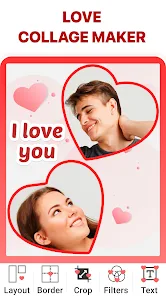
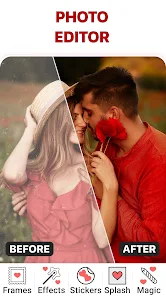
Love Collage & Picture Frames is a photo editing and collage-making app from eToolkit Inc, a developer known for churning out a bunch of utility and lifestyle tools. You basically use it to mash multiple photos together into a single frame, add some decorative stickers, and slap on text or a filter. It's not an app you seek out for its cutting-edge editing tools, but more something you grab when you want to whip up a quick birthday collage or a sappy anniversary post without fumbling through a complex suite like Photoshop Express. I grabbed it from the Play Store just to see if it could replace my go-to for lazy Sunday photo projects, and the first impression was... mixed. The install count is decent, it's free to download, but immediately after launching you get hit with a full-screen ad and a prompt to subscribe. That kind of start makes you wonder if the app itself is even worth the bother, but once you dismiss it, the home screen shows off a handful of template styles that look clean enough to give it a fair shot.
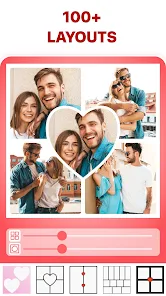
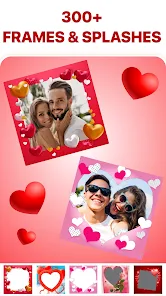
After you tap into any layout, the real hands-on experience kicks in. The interface is straightforward, with a grid for your photos along the bottom and a top bar for stickers, text, and backgrounds. You just drag your images into the designated slots, and the app resizes them automatically, which saves time compared to manually cropping in something like PicsArt. I found the sticker selection surprisingly decent for a free app, with plenty of hearts, frames, and seasonal doodles. The onboarding is basically nonexistent, so you learn by tapping around. A little tip: when you're editing text, double-tap to bring up the color picker rather than hunting for a hidden menu. The flow feels smooth for simple projects, though I did get tripped up when I tried to rearrange layers. You have to delete and re-add a sticker if you mess up the order, which is a bit clunky. For everyday use, it works fine for making a quick 3-photo grid for Instagram, but for anything more advanced, you'll start to miss finer controls.
After spending a few evenings tinkering with it, I can see where this app fits and where it falls short. It's perfect for casual users who just need a fast way to combine vacation snaps with some cute frames, or for someone making a simple gift collage for a friend. But if you're the type who likes to tweak shadows, blend layers, or use precise selection tools, this will feel way too shallow. Compared to something like Layout from Instagram, Love Collage offers more decorative options like stickers and text, but Layout is much smoother and ad-free. The constant attempts to upsell to a premium subscription get annoying fast, and I uninstalled it after a week because the ads broke the flow every time I tried to save a project. It's not a bad app, just one that feels designed to nudge you into paying rather than letting you enjoy the free version. I'd keep it around only if I had no other collage app and needed something quick for a special occasion.
features
- 🎨 Template Variety – Unlike a bare-bones tool like Canva's free collage section, Love Collage gives you dozens of pre-made frame layouts with distinct themes like “Love,” “Friends,” and “Travel.” You just pick a grid, drop in your photos, and the app handles the spacing and margins automatically. Canva is more flexible but requires you to manually align elements, while this app feels more “instant.”
- 📝 Built-in Sticker & Text Library – The sticker collection is a standout compared to Google Photos' collage feature, which gives you zero decorative extras. Love Collage offers hearts, ribbons, flowers, and even seasonal packs. Text editing is basic but functional, with a handful of fonts and color options. PicsArt has more depth here, but for a free app, the quantity is generous.
- 🖼️ One-Tap Backgrounds & Borders – You can change the background color behind your collage with a single tap, or pick from gradient patterns. Instagram's Layout doesn't even offer background customization. It's a small feature, but it makes a big difference when you want to match a specific color scheme for a social media post.
- 💾 Quick Export to Social Platforms – The app has direct share buttons for Instagram, Facebook, and WhatsApp, which saves a step. In comparison, apps like Adobe Express require you to export to your gallery first, then manually upload. It's a tiny time-saver that feels natural for someone who just wants to post and move on.
pros
- 👍 Beginner-Friendly Onboarding – Compared to something like PicsArt, which throws a hundred tools at you right away, Love Collage is simple. You open it, pick a layout, and start adding photos. No learning curve. It's great for someone who just wants results fast.
- 👍 Generous Free Tier Content – While Canva locks many templates behind a paywall, this app gives you a solid number of layouts and stickers for free. You can create plenty of collages without ever touching the premium options.
- 👍 Fast Performance on Older Phones – The app runs smoothly even on a mid-range Android from a few years ago. No lag when dragging photos, unlike some bloated editors that stutter on weaker hardware.
cons
- 👎 Aggressive Ads and Upsells – Every time you save a project or switch a tab, a full-screen video ad pops up. Layout from Instagram has zero ads, making it far less intrusive. The constant “upgrade now” banners get old fast.
- 👎 No Layer Management – If you place a sticker on top of text by mistake, you can't simply move it back. You have to delete and re-add it. Tools like PicsArt allow full layer reordering, which is much more forgiving.
- 👎 Limited Export Resolution – The saved images come out at a modest resolution, fine for social media but not great for printing. If you want high-res output, you'll need a proper editor like Photoshop Express or even Snapseed.
- 👎 Clunky Text Tool – You can't freely drag text anywhere on the canvas; it snaps to preset positions. And the font selection is basic. For anyone used to Canva's fluid text placement, this feels restrictive.
Articles
![]()
Guide
How to Update Google Play Store on Android 2026
![]()
Guide
How to Download Older Versions of Android Apps
![]()
Guide
How to Download Apps Without Google Play Store
![]()
Guide
What Is an APK File for Android?
If you use an Android phone, you may have seen the term APK while searching for apps or games online. Some websites offer an APK download instead of a Google Play install button. Some users also mention APK files when talking about apps that are not available in their region, older app versions, or Android games downloaded outside the Play Store.
![]()
Guide
How to Install Games from Google Play for Beginners
Installing games on an Android phone is usually simple, but for beginners, the process can still feel confusing at first. You may not know where to search, which button to tap, whether the game is safe, or why Google Play sometimes asks for account settings, storage access, or payment information. If you are using an Android phone for the first time, learning how to install games from Google Play is one of the easiest ways to get started.
![]()
Guide
How Useful Gemini Is for Everyday Questions and Quick Tasks
emini feels different from many AI apps because it is not only trying to be a chatbot. After using it for everyday questions, quick writing, image understanding, and planning, I think its biggest strength is convenience.
![]()
Guide
What to Know Before Downloading APKs
For many Android users, downloading an APK is a common way to install apps and games. Sometimes an app is not available in a certain country.
![]()
Guide
ChatGPT Review: Is It Still the Best AI App in 2026?
![]()
Guide
Seedance 2.0 vs Sora: The Future of AI Video Generation
The AI video race has intensified dramatically over the past two years. Platforms like Sora from OpenAI and Luma Dream Machine pushed the boundaries of text-to-video realism. Yet, despite their impressive outputs, most tools still operate as probabilistic generators—you describe a scene, and the model interprets it. Control remains limited. With the February 2026 release of Seedance 2.0, developed by ByteDance, the paradigm shifted. Internally known as Jimeng 2.0, Seedance does not position itself as just another video model. It positions itself as an AI Director. Rather than guessing what you want, Seedance 2.0 allows you to direct what happens. This distinction defines everything that follows.









Recommended Apps
![]()
Home Design 3D
Anuman4.2
![]()
Truth or Dare Game - Party App
Chouic4.8
![]()
Photo Collage Maker
Scoompa4.7![]()
Learn to Draw Flower
Creative APPS4.2![]()
FIFA World Cup 2026™
FIFA2.8![]()
Mirror Plus: Mirror with Light
Digitalchemy, LLC4.4![]()
Meitu- Photo Editor & AI Art
Meitu (China) Limited4.5![]()
Perplexity - Ask Anything
PerplexityAI4.7![]()
GhostTube SLS Camera Alternate
GhostTube4![]()
Boom Chip Blast: 2-Player
Black Pyramid 3D Games Studio0![]()
Healthy Benefits+
Solutran, Inc.4.5![]()
Deepcheck AI Search Assistant
rohe.ai4![]()
Idol Prank Video Call & Chat
LightCode Solutions4![]()
Face Shape - Pretty Scale
GlintTec Apps3.9![]()
Plant App - Plant Identifier
ScaleUp4.6











































