

FamilySearch Tree

5M+
Installs
FamilySearch International
Developer
-
Parenting
Category
-
Rated for 3+
Content Rating
-
fsandroiddeveloper@familysearch.org
Developer Email
-
https://www.familysearch.org/legal/privacy
Privacy Policy
Screenshots
editor reviews
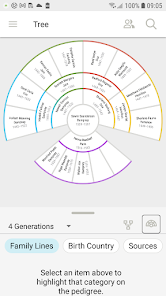
FamilySearch Tree is a genealogy app developed by FamilySearch International, a nonprofit organization backed by The Church of Jesus Christ of Latter-day Saints. It's essentially a family history tool that lets you build, view, and edit a shared family tree. Unlike some private tree services, everything you add here is collaborative, meaning other relatives can see and update the same records. I downloaded it from the Google Play store mostly out of curiosity after hearing it was completely free with no subscription fees. The first impression after launching was a bit overwhelming. There's a lot of information on the screen right away, with ancestor cards and hints popping up, but the layout feels clean once you get past the initial noise. Registration was required, but it's straightforward. I didn't notice any intrusive ads or annoying in-app purchase prompts, which was a huge relief for a free app.
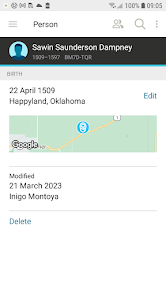
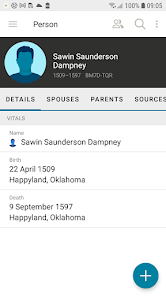
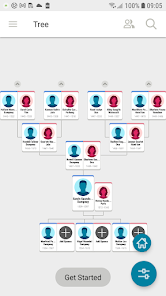
Once I started poking around, the actual experience was a mixed bag. The onboarding walks you through adding yourself first, then it automatically searches for relatives based on what you enter. It pulls from a massive global database, which is impressive but can also flood your screen with possible matches. The main interface revolves around a family tree view that you can zoom and scroll through. One common action is tapping on a person to see their profile, where you can add photos, stories, or documents. It felt smooth most of the time, but I hit a few confusing moments when trying to merge duplicate profiles. The app does suggest merges, but figuring out which record to keep takes some patience. A practical tip I picked up: use the "Sources" tab on a profile first before making changes, because it helps you avoid messing up data others have added.
After using it for a couple of weeks, I have a clearer sense of who this app is really for. If you're someone who enjoys collaborative research and doesn't mind that your tree is public for others to edit, this is a solid choice. But if you're more private or want full control over your data, you might prefer something like Ancestry or MyHeritage, which let you keep trees hidden. What sets FamilySearch Tree apart is the sheer volume of historical records they've digitized for free. That's hard to beat. I could see myself keeping it installed as a research companion, but I wouldn't rely on it as my only tree manager because the collaborative nature means changes can be made by anyone. It's a powerful tool if you're okay with sharing the reins.
features
- 🌳 The standout feature is the massive shared database that spans billions of records. When you add a relative, the app instantly scans for existing profiles and sources, saving you hours of manual digging. It's like having a global family tree already half-built for you. 🧬 Another strong point is the integration of DNA tools through FamilySearch's partnership with third-party services. You can link DNA test results to profiles in your tree, which helps confirm relationships and break down brick walls in research. 📜 The Source Linker tool is a hidden gem. It scans historical documents and suggests attaching them to the correct ancestors in your tree. Compared to Ancestry's similar feature, FamilySearch's is less clunky and doesn't require a paid subscription to access full record hints.
pros
- ✅ It's completely free with no paywalls. Unlike Ancestry or MyHeritage, you get unlimited access to their genealogical records collection without a subscription. The app also syncs with the FamilySearch website, so changes made on either platform update instantly. ✅ The collaborative tree model is a strength for families working together. You can see edits made by other relatives in real time, and the activity feed helps you track changes. This beats MyHeritage's invitation-only setup for group projects. ✅ There's a built-in scanning feature in the mobile app that lets you digitize old photos and documents using your phone's camera. The quality is decent and the files upload directly to profiles, saving you from using a separate scanner app.
cons
- ❌ The app can be slow to load, especially when syncing large trees or pulling up record hints. I've had it freeze a few times on my Galaxy S21, which is annoying during quick research sessions. Ancestry's app runs smoother on the same phone. ❌ Data privacy is a real concern here. Since the tree is open for anyone to edit, you might find incorrect information added by distant relatives. There's no way to lock profiles or control who can change them, unlike FamilySearch's competitors that offer private tree options. ❌ The mobile interface feels cramped on smaller screens. Navigating complex family connections is easier on a desktop. MyHeritage does a better job with touch-friendly navigation and zoom controls for phones. ❌ Search results for records can be too broad or inaccurate at times. You'll often get matches that aren't even close to your ancestor's details. Ancestry's search algorithm feels more precise and filters out noise better.
Articles
![]()
Guide
How to Update Google Play Store on Android 2026
![]()
Guide
How to Download Older Versions of Android Apps
![]()
Guide
How to Download Apps Without Google Play Store
![]()
Guide
What Is an APK File for Android?
If you use an Android phone, you may have seen the term APK while searching for apps or games online. Some websites offer an APK download instead of a Google Play install button. Some users also mention APK files when talking about apps that are not available in their region, older app versions, or Android games downloaded outside the Play Store.
![]()
Guide
How to Install Games from Google Play for Beginners
Installing games on an Android phone is usually simple, but for beginners, the process can still feel confusing at first. You may not know where to search, which button to tap, whether the game is safe, or why Google Play sometimes asks for account settings, storage access, or payment information. If you are using an Android phone for the first time, learning how to install games from Google Play is one of the easiest ways to get started.
![]()
Guide
How Useful Gemini Is for Everyday Questions and Quick Tasks
emini feels different from many AI apps because it is not only trying to be a chatbot. After using it for everyday questions, quick writing, image understanding, and planning, I think its biggest strength is convenience.
![]()
Guide
What to Know Before Downloading APKs
For many Android users, downloading an APK is a common way to install apps and games. Sometimes an app is not available in a certain country.
![]()
Guide
ChatGPT Review: Is It Still the Best AI App in 2026?
![]()
Guide
Seedance 2.0 vs Sora: The Future of AI Video Generation
The AI video race has intensified dramatically over the past two years. Platforms like Sora from OpenAI and Luma Dream Machine pushed the boundaries of text-to-video realism. Yet, despite their impressive outputs, most tools still operate as probabilistic generators—you describe a scene, and the model interprets it. Control remains limited. With the February 2026 release of Seedance 2.0, developed by ByteDance, the paradigm shifted. Internally known as Jimeng 2.0, Seedance does not position itself as just another video model. It positions itself as an AI Director. Rather than guessing what you want, Seedance 2.0 allows you to direct what happens. This distinction defines everything that follows.









Recommended Apps
![]()
Home Design 3D
Anuman4.2
![]()
Truth or Dare Game - Party App
Chouic4.8
![]()
Photo Collage Maker
Scoompa4.7![]()
Learn to Draw Flower
Creative APPS4.2![]()
FIFA World Cup 2026™
FIFA2.8![]()
Mirror Plus: Mirror with Light
Digitalchemy, LLC4.4![]()
Meitu- Photo Editor & AI Art
Meitu (China) Limited4.5![]()
Perplexity - Ask Anything
PerplexityAI4.7![]()
GhostTube SLS Camera Alternate
GhostTube4![]()
Boom Chip Blast: 2-Player
Black Pyramid 3D Games Studio0![]()
Healthy Benefits+
Solutran, Inc.4.5![]()
Deepcheck AI Search Assistant
rohe.ai4![]()
Idol Prank Video Call & Chat
LightCode Solutions4![]()
Face Shape - Pretty Scale
GlintTec Apps3.9![]()
Plant App - Plant Identifier
ScaleUp4.6












































