
Face Changer - My Fake Look

10M+
Installs
Cards
Developer
-
Video Players & Editors
Category
-
Rated for 3+
Content Rating
-
support.myfakelook@zipoapps.com
Developer Email
-
https://zipoapps.com/myfakelook/privacy
Privacy Policy
Screenshots
editor reviews
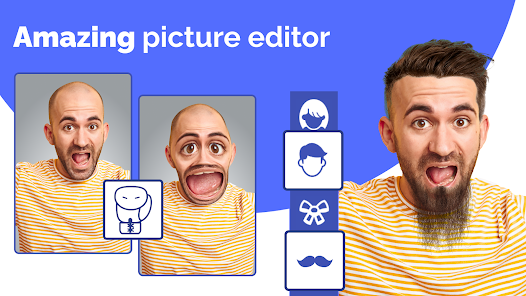
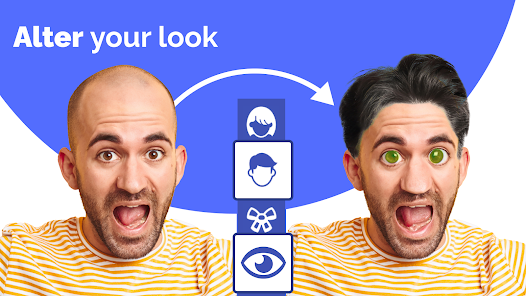
Face Changer - My Fake Look is a photo editing utility that focuses entirely on altering facial features within existing pictures. It's a tool for people who want to experiment with their appearance without using a real-time filter or a full editing suite. The main draw is the ability to swap faces with celebrities, change your age, or adjust gender presentation in a single tap. A regular user might install it out of pure curiosity after seeing a friend's hilarious result, or because they want a quick, no-fuss way to make a funny profile picture. The first impression after launching the app is mixed; the interface is straightforward with large, obvious buttons, but it also throws a barrage of ads and a premium subscription offer in your face before you even pick a photo. It feels less like a polished creative tool and more like a fast, playful experiment you try once or twice.
Once you get past the initial ad wall, the actual hands-on experience is pretty simple. You pick a photo from your gallery or take a new one, then choose a gender swap, age change, or celebrity face filter. The app processes the image quickly, and the result is usually good for a laugh, though not always believable. The gender swap can look cartoonish, and the age filters sometimes just add random wrinkles or soften the skin without much nuance. A smooth moment is when the face swap actually aligns with the original features, making the result look surprisingly natural for half a second. A confusing moment is figuring out how to save a high-resolution version without paying; the free export is heavily compressed. A small practical tip is to use a well-lit, front-facing portrait for the best results, as side profiles or group shots often confuse the face detection and create a distorted mess. Daily use isn't really the point; this is more of a party trick app you open when you need a quick distraction.
After playing with it for a while, my personal judgment is that this app is perfect for someone who wants five minutes of goofy fun with friends but has almost no long-term value. People who enjoy making meme-worthy photos or pranking their group chats will get a kick out of it right away. But anyone looking for a serious photo editor, or even a reliable face-swap tool for content creation, will feel let down by the aggressive monetization and inconsistent results. Unlike something like Remini which enhances clarity, or FaceApp which offers more subtle and realistic age and gender filters, My Fake Look feels outdated and gimmicky. The free version is borderline unusable because of the ad frequency, and the paid subscription doesn't justify itself when free alternatives exist. Most people will likely uninstall it after a few uses, once the novelty of seeing yourself as the opposite gender or as a celebrity wears off. It's a forgettable app that fills a very narrow, momentary need.
features
- Face Swapping with Celebrities: The app includes a library of celebrity faces you can map onto your own photo. This is its main hook and differentiator from an app like FaceApp, which focuses more on aging and makeup rather than pulling in external faces. The execution is hit or miss but can be hilarious when it works.
- Gender and Age Filter Simplicity: It offers one-tap gender swaps and age progression or regression. While FaceApp does these very realistically, My Fake Look goes for a more exaggerated, sometimes cartoon-like effect. This makes it less convincing but more fun for shareable, silly content.
- Outstanding Feature - One-Tap Result: The standout feature here is how aggressively fast it processes. You don't tweak anything; you just pick a filter and get an instant, often ridiculous result. This removes all friction for a casual prank or joke, unlike more complex editors that require manual adjustments and patience.
pros
- Speed and Convenience: The app processes face swaps and filters in seconds. You don't have to manually outline faces or adjust blending, which is a huge plus over something like Photoshop Express or Pixlr where those tasks take minutes. It's built for instant gratification.
- Built for Pranks: This app knows its audience. Unlike a serious editor such as YouCam Perfect which aims for beautification, My Fake Look is designed to produce funny or weird results. The celebrity face swipe section is genuinely good for surprising friends in a group chat.
- Low Learning Curve: There are zero tutorials needed. Anyone, including someone who never edits photos, can open the app, pick a picture, and apply a filter in under thirty seconds. This is much more accessible than a feature-rich app like Snapseed, which can overwhelm casual users.
cons
- Aggressive Ads and Paywalls: The free experience is constantly interrupted by full-screen video ads. After every single result, you're prompted to watch an ad or pay. Compared to a free app like Remini which has a usable free tier, My Fake Look feels punishing unless you cough up money.
- Poor Results on Non-Ideal Photos: The face detection is fragile. If you use a group photo, a profile shot, or an image with glasses, the filter often glitches, showing half a swapped face or a distorted warped mess. FaceApp handles these edge cases far more gracefully.
- Low Export Quality: Saving a photo without paying results in a low-resolution, compressed image. It looks fine on a small phone screen, but if you try to share it on a desktop or print it, the quality is terrible. Competing free apps don't cripple the export quality this aggressively.
- Feature Bloat with Little Value: Beyond the main filters, there are random tools like background changes and sticker packs that feel tacked on and poorly made. They distract from the main purpose without adding genuine utility, unlike the focused toolset in an app like PicsArt.
Articles
![]()
Guide
How to Update Google Play Store on Android 2026
![]()
Guide
How to Download Older Versions of Android Apps
![]()
Guide
How to Download Apps Without Google Play Store
![]()
Guide
What Is an APK File for Android?
If you use an Android phone, you may have seen the term APK while searching for apps or games online. Some websites offer an APK download instead of a Google Play install button. Some users also mention APK files when talking about apps that are not available in their region, older app versions, or Android games downloaded outside the Play Store.
![]()
Guide
How to Install Games from Google Play for Beginners
Installing games on an Android phone is usually simple, but for beginners, the process can still feel confusing at first. You may not know where to search, which button to tap, whether the game is safe, or why Google Play sometimes asks for account settings, storage access, or payment information. If you are using an Android phone for the first time, learning how to install games from Google Play is one of the easiest ways to get started.
![]()
Guide
How Useful Gemini Is for Everyday Questions and Quick Tasks
emini feels different from many AI apps because it is not only trying to be a chatbot. After using it for everyday questions, quick writing, image understanding, and planning, I think its biggest strength is convenience.
![]()
Guide
What to Know Before Downloading APKs
For many Android users, downloading an APK is a common way to install apps and games. Sometimes an app is not available in a certain country.
![]()
Guide
ChatGPT Review: Is It Still the Best AI App in 2026?
![]()
Guide
Seedance 2.0 vs Sora: The Future of AI Video Generation
The AI video race has intensified dramatically over the past two years. Platforms like Sora from OpenAI and Luma Dream Machine pushed the boundaries of text-to-video realism. Yet, despite their impressive outputs, most tools still operate as probabilistic generators—you describe a scene, and the model interprets it. Control remains limited. With the February 2026 release of Seedance 2.0, developed by ByteDance, the paradigm shifted. Internally known as Jimeng 2.0, Seedance does not position itself as just another video model. It positions itself as an AI Director. Rather than guessing what you want, Seedance 2.0 allows you to direct what happens. This distinction defines everything that follows.









Recommended Apps
![]()
Home Design 3D
Anuman4.2
![]()
Truth or Dare Game - Party App
Chouic4.8
![]()
Photo Collage Maker
Scoompa4.7![]()
Learn to Draw Flower
Creative APPS4.2![]()
FIFA World Cup 2026™
FIFA2.8![]()
Mirror Plus: Mirror with Light
Digitalchemy, LLC4.4![]()
Meitu- Photo Editor & AI Art
Meitu (China) Limited4.5![]()
Perplexity - Ask Anything
PerplexityAI4.7![]()
GhostTube SLS Camera Alternate
GhostTube4![]()
Boom Chip Blast: 2-Player
Black Pyramid 3D Games Studio0![]()
Healthy Benefits+
Solutran, Inc.4.5![]()
Deepcheck AI Search Assistant
rohe.ai4![]()
Idol Prank Video Call & Chat
LightCode Solutions4![]()
Face Shape - Pretty Scale
GlintTec Apps3.9![]()
Plant App - Plant Identifier
ScaleUp4.6












































