
Perfect Me -Face & Body Editor

10M+
Installs
ryzenrise
Developer
-
Video Players & Editors
Category
-
Rated for 3+
Content Rating
-
ryzengchang@gmail.com
Developer Email
-
https://www.wisharcbuilder.com/privacy_perfectme.html
Privacy Policy
Screenshots
editor reviews
I first stumbled across Perfect Me when I was messing around on Google Play, looking for something to clean up a few vacation photos without having to load up a full desktop editor. It basically falls into the beauty and body editing category, which is pretty crowded, but the app's tagline about "natural-looking results" caught my eye. After I downloaded the free version, the first screen that popped up asked for access to my photo gallery, which is pretty standard. The layout looked clean enough, with big icons and no ads screaming at me right away, so my first impression was decent. It felt like one of those tools you keep around just for quick touch-ups rather than something you'd use for serious graphic design work.
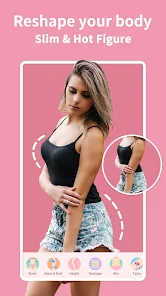
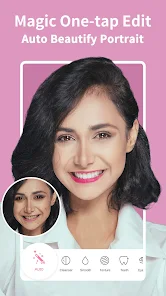
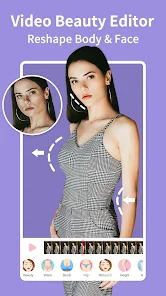
Once I actually started using it, I got curious about what it could really do. The interface is fairly intuitive: you pick a photo, and then a row of tools shows up at the bottom. The body reshaping tool was the first thing I tried, and it lets you adjust waist, hips, shoulders, and legs by simply dragging a slider. It took me a couple of tries to get the hang of not overdoing it, because the changes are pretty aggressive even at low settings. The face editing part includes skin smoothing, blemish removal, and even a "face lift" option that can tweak your jawline or cheekbones. I noticed the app saves your edits as a copy, so you never lose the original, which is a nice touch. One thing that tripped me up a bit was the export button being tucked away in a menu instead of being front and center, but once I found it, sending the final image to my camera roll took just a second. For a free app, the processing speed was pretty snappy, no lag or crashes.
After using it off and on for a couple of weeks, I can see the appeal for people who post on social media a lot and want to adjust their appearance without it looking fake. It does a better job than basic photo editors at keeping skin texture intact while smoothing out blemishes, which I appreciated. But honestly, I don't think I'd keep it installed forever because the free version only lets you do so much before it asks you to upgrade, and there are similar tools like Facetune or YouCam that offer more advanced features. For someone who just needs to fix a few photos every now and then, Perfect Me gets the job done. But if you're after a full editing suite for constant use, you might get frustrated by the limitations pretty quickly.
features
- 🖼️ Face retouching feels natural: Unlike Facetune, which sometimes makes skin look like plastic, Perfect Me keeps the pores and subtle shadows intact while smoothing out uneven patches. I edited a selfie with harsh lighting, and the results didn't scream "edited".
- 👗 Body reshaping with real-time preview: You drag a slider and watch your waist or legs change instantly. This makes it way easier to dial in a natural look compared to apps like Remini, which only does one-click enhancements with no fine-tuning.
- 🎨 Selective color adjustments: Most beauty editors ignore this, but Perfect Me lets you tweak the saturation and hue of specific parts. I used it to make a dull-looking shirt pop without affecting my skin tone, which is something YouCam CamPerfect makes way more complicated.
- 📱 No watermark on exports: For a free app, this is rare. Facetune throws a watermark unless you pay, but Perfect Me gives you clean images right away.
pros
- ⚡ Speed and stability: It processes edits way faster than Facetune, which sometimes freezes on my older phone. Perfect Me handled a 12MP photo in about three seconds.
- ⚡ Undo button works like a charm: Unlike YouCam Perfect, where the undo sometimes skips steps, Perfect Me lets you step back one change at a time without losing the whole edit.
- ⚡ Low learning curve: I handed it to my mom, who never uses photo editors, and she figured out the sliders in two minutes. That's not something I can say about PicsArt, which buries similar tools in menus.
cons
- 🐢 Limited creative filters: The app focuses almost entirely on beauty editing, so you won't find fancy filters or artistic effects like those in PicsArt or Snapseed.
- 🐢 No batch editing: If you have a set of photos to fix, you have to do them one by one. Remini lets you queue up images for batch processing, which Perfect Me doesn't offer.
- 🐢 Occasional result feels over-processed: Even at the lowest settings, some body adjustments can still look slightly stretched, especially if you try to change hip width. Facetune handles that kind of edit with more subtlety.
- 🐢 Free version nag screen: After you finish an edit, the app sometimes shows a pop-up suggesting the pro version. It's not super annoying, but it does break the flow.
Articles
![]()
Guide
How to Update Google Play Store on Android 2026
![]()
Guide
How to Download Older Versions of Android Apps
![]()
Guide
How to Download Apps Without Google Play Store
![]()
Guide
What Is an APK File for Android?
If you use an Android phone, you may have seen the term APK while searching for apps or games online. Some websites offer an APK download instead of a Google Play install button. Some users also mention APK files when talking about apps that are not available in their region, older app versions, or Android games downloaded outside the Play Store.
![]()
Guide
How to Install Games from Google Play for Beginners
Installing games on an Android phone is usually simple, but for beginners, the process can still feel confusing at first. You may not know where to search, which button to tap, whether the game is safe, or why Google Play sometimes asks for account settings, storage access, or payment information. If you are using an Android phone for the first time, learning how to install games from Google Play is one of the easiest ways to get started.
![]()
Guide
How Useful Gemini Is for Everyday Questions and Quick Tasks
emini feels different from many AI apps because it is not only trying to be a chatbot. After using it for everyday questions, quick writing, image understanding, and planning, I think its biggest strength is convenience.
![]()
Guide
What to Know Before Downloading APKs
For many Android users, downloading an APK is a common way to install apps and games. Sometimes an app is not available in a certain country.
![]()
Guide
ChatGPT Review: Is It Still the Best AI App in 2026?
![]()
Guide
Seedance 2.0 vs Sora: The Future of AI Video Generation
The AI video race has intensified dramatically over the past two years. Platforms like Sora from OpenAI and Luma Dream Machine pushed the boundaries of text-to-video realism. Yet, despite their impressive outputs, most tools still operate as probabilistic generators—you describe a scene, and the model interprets it. Control remains limited. With the February 2026 release of Seedance 2.0, developed by ByteDance, the paradigm shifted. Internally known as Jimeng 2.0, Seedance does not position itself as just another video model. It positions itself as an AI Director. Rather than guessing what you want, Seedance 2.0 allows you to direct what happens. This distinction defines everything that follows.









Recommended Apps
![]()
Home Design 3D
Anuman4.2
![]()
Truth or Dare Game - Party App
Chouic4.8
![]()
Photo Collage Maker
Scoompa4.7![]()
Learn to Draw Flower
Creative APPS4.2![]()
FIFA World Cup 2026™
FIFA2.8![]()
Mirror Plus: Mirror with Light
Digitalchemy, LLC4.4![]()
Meitu- Photo Editor & AI Art
Meitu (China) Limited4.5![]()
Perplexity - Ask Anything
PerplexityAI4.7![]()
GhostTube SLS Camera Alternate
GhostTube4![]()
Boom Chip Blast: 2-Player
Black Pyramid 3D Games Studio0![]()
Healthy Benefits+
Solutran, Inc.4.5![]()
Deepcheck AI Search Assistant
rohe.ai4![]()
Idol Prank Video Call & Chat
LightCode Solutions4![]()
Face Shape - Pretty Scale
GlintTec Apps3.9![]()
Plant App - Plant Identifier
ScaleUp4.6











































