
Voila AI Artist Cartoon Photo

10M+
Installs
Wemagine.AI
Developer
-
Generative AI
Category
-
Rated for 3+
Content Rating
-
hello@wemagine.ai
Developer Email
-
https://www.wemagine.ai/privacypolicy
Privacy Policy
Screenshots
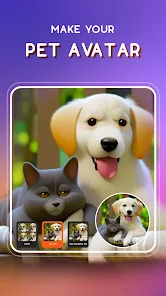
editor reviews
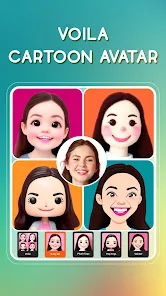
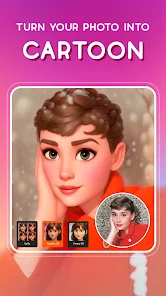
So Voila AI Artist Cartoon Photo is one of those apps that promises to turn your regular photos into cartoon-like portraits. It's definitely in the photo editing and entertainment category. I wanted something fun to play with on a lazy Sunday, so I downloaded it from the Google Play Store. It's free to install, and while I can't remember the exact number of reviews, it's got a solid enough reputation. After launching it, the first screen threw a bunch of options at me – cartoon styles, oil painting, caricature, pencil sketches. It felt a bit busy, honestly. Registration wasn't mandatory, which I liked, and there are ads popping up here and there, plus in-app purchases if you want extra filters or to skip watermarks.
Getting hands-on with it took a bit of fiddling. You start by picking a photo from your gallery or taking a new one. The interface isn't the smoothest – I picked a selfie and tapped "Cartoon 3D," and within maybe ten seconds, it spat out a result. It looked cute, but the edges were a little rough, like the AI didn't quite know what to do with my hair. You can adjust the intensity of the effect, which is handy. A common usage step is just trying different styles – the caricature one made me laugh, but it exaggerated my nose way too much. I found that photos with plain backgrounds turned out much better. There's no real onboarding tutorial, so you just tap around until you get something decent. Small tip: stick with front-facing, well-lit shots for the best output.
After messing around for a week, I think it's decent for quick laughs. People who love sharing goofy avatars on social media or want a unique profile picture will get a kick out of it. But if you're a digital artist looking for precise tools, this isn't it. What makes it different from apps like FaceApp is the focus purely on artistic reimaginings rather than aging or swapping faces. I'll probably keep it installed for the occasional party trick, but I can see someone uninstalling it because the free version feels limited and ads interrupt the flow. It's not a daily driver, just a novelty toy.
features
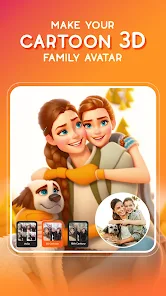
- 🎨 Cartoon 3D produces genuinely charming cartoon avatars that look like they belong in a Pixar film, whereas FaceApp focuses more on realistic edits like aging or gender swaps, so this app feels more playful for artistic fun.
- 🎨 Caricature effect exaggerates facial features in a humorous way, making it stand out from big apps like Prisma, which only offer painting filters without any humorous distortion.
- 🎨 Background subtraction helps the AI focus on faces, leading to cleaner results than Reface, which sometimes blends subjects awkwardly into their clips or templates.
- 🎨 Instant preview lets you see the before-and-after in seconds, saving time compared to Photoshop Express, where you need manual tweaks for a similar effect.
pros
- 👍 Free to use without mandatory sign-up, which beats PicsArt that often pushes account creation before you can apply any cartoon filters.
- 👍 Offers multiple artistic styles in one app, like oil painting and pencil sketch, while something like OnlyMe is limited to just cartoon outcomes.
- 👍 Fast processing, often under 10 seconds, faster than ZMO's AI cartoonizer which can be sluggish live.
- 👍 Results are share-ready with a single tap to social platforms, a step ahead of YouCam Perfect that requires manual saving and uploading.
cons
- 👎 Ads interrupt the workflow after every second export, way more intrusive than in Cartoon Photo Editor by Lyrebird Studio which spaces ads better.
- 👎 Watermark on free creations unless you pay, while Clip2Comic allows free export without branding.
- 👎 Inconsistency with darker skin tones, often producing washed-out details, a flaw less common in FaceApp's filters.
- 👎 Limited manual controls, so unlike Adobe Photoshop Sketch, you can't refine the AI's output if a feature looks off.
Articles
![]()
Guide
How to Update Google Play Store on Android 2026
![]()
Guide
How to Download Older Versions of Android Apps
![]()
Guide
How to Download Apps Without Google Play Store
![]()
Guide
What Is an APK File for Android?
If you use an Android phone, you may have seen the term APK while searching for apps or games online. Some websites offer an APK download instead of a Google Play install button. Some users also mention APK files when talking about apps that are not available in their region, older app versions, or Android games downloaded outside the Play Store.
![]()
Guide
How to Install Games from Google Play for Beginners
Installing games on an Android phone is usually simple, but for beginners, the process can still feel confusing at first. You may not know where to search, which button to tap, whether the game is safe, or why Google Play sometimes asks for account settings, storage access, or payment information. If you are using an Android phone for the first time, learning how to install games from Google Play is one of the easiest ways to get started.
![]()
Guide
How Useful Gemini Is for Everyday Questions and Quick Tasks
emini feels different from many AI apps because it is not only trying to be a chatbot. After using it for everyday questions, quick writing, image understanding, and planning, I think its biggest strength is convenience.
![]()
Guide
What to Know Before Downloading APKs
For many Android users, downloading an APK is a common way to install apps and games. Sometimes an app is not available in a certain country.
![]()
Guide
ChatGPT Review: Is It Still the Best AI App in 2026?
![]()
Guide
Seedance 2.0 vs Sora: The Future of AI Video Generation
The AI video race has intensified dramatically over the past two years. Platforms like Sora from OpenAI and Luma Dream Machine pushed the boundaries of text-to-video realism. Yet, despite their impressive outputs, most tools still operate as probabilistic generators—you describe a scene, and the model interprets it. Control remains limited. With the February 2026 release of Seedance 2.0, developed by ByteDance, the paradigm shifted. Internally known as Jimeng 2.0, Seedance does not position itself as just another video model. It positions itself as an AI Director. Rather than guessing what you want, Seedance 2.0 allows you to direct what happens. This distinction defines everything that follows.









Recommended Apps
![]()
Home Design 3D
Anuman4.2
![]()
Truth or Dare Game - Party App
Chouic4.8
![]()
Photo Collage Maker
Scoompa4.7![]()
Learn to Draw Flower
Creative APPS4.2![]()
FIFA World Cup 2026™
FIFA2.8![]()
Mirror Plus: Mirror with Light
Digitalchemy, LLC4.4![]()
Meitu- Photo Editor & AI Art
Meitu (China) Limited4.5![]()
Perplexity - Ask Anything
PerplexityAI4.7![]()
GhostTube SLS Camera Alternate
GhostTube4![]()
Boom Chip Blast: 2-Player
Black Pyramid 3D Games Studio0![]()
Healthy Benefits+
Solutran, Inc.4.5![]()
Deepcheck AI Search Assistant
rohe.ai4![]()
Idol Prank Video Call & Chat
LightCode Solutions4![]()
Face Shape - Pretty Scale
GlintTec Apps3.9![]()
Plant App - Plant Identifier
ScaleUp4.6












































