

3D My Name Live Wallpaper

10M+
Installs
My Name Cube Apps
Developer
-
Productivity
Category
-
Rated for 3+
Content Rating
-
mynamecubeapps@gmail.com
Developer Email
-
http://www.sanguinosoft.com/mynamecubeapps/privacypolicy.html
Privacy Policy
Screenshots
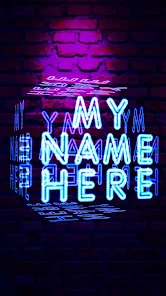
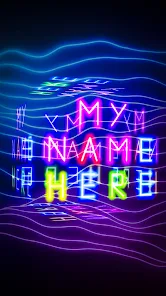
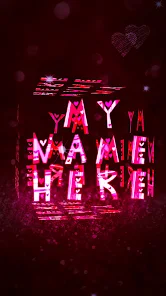
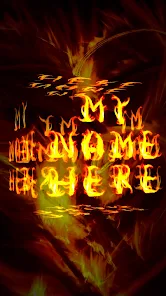
editor reviews
“3D My Name Live Wallpaper” is a personalization app, specifically a live wallpaper creator that lets you turn any name or text into a full-screen, moving background. If you are tired of static, generic wallpapers and want something deeply personal, this is where it stands out. After downloading it from Google Play (it is free to install, with over 10 million installs), the first impression is the immediate question: pick a name. You type it in, choose a style, and watch it transform into a glowing, rotating 3D text piece. Right after launch, you are hit with a few steps—pick you font, color, animation style—and then you set it as your wallpaper. The whole process takes under a minute, which feels satisfying for something that makes your phone screen feel uniquely yours. Though there are in-app purchases for premium fonts and effects, the free options are decent enough for most people, and ads pop up occasionally but not aggressively.
Once you start using it daily, the experience is mostly smooth but has some quirks. The interface is simple: a home screen with the name input, a preview window showing your creation in real time, and a row of style options like “Neon,” “Glitch,” or “Fire.” You tap on a style, the preview updates instantly, and you can adjust the speed of the animation or the text position. For example, I typed “Alex,” picked the “Cyber” style with a purple gradient, and the letters started floating and spinning gently. Setting it as a live wallpaper takes one more tap, and then it works on your lock screen too. A small tip: if you want the text to fit perfectly without cropping, preview it on your main screen first. The app can feel a bit clunky when switching between fonts or when the preview lags for a second, but once it is set, the animation runs smoothly without draining the battery too much. One confusing moment was realizing some features are locked behind a paywall, like removing the watermark on the preview, which feels unnecessary.
After using it for a few weeks, I can see who would love this: anyone who wants a cheap, easy way to make their phone feel unique, especially kids, teens, or people who enjoy showing off their name or a loved one's name. But if you are looking for complex customization like weather effects or deep color editing, you will be disappointed. What sets it apart from apps like “KLCK” or “Wallpaper Engine” is the simplicity—you do not need to learn any tools. But that is also its limit; those apps offer far more control. Compared to “Name Art Wallpaper,” this app has better 3D animations but fewer text styles. I kept it installed because it is fun to change the name every now and then for a fresh look, but I can see someone uninstalling it after a week if they get bored of the limited options. It is a neat little app for personal flair, but not a must-have.
features
- 🔹 3D Text Animation: The core feature is turning any name or short phrase into a moving, glowing 3D piece. Compared to “Wallpaper Engine,” which requires importing custom files, this app does all the work for you—just type and it is ready. The outstanding part is the depth effect, where letters rotate in real time, making it feel like a hologram on your screen.
- 🔹 Instant Live Preview: You see changes immediately without refreshing or saving. Tap a style like “Neon,” and the preview updates within a second. “KLCK” makes you edit layers manually, so this is a big time-saver for quick personalization.
- 🔹 One-Tap Apply: Setting it as a home and lock screen wallpaper takes a single button. “Nova Launcher” needs extra steps through widget setup, but here it is seamless, although some default settings may crop your text slightly.
- 🔹 Custom Color and Speed: You can adjust the animation speed and pick from basic color palettes. While “Zedge” offers more randomness, this app gives you direct control over how fast or slow the text moves.
pros
- ✔️ Simple and Fast Setup: No learning curve—type, pick, apply. “KLCK” requires hours of tweaking, but this app works immediately for anyone.
- ✔️ Battery Efficient: The animations are lightweight, so battery drain is minimal compared to “Live Wallpaper 3D,” which drains faster with heavier effects.
- ✔️ Personal Touch: It is your name, not a stock image. “Zedge” has thousands of wallpapers, but none as personal as this. It works great for gifts too.
cons
- ❌ Limited Free Options: Many cool fonts and effects are behind a paywall. “Wallpaper Engine” offers a wider variety for free once purchased on PC.
- ❌ Watermark on Preview: The app shows a watermark during setup, which can annoy users. “KLCK” does not force this on you.
- ❌ Basic Customization: You cannot change background gradients or add stickers. “Name Art Wallpaper” allows more tweaks, like adding photos behind the text.
Articles
![]()
Guide
How to Update Google Play Store on Android 2026
![]()
Guide
How to Download Older Versions of Android Apps
![]()
Guide
How to Download Apps Without Google Play Store
![]()
Guide
What Is an APK File for Android?
If you use an Android phone, you may have seen the term APK while searching for apps or games online. Some websites offer an APK download instead of a Google Play install button. Some users also mention APK files when talking about apps that are not available in their region, older app versions, or Android games downloaded outside the Play Store.
![]()
Guide
How to Install Games from Google Play for Beginners
Installing games on an Android phone is usually simple, but for beginners, the process can still feel confusing at first. You may not know where to search, which button to tap, whether the game is safe, or why Google Play sometimes asks for account settings, storage access, or payment information. If you are using an Android phone for the first time, learning how to install games from Google Play is one of the easiest ways to get started.
![]()
Guide
How Useful Gemini Is for Everyday Questions and Quick Tasks
emini feels different from many AI apps because it is not only trying to be a chatbot. After using it for everyday questions, quick writing, image understanding, and planning, I think its biggest strength is convenience.
![]()
Guide
What to Know Before Downloading APKs
For many Android users, downloading an APK is a common way to install apps and games. Sometimes an app is not available in a certain country.
![]()
Guide
ChatGPT Review: Is It Still the Best AI App in 2026?
![]()
Guide
Seedance 2.0 vs Sora: The Future of AI Video Generation
The AI video race has intensified dramatically over the past two years. Platforms like Sora from OpenAI and Luma Dream Machine pushed the boundaries of text-to-video realism. Yet, despite their impressive outputs, most tools still operate as probabilistic generators—you describe a scene, and the model interprets it. Control remains limited. With the February 2026 release of Seedance 2.0, developed by ByteDance, the paradigm shifted. Internally known as Jimeng 2.0, Seedance does not position itself as just another video model. It positions itself as an AI Director. Rather than guessing what you want, Seedance 2.0 allows you to direct what happens. This distinction defines everything that follows.









Recommended Apps
![]()
Home Design 3D
Anuman4.2
![]()
Truth or Dare Game - Party App
Chouic4.8
![]()
Photo Collage Maker
Scoompa4.7![]()
Learn to Draw Flower
Creative APPS4.2![]()
FIFA World Cup 2026™
FIFA2.8![]()
Mirror Plus: Mirror with Light
Digitalchemy, LLC4.4![]()
Meitu- Photo Editor & AI Art
Meitu (China) Limited4.5![]()
Perplexity - Ask Anything
PerplexityAI4.7![]()
GhostTube SLS Camera Alternate
GhostTube4![]()
Boom Chip Blast: 2-Player
Black Pyramid 3D Games Studio0![]()
Healthy Benefits+
Solutran, Inc.4.5![]()
Deepcheck AI Search Assistant
rohe.ai4![]()
Idol Prank Video Call & Chat
LightCode Solutions4![]()
Face Shape - Pretty Scale
GlintTec Apps3.9![]()
Plant App - Plant Identifier
ScaleUp4.6











































